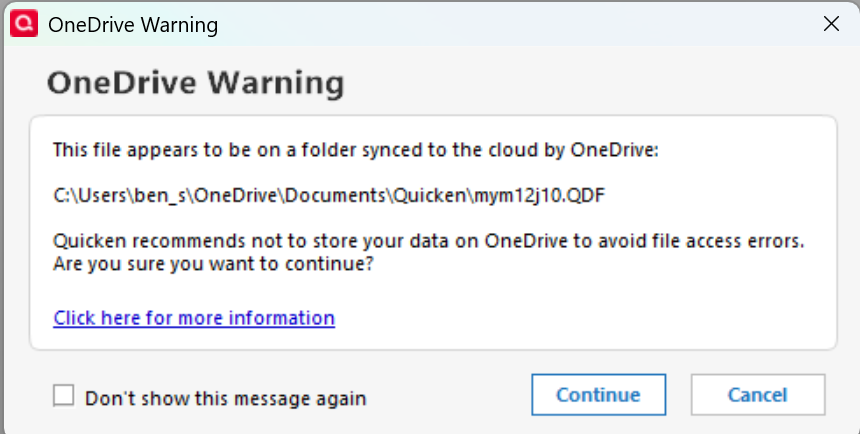
Today i opened my quicken and got one drive error message, i followed the instruction online bbut didn't fix can somebody help
Ok so I was searching online for help with a Quicken OneDrive error because my files were not syncing correctly and Quicken kept giving me problems opening the data file. I honestly don’t remember exactly how I reached support, but the technician was professional, and walked me through the troubleshooting step by step. He also explained me fix the OneDrive-related issue and made sure Quicken was working normally again before ending the call. He told me quicken files can be locked when they are stored inside "OneDrive" and syncing happens while Quicken is running.
Overall, I had a good experience, and my issue was resolved. One question, though, Is [Removed-Third Party Software] part of Quicken?
[Edited-Readability]
So i just needed to change the location from the one drive. Cool
And that EXACT message was??? There's not a whole lot that this user-community can do to help without knowing what we're dealing with.
The EXACT error is like One drive warning popup message and i dont know what exactly are you talking about because i already said that before
Quicken suggests that you use "local storage" instead of "Cloud Drives" for your Quicken data file (probably because they want to sell you on THEIR Cloud drive back-up solution?). Click the "Don't show this message again" box if you don't want to see the warning message again. Not sure if the Quicken program has ever had data file errors/issues when consistently using a cloud drive like "OneDrive", "Google Drive" or "DropBox"….I don't see why it would, cloud drives appear to be a "local" drive to your PC/Mac usually.
I have, just now, read every message that you've posted in this forum … and you've NEVER posted this Q message before.
So, where do you believe that you "said that before"?