How do I back up my data files, etc, to an external storage device, and are those files retrievable from another computer that has Quicken installed?
Hi @Jerry Pederson,
Thank you for reaching out.
To back up your Quicken data file to an external drive, such as a USB flash drive, CD, or DVD, please follow these steps:
1. Insert the CD/DVD or attach the flash drive you want to use for your backup.
2. Open Quicken.
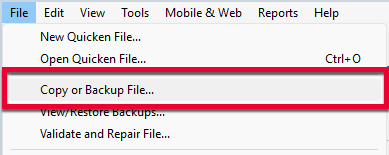
3. Select File > Copy or Backup File...
4. Select Create a complete backup and click Next.
5. Quicken will show you the location where your backup will be saved along with the name of the backup file (this is typically your Quicken file name followed by .QDF-backup). Click Change... to select where you would like to save your backup. This is where you'll select your CD/DVD drive or flash drive.
6. Click Create Backup.
To answer your other question, yes, backup files can be transferred and restored on a different device.
For more information about creating and restoring backups, please review the following support article https://www.quicken.com/support/how-backup-or-restore-your-quicken-data/#section-windows-5
Please feel free to reach out if you have additional questions.
I just wanted to follow up since I haven’t heard back from you. I’m checking in to see if you still need assistance.
Hello @Jerry Pederson,
Checking in once more before this thread is closed. Let us know if you still need assistance.
Thank you!
Thanks for the help.
@Jerry Pederson Thanks for following up!
If anything else comes up, please don't hesitate to reach back out.