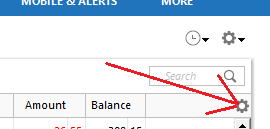
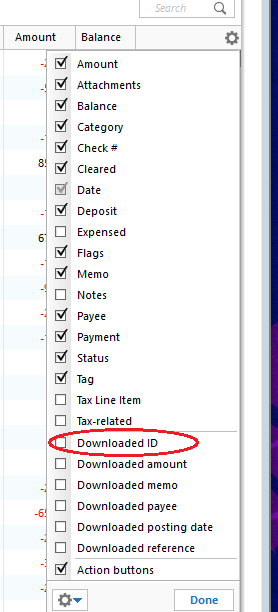
reported via help screen and sent to Dale [Edited-Removed Personal Info]
Hi @leonard kearney,
Thank you for reaching out. I'd be happy to help investigate this issue.
To determine what is causing the duplicate transactions, we'll first need to review the Downloaded ID associated with the affected transactions.
1. Click on the Register Columns gear icon at the top right of the account register.
2. Place a checkmark next to Downloaded ID, then click Done. (If you use Two-Line Display, you will need to select Downloaded ID and Downloaded reference)
3. Review the Downloaded ID. This is the unique identifier for each downloaded transaction. It is used by Quicken to determine which transactions have been downloaded and which ones need to be downloaded.
Mismatched manual and downloaded transactions appear in the account register.
If the duplicate and manual transactions do not have a Downloaded ID, then the downloaded transaction was not properly matched to the manual entry.
Solution: Delete the manual entry.
Downloaded transaction appears twice, with the same Downloaded ID.
Solution: Set the register for the affected account to Single-line display.
Downloaded transactions appear twice, with different Downloaded IDs.
If your bank and/or their service provider is making changes to how they present data to Quicken, there is the possibility that they may transmit the same transaction with two different IDs. Solution: Contact the Online Banking Support for your bank (Tools menu > Online Center > Contact Info) to request they escalate to their OFX team or service provider in order to resolve this issue for all their Quicken customers.
Transactions are downloaded through Quicken AND a manual download from your bank's website, resulting in different Downloaded ID numbers and duplicate data.
Solution: Don't mix your methods for getting transactions from your bank. If you want to download from the website, try to stay with that method. If you decide later that you want Quicken to update automatically rather than manually downloading yourself (or vice versa), be aware that you may encounter duplicate transactions on that first download after the change. You will need to manually delete the duplicate transactions.
Deactivating and reactivating your account to change the connection method has caused downloaded transactions to appear again.
This is typically a one-time event; if you have not deactivated and reactivated your account in Quicken, this does not apply to you.
Transfers are appearing twice.
This occurs when a transfer is downloaded for one account then downloads again for the other account and the transfer transactions do not get matched to each other.
Please let me know what you find when reviewing the downloaded IDs.
thanks, FYI - i don't manually enter transactions to this account. only corrections. so there is no "matching"
I am a long time Q user, I am ok with correcting transactions. I send these in to help you guys debug the system.
here are two transactions with downloaded id
Thank you for sharing this information.
The known issue involving duplicate transactions has been resolved. However, if you continue to experience duplicate transactions during your regular downloads, I recommend contacting Quicken Support directly for further assistance. They can open a case specific to your situation, guide you through additional troubleshooting steps in real time, and escalate the issue if needed.
You can find the Quicken Support phone number here: Support Home | Quicken. Phone support is available Monday through Friday, from 5:00 AM PT to 5:00 PM PT.
I apologize that I could not provide a more direct solution, but please don’t hesitate to reach out again if you have any other questions.
thank you
working on a similar duplicate issue went to add download id and and
Register Columns gear icon is no longer at the top right of the account register.
Thank you for the follow-up,
In the screenshot you provided, the settings gear is there. Are you not seeing the Register columns option when you click on it?
Thank you!
Hello @leonard kearney,
We haven't heard back from you in a while. Do you still need assistance?
Check back and let us know! Thank you.
Yes, I see it. I will use it next time this occurs.
[Edited - Readability]
Let us know what happens!