I noticed I am getting updates in mutual funds that I sold off many years ago. How do I stop that from happening.
I know I can do it at the moment I update historical prices, but the de-selection is not persisted.
Just find each of the funds in the Security List and de-select "Download Quotes"
Try Tools | Security List and uncheck Download Quotes for the securities where you no longer want price updates.
You also need to look for a checkmark at Watch List in the Security List and remove it.
Quicken will download quotes when
Actually the Watch List selection is secondary to the Download Quotes selection. The logic for downloading quotes from Quicken's quote provider is:
Quotes downloaded IF the security is in their database AND it has a valid ticker symbol AND Download Quotes box ix checked AND ((shares currently held NOT = 0) OR (Watch List box is checked))
If you are downloading transactions from your brokerage, you will also get quotes from them, even if they are not available from the quote provider.
If quotes are available from both sources, the ones from the quote provider are used.
thank you
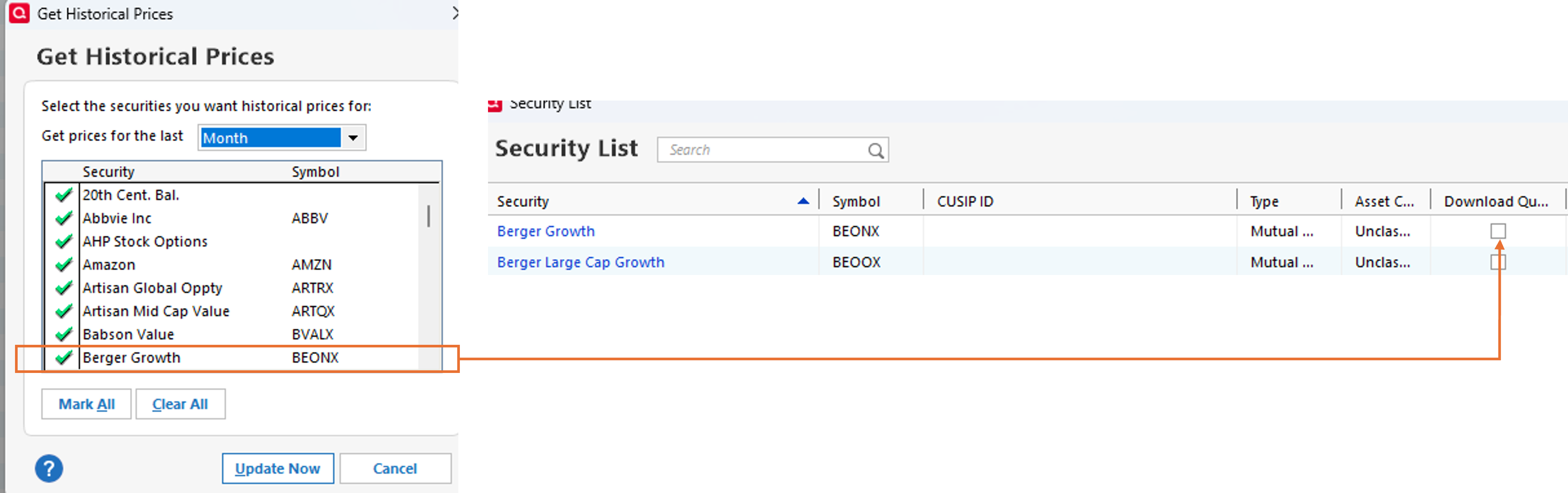
This is not working as people suggest. See the example below:
I do not want to keep on getting prices for Berger Growth. If I deselect it on the left, it is not retained the next time I "Get Historical Prices"
@BarryMo You are right.
Surprisingly, in a test file with R65.29 and maybe earlier versions, going to Tools > Security List and un-checking Download Quotes and Watch List does not remove the security from the Download Historical Quotes list. The list apparently includes all the securities in your Security List.
In the test file, a checkmark next to the security name causes quotes for the selected time period to be downloaded even if Download Quotes and Watch List are un-checked in the Security List. I think this is a bug.
In my working file, which is much older, checking the Watch List box in the Securities List or having a nonzero balance and the Download Quotes box checked determines whether the security appears and is checked by default in the Download Historical Quotes box.
@BarryMo It appears you are relying on the Update Historical Prices path. Is that the case?
If so, that defaults to a more comprehensive than the regular Update Quotes path. I believe, at this point, to filter out more securities from the Update Historical Prices, you need to Hide securities via the Security List. Just be somewhat sure that doesn't cause you issues other places.
Further, it appears perhaps you are only updating prices monthly and thus going to Update Historical Prices to get the 30-day data. Is that correct?
My thinking had been that the Download Quotes tended to be a five-day period but would go back longer of data was missing. Have you had good or bad experience with the Update Quotes process vs the Update Historical Prices path?
@Jim_Harman I was surprised to learn that the Update Historical Prices (UHP) path offered a subset of the security list. I thought it was a much bigger portion of the security list, but now see that it is not.
My limited investigation suggests they may be attempting to include all currently owned securities + Watchlist + securities owned within the last five years. I believe hidden securities are excluded and the Security List Download Quotes check is not considered. But I do know in my file at least one security sold off as recently as March 2026 does not appear in the UHP offerings; that damages my five year hypothesis. And I have at least 4 securities (of the first 15 alphabetically) that are on the list but not within the criteria I hypothesized.