Downloading is not working properly . it is downloading previously downloaded transactions.
this started immediately after the last update. Quicken for windows, Classic Deluxe, V67.10, Build 27.1.67.10,
Hi @Rvolkhardt, Thank you for reaching out to the Quicken Community and for providing those details.
To better understand what's causing this issue, I have a few questions:
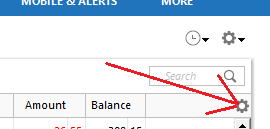
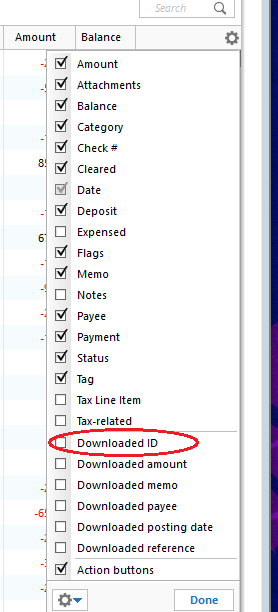
To identify why the duplicate transactions are occurring, we'll also need to review the Downloaded ID for the affected transactions. I recommend following the steps in our support article on duplicate transactions:
Duplicate transactions can occur for several reasons, including:
Once you've reviewed the downloaded IDs, please let us know which scenario best matches what you're seeing. Please review our support article for more details about each scenario. If you're unsure, feel free to share a screenshot of the duplicate transactions with the Downloaded ID column visible.
I hope this helps. I look forward to your reply!
Hi @Rvolkhardt,
I just wanted to follow up since I haven’t heard back from you. I’m checking in to see if you still need assistance.
This along with creating a downloaded transaction with the same payee info as an already entered Bill Reminder transaction… it fails to MATCH the existing Bill Reminder, and when manually matched, the transaction created by the download remains. OR, WORSE, accepted TRANSFER transaction is overwritten WITHOUT being accepted changing the DOWNLOAD ID, DOWNLOAD PAYEE, DOWNLOAD AMOUNT and removing the category information. this issue has been occurring for moths no with repeated reports submitted with data files. The integrity of the data is corrupted as is the reliability of the transaction data.
@Rvolkhardt and @George@16 it sounds like you are both having the issue described in this post: