This discussion was created from comments split from: Walmart One Pay, and Sam's Club Credit Cards with Synchrony Bank.
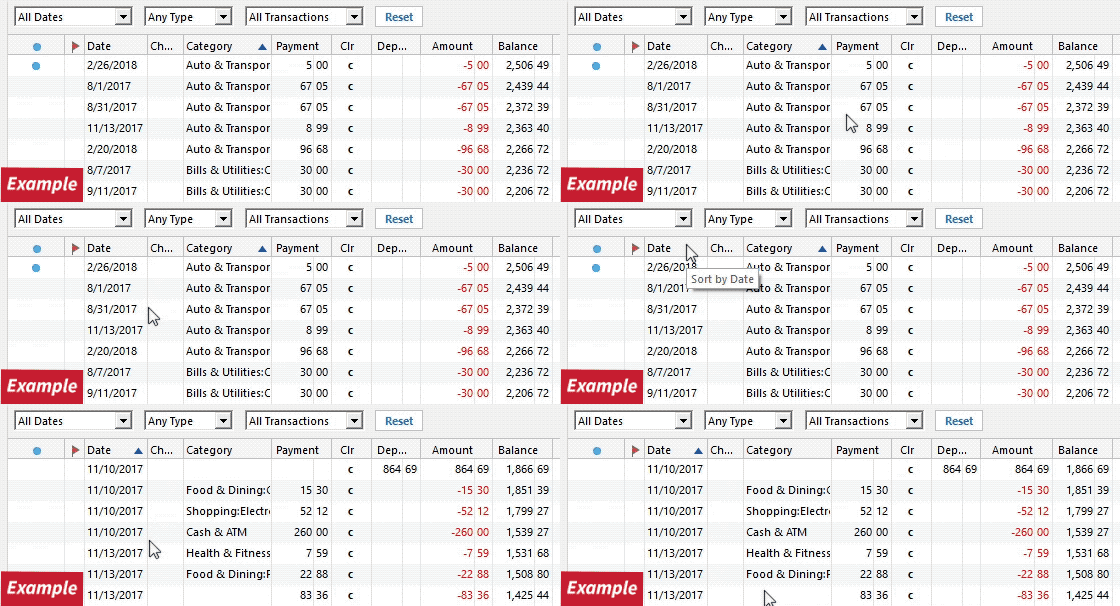
My Walmart One Pay account is connected, and transactions download; however, credits download as debits, and debits download as credits. Is there a fix for that?
[Edited - Readability]
Hi @kevinholeton, Thank you for bringing this to our attention!
To better understand the issue and determine the next steps, I have a few questions:
I look forward to your reply!
Hi Carlos, attached are the screen shots you requested.
Hi @kevinholeton, Thanks for uploading the screenshots; they are helpful. I suggest testing how the transactions download in a new file:
To create a Test File:
Once the test file is created, add the account:
Please let me know the result. I look forward to your reply!
Hi @kevinholeton, I just wanted to follow up since I haven’t heard back from you. I’m checking in to see if you still need assistance.
hi Quicken Carlos. I haven’t been able to connect to Synchrony Bank using a new test file. I’ve tried several times and it won’t connect. Of course no issues connecting through my normal Quicken file.
Thanks for your reply and for trying the steps in a test file, @kevinholeton .
Since the account was not able to connect in the test file, I suggest switching back to your original file.
To do this:
For the issue with transactions downloading as the opposite transaction type, I recommend contacting Quicken Support for further assistance. A support agent can walk you through additional troubleshooting steps in real time and escalate the issue if necessary.
Phone support is available Monday through Friday, from 5:00 AM PT to 5:00 PM PT.
I hope this helps!
Hi Quicken Carlos. I had to go to ABC Warehouse Credit Card for Synchrony to get access to my OnePay account. I was able to add it to a test quicken file. Still the same issue - purchases are showing as credits and payments are showing as debits. See attached.
I will contact Quicken support for assistance.
Hi @kevinholeton, Thanks for the update and for testing this in a new file. Since the same issue occurs there as well, contacting Quicken Support is a good next step so they can investigate further and escalate it if needed.
Please let us know if Quicken Support is able to assist. If you encounter any other errors or issues along the way, feel free to reach back out to us here.
Thanks again for taking the time to test this and share the results!
Hi @kevinholeton,
I just wanted to follow up since I haven’t heard back from you. I’m checking in to see if Quicken Support was able to assist or if you still need assistance.
Hi Carlos, the fix that customer service provided did not work. I will live with having to change all credits to debits and debits to credits. Or not use that credit card any longer.