It says there are 6 transactions but nothing downloads. I see there are other questions as to when this will be fixed. It isn't fixed as of 9-12-26. If this isn't fixed by December I am thinking of now renewing my subscription.
I am running Quicken Classic for Windows and have the same issue. Today, 9/1/26, none of the transactions from my twelve accounts at Advia Credit Union have downloaded. I had to manually enter all the transactions from 6/30/26 thru 8/31/26. Transactions from my Fifth Third Bank accounts and my Fidelity Brokerage accounts have all downloaded fine. I do not see any activity from Quicken regarding this problem and we should not have to enter transactions manually going on four months now. I would not have purchased the renewal subscription for $75 had I known that I would have to enter transactions manually. Let's get this fixed already!👎️☹️
Hi @geo791, Thank you for sharing the details of your issue and for joining this thread.
The issue that @carl.albert reported was escalated internally to our Support team, and an individual ticket was created during their interaction with Quicken Support.
If you haven't done so already, I suggest following the steps outlined in our support article about missing transactions:
Let me know how it goes. I look forward to your reply!
@Quicken Carlos - I'm having the same issue with Advia Credit Union as @carl.albert on Quicken Classic. Transactions stopped downloading months ago, around the time Advia rolled out their new security protocol. No error messages; updates just silently return zero new transactions.
I've tried the usual troubleshooting and what you suggested to @geo791: reset the accounts, deactivated and reactivated the connection in Quicken, and given it time in case it was a temporary sync issue. Still nothing.
This sounds exactly like what carl.albert and geo791 have already reported. Can you add my case to Ticket #12534422 so it's tracked with the others and hopefully escalated? Happy to submit log files if that helps move things along.
Hi @TabbyTransactions,
Thank you for sharing the details of what you’re experiencing and the troubleshooting steps you’ve already tried.
I checked your accounts, but they don’t appear to be connected at the moment. Could you please confirm whether they are currently connected on your end?
I know you mentioned that you’ve already tried deactivating and reactivating the accounts. However, did you also have a chance to follow the troubleshooting steps provided by @Quicken Carlos ?
I look forward to your response!
I have the same problem with my Advia Credit Union account.
Hello @Blondye2105,
Thank you for letting us know you're also having an issue with transactions not downloading. If you haven't already done so, please start troubleshooting by following the troubleshooting @Quicken Carlos shared earlier:
I look forward to your reply!
I did the troubleshooting and it didn’t help.
It shows 8 accounts synced sucessfully. It shows the new balance. It shows 0 transactions and 0 downloaded.
I don’t understand why the case is closed as the trouble is still there.
Thank you for your replies,
What case are you referring to? Did you contact Quicken Support about this issue earlier? If you did, please provide the ticket number, and I can check on it for you.
Thank you!
I did the possible flx that Carlos discussed on 9.1.26 to another customer.
I never got a case number.
Thank you for your reply,
The Community is not the same as contacting Quicken Support directly. Community posts are not the same as a ticket, and we will close a discussion after about a month of inactivity, even if the issue remains unresolved.
If you followed the recommended troubleshooting and the issue persists, please contact Quicken Support directly for further assistance, as they have tools we can't access in the Community, and they can escalate the issue as needed. The Quicken Support phone number can be found through this link here. Phone support is available from 5:00 am PT to 5:00 pm PT, Monday through Friday.
I apologize that I could not be of more assistance!
Downloading transaction issue continues…none of the above suggestions resolved the issue. 😣
We have 12 Advia Credit Union Accounts and none of them have downloaded transactions for the months of August and September. I have deactivated each account and reactivated them. The accounts all connect to Advia with no errors. The summary shows 12 accounts connected with "0" transactions. Our Fifth Third Bank and Fidelity Brokerage accounts are downloading fine. It's a pain to have to manually enter transactions for all 12 accounts at Advia Credit Union. This financial institution seems to always have issues. I have uploaded a problem report to Quicken Support.
I've checked all the recommendations and nothing has resolved the problem which has been ongoing for several months! Today is 10-1-26 and the problem has not been resolved!😣
Hi @geo791,
Thank you for chiming in and for outlining the troubleshooting steps you’ve already tried.
I checked your accounts on our end, and they appear to be connected properly. I also refreshed them. To help us rule out some of the most common causes of missing transactions, please follow the steps outlined in our Missing Transactions support article:
Be sure to follow these steps in order:
1. Go to Edit > Preferences > Downloaded Transactions. The option Automatically add to banking registers needs to be unchecked.
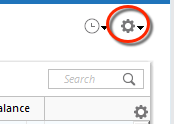
2. Refresh your online account information by clicking the Actions Gear Icon on the upper right of the register, and select Update Now. Follow the on-screen instructions to complete the update.
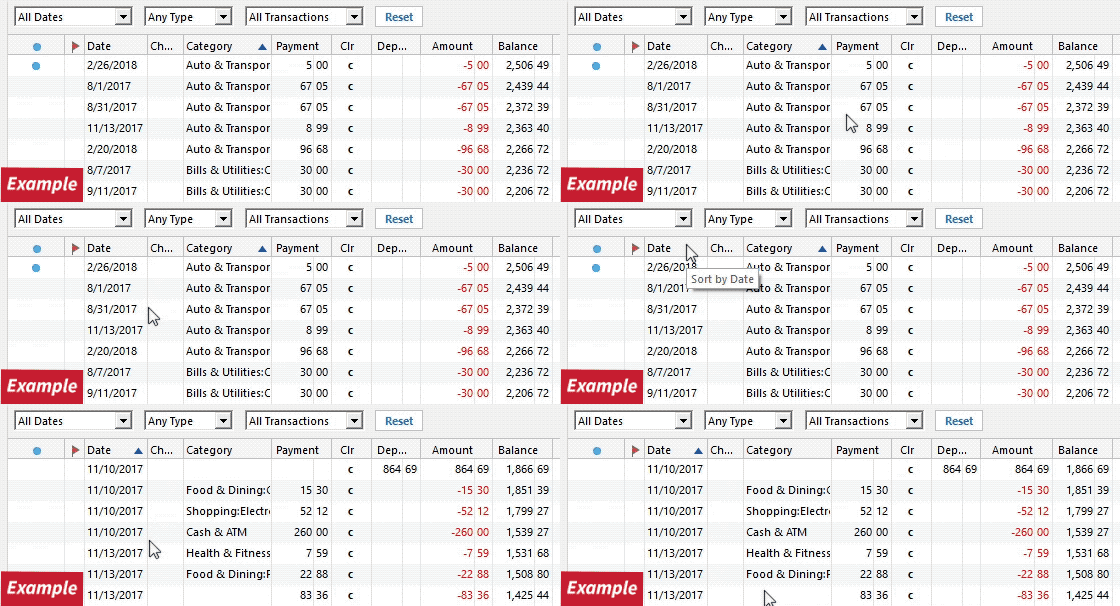
3. Confirm that the Sort Order in your account is by Date; just click the top of the Date column in your account register. It's possible the transactions are in your register, but not where you thought they'd be.
4. Click the Reset button at the top of the register. This will confirm that there's no filtering in your account register.
5. Try refreshing your login session: To do this, go to Help > Refresh Sign in. After completing the log-in process, trying running a One Step Update again.
6. Go to Actions (Gear Icon) > Register Columns > Check Downloaded Payee in the account register. This allows you to search by Payee to confirm the transactions haven't been renamed unexpectedly.
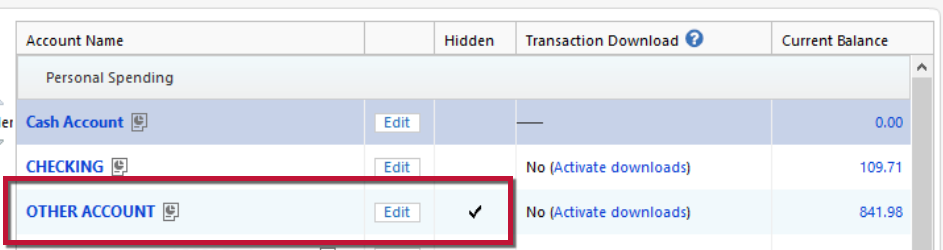
7. Go to Tools > Account List and check Show Hidden Accounts at the bottom left. Confirm the missing transactions haven't been added to a hidden account by clicking on the name of any account that appears with a check mark in the Hidden column.
Please let me know how it goes after completing these steps. If the transactions are still missing, let me know what you find, and we can continue troubleshooting.
None of the suggestions resolved the issue of Advia CU transactions not downloading. I gave up today and manually entered all of the transactions in the 12 accounts. Took way too much time! I certainly hope that Quicken Support resolves this problem soon or I will have to rethink renewing my subscription next time. Advia instituted 2FA a few months ago. This is about the time transactions stopped downloading.
Quicken Carlos posted this reply on August 14, 2016
"Our team is still working toward a resolution. At this time, there is no ETA for a fix, and the issue is being investigated under Ticket #12534422." Why was this discussion closed with no resolution or even an estimated time to resolve it?
The Community is mainly a user-to-user forum with a handful of moderators who can help troubleshoot issues. Posts to the Community are not the same as a trouble ticket. We close discussions after about a month of inactivity, even if the issue isn't resolved. Please note that closing the discussion does not close any tickets created for an issue.
I checked the ticket number you referenced. It is an escalation specifically for the customer in that previous discussion. If you are experiencing the same issue and the troubleshooting @Quicken Laura shared did not correct the issue, I recommend that you contact Quicken Support directly for further assistance, as they have tools we can't access on the Community, and they can escalate the issue as needed. The Quicken Support phone number can be found through this link here. Phone support is available from 5:00 am PT to 5:00 pm PT, Monday through Friday.