This discussion was created from comments split from: I am getting duplicated pending transactions.
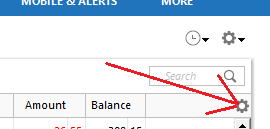
Any idea when this problem is fixed? CTP 18428. My have R69.53, on Win 11. These screen grabs address the issue:
I will do a Report to Quicken to post my log files.
Hi @jimarcher6837,
Thank you for providing the additional information and screenshots. I’d like to clarify a few details to make sure I understand what’s happening.
Once I have this information, I can better understand what’s happening and determine the next steps.
I look forward to your response!
Did you get my logs?
This problem started appearing on August 23. It appears to be related to CTP 18428 ticket. When will this bug get fixed?
I can manually log my transactions to reflect my bank / credit card statements. I will turn off the automatic updates for those.
Thank you for your response, @jimarcher6837, and for submitting the log files. I’ve received them.
Based on the information you provided, your issue appears different from the one reported in CTP-18428, which involves pending transactions. In your case, the transactions have already cleared, but Quicken is downloading them again and matching them to your existing entries.
To help us narrow this down, could you please confirm the following?
For example, does it always go back about a week, a few days, or some other consistent period/number of entries?
I’ll keep an eye out for your response. Thank you for helping us gather these additional details!
Laura,
Does this affect all accounts? Bank of America, and Capital One. The Bank and Credit Card accounts. No brokerage accounts (under Investing) and Investing accounts.
Have you noticed whether Quicken consistently goes back a certain amount of time or a specific number of transactions? HOW DO I TEST THIS? QUICKEN SEEMS TO REPEAT THE SAME ENTRIES. ALSO, IT GOES TO A GREY SCREEN OCCASIONALLY, AND THE TASK MANAGER IS THE ONLY WAY TO SHUT THE APP DOWN.
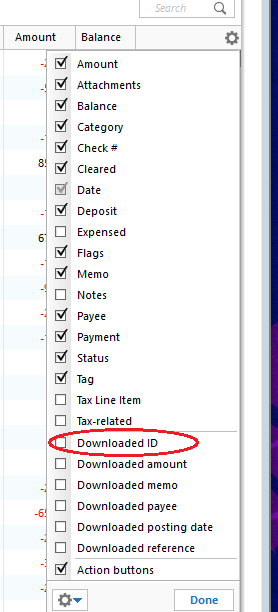
I also check Downloaded ID, but is not persistent.
Thank you for your response and for providing the additional details about Quicken occasionally going gray.
Before we can determine the source of the issue, I’d like to rule out a few other possibilities:
I look forward to hearing from you!
Look at this:
I can rename the file and file it in the working directory.
This is the file location for qw.exe:
The file is being backed up locally on an local drive. It is not backed up remotely on the cloud. I did a validate / super validate on the file.
Jim
Thank you, @jimarcher6837.
Would you be able to test the account behavior in a new test file? This will help us determine whether the issue is specific to your existing data file.
NEW FILE
Note: Creating a test file will not affect your existing data file. However, you may want to create a backup before proceeding.
Once you've completed the test, please let me know how it goes.
I have records to 2013, on my brokerage accounts. Before that, it was the days of DOS way back. The PC I was using got corrupted.
That proves that this instance of QUICKEN, RECORDS 2026, does not replicate transactions as the other (Record 2020-JIM-ALLINONE). So what do I do now? Restore a Back up? Use the File / Export and File / Import functions? Use a .csv to import transactions? Do off line updates to bank and credit card accounts?
Thank you for your response. You can either restore a backup from before the issue began or create a copy of your current file.
Please note that creating a copy will preserve your information as of today, but it will disconnect your accounts from online services. You will need to reactivate those accounts in the new file.
Restore Quicken data
Create a copy
In the Copy or Template window:
Please try whichever option you prefer and let me know how it goes. If you run into any issues along the way, feel free to let me know what happens, and I’ll be happy to help.
Restore the Back Up / Restore might be the easiest. My back ups are every couple days. I may go back to the end of August…..
Maybe I will try to deactivate the banks and credit card accounts, then do those manually. I will let you know…….
I tried Copy, it is ugly……
Thank you for the follow-up,
Would you please provide more details about what went wrong in the copied file?
Thank you!
Kristina,
Multiple entries towards the reconciled list on entries. See the example. The good news is that I can clean up the Downloaded Ref.
The balance is all askance.
Thank you for your reply and the screenshot,
Since it's necessary to reconnect your accounts in the copied file, there is a risk of getting duplicate transactions in the first update after reconnecting, but this should happen only once, and deleting the duplicates should correct it. Have any further duplicate transactions been downloaded into the copied file?
The duplicates visible in the screenshot all seem to follow the same pattern: The reconciled transaction has no Downloaded ID, while the downloaded duplicate has one. Was the reconciled transaction a manual entry or a reminder that was entered into the register?
A days work cleaning this up.
Reconcile All at the top right right gear box.
Thank you for your reply,
To clarify, does that mean that it took a day to clean everything up, but it's now working properly?
I tried the Restore / Backup function and this is what I got.
It will take a week to restore back to initial application of this tool.
So much for creating backup files. It is a disaster.
I'd like to chime in and mention that I've been experiencing this exact same issue… It started within the past few weeks, and it gives me multiple downloads of transactions that I've already cleared, over and over again for most of my banking accounts (at least 5-6 of them). The duplicate transactions appear to go back about a month. So every time I do an online update, I need to clear out a month's worth of transactions that I've already cleared. EVERY SINGLE TIME. This is for Business & Personal, R69.53, build 27.1.69.53. Note that I have not done anything to change any sort of configuration, other than applying updates when they're available. This sure smells like a bug in the software to me, not a user's local config problem, as the above seems to imply.
See my comment below
I see the same error. Maybe this is something algorithmic. I have not changed the settings. I have the same build and version as you.
Investigate when this ticket [CTP-18428] will be fixed? See (Ticket #12620156/CTP-18761).
Check out
Also : https://www.quicken.com/support/understanding-how-automatic-transaction-matching-works-in-quicken/
This also applies to Bank of America and Capital One.
I have a few Chase accounts where I'm seeing this happening, but also American Express as well.
Thank you for your replies,
The error message you shared usually means that there's a missing program file.
To resolve the issue, please uninstall and reinstall Quicken. For instructions on uninstalling Quicken, please use this article: https://www.quicken.com/support/how-do-i-uninstall-quicken-windows/#section-windows-1
For instructions on reinstalling Quicken, please use this article: https://www.quicken.com/support/how-do-i-download-quicken-quickencom-after-i-buy-it#section-windows-1
If the issue persists, please let me know!
Hello @bananenbieger13,
Thank you for letting us know you're also having an issue with duplicate transactions repeatedly downloading. If you haven't already done so, please follow these steps from our article on duplicate transactions:
1. Click on the Register Columns gear icon at the top right of the account register.
2. Place a checkmark next to Downloaded ID, then click Done. (If you use Two-Line Display, you will need to select Downloaded ID and Downloaded reference)
3. Review the Downloaded ID. This is the unique identifier for each downloaded transaction. It is used by Quicken to determine which transactions have been downloaded and which ones need to be downloaded.
Mismatched manual and downloaded transactions appear in the account register.
If the duplicate and manual transactions do not have a Downloaded ID, then the downloaded transaction was not properly matched to the manual entry.
Solution: Delete the manual entry.
Downloaded transaction appears twice, with the same Downloaded ID.
Solution: Set the register for the affected account to Single-line display.
Downloaded transactions appear twice, with different Downloaded IDs.
If your bank and/or their service provider is making changes to how they present data to Quicken, there is the possibility that they may transmit the same transaction with two different IDs. Solution: Contact the Online Banking Support for your bank (Tools menu > Online Center > Contact Info) to request they escalate to their OFX team or service provider in order to resolve this issue for all their Quicken customers.
Transactions are downloaded through Quicken AND a manual download from your bank's website, resulting in different Downloaded ID numbers and duplicate data.
Solution: Don't mix your methods for getting transactions from your bank. If you want to download from the website, try to stay with that method. If you decide later that you want Quicken to update automatically rather than manually downloading yourself (or vice versa), be aware that you may encounter duplicate transactions on that first download after the change. You will need to manually delete the duplicate transactions.
Deactivating and reactivating your account to change the connection method has caused downloaded transactions to appear again.
This is typically a one-time event; if you have not deactivated and reactivated your account in Quicken, this does not apply to you.
Transfers are appearing twice.
This occurs when a transfer is downloaded for one account then downloads again for the other account and the transfer transactions do not get matched to each other.
If duplicates continue to download, you may require the assistance from either the Online Banking Support for your bank or from Quicken Support.
If you need to delete numerous duplicate transactions, follow the steps below. Please note, multiple transactions can only be deleted simultaneously in the register. This process cannot be completed in the Compare to Register at the bottom of the Quicken window.
I hope this helps!
I tried this:
It looks promising. I will try OSU tomorrow. BofA does not carry Downloaded ID. Cap 1 does.
I saw your announcement from 10/2 regarding this issue.
Of course, I can go online to download Quicken. Why did Quicken miss locate Quicken.msi?
Kristina:
This appeared to work:
Deactivating and reactivating your on line bank and credit card account
This was a last stab effort, and it appeared to be a success. Last time, the results were very different.
I will try it tomorrow. This works on all other files I created.
Just joining the fun… been happening to me for a week or two now. Really makes you question your sanity!
Download transactions, accept them, auto-reconcile, and call it a day. Then the next day, those same transactions download again like they've never been seen before. Meanwhile, the previously reconciled transactions have magically reverted to their original state, either nonexistent or back to being manually entered and cleared/reconciled.
Had me seriously questioning my memory. Didn't I just do this yesterday? Am I losing my mind?
It's like Groundhog Day, but with bank transactions. And somehow, even less fun.
mike008,
It has been groundhog day for 6 weeks. Try this, deactivate and reactivate your bank and CC accounts. Let me know if you are losing your mind. See this link:
https://community.quicken.com/discussion/7976803/new-10-2-26-quicken-windows-duplicate-pending-transactions-in-register-after-one-step-update
To address the problem of Quicken Re-Downloading previously cleared and matched transactions, try this: deactivate and reactivate your bank and CC accounts. It works in my case.
[Edited - Readability/Screenshot]
This is a follow-up:
I'm glad to hear you found a resolution!
Hello @mike008,
If the recommendations earlier in this discussion don't resolve the issue, please let us know!
It is happening again……