This discussion was created from comments split from: New CC-505 Errors with Capital One and Fidelity, OL-295-A continuing with Vanguard.
Still getting CC-505 errors with Capital One since yesterday and OL-295-A errors with Vanguard for nearly two weeks. If Quicken can't get this fixed soon, I've got no use for the product. [Removed - Off Topic]
Hello @mbrown0812,
Thank you for letting us know you're seeing this issue.
The Vanguard issue is a known issue. For a workaround, please review the community alert linked below. You can also bookmark it to receive notifications of updates:
To troubleshoot the CC-505 error you're seeing with Capital One, please follow these steps from our article on CC-505 errors:
This error message is typically caused by a temporary issue on your bank's servers. You can try updating again in a few hours or the next business day.
Try refreshing your online account information:
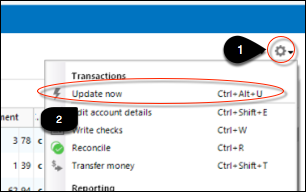
1. From your account register, select the Actions gear icon at the very top right of your register (Ctrl + Shift + N).
2. Select Update Now.
3. Follow the on-screen instructions to complete the update.
4. Repeat these steps for each financial institution experiencing this error.
Try the steps above again the next business day. If the problem continues for over 48 hours contact Quicken Support for assistance.
I hope this helps!