Error while loading Quicken on new laptop
Options

scregan
Member ✭
While trying to load Quicken 2017 on my new laptop, I get the following message
Please check internet connection and retry. [SSL_VERSION_OR_CIPHER_MISMATCH]
Running Windows 10 Pro
Avast virus checker (Free version)
Windows Defender Firewall (Quicken not showing up in list of apps for Defender)
Any ideas on getting Quicken running?
Please check internet connection and retry. [SSL_VERSION_OR_CIPHER_MISMATCH]
Running Windows 10 Pro
Avast virus checker (Free version)
Windows Defender Firewall (Quicken not showing up in list of apps for Defender)
Any ideas on getting Quicken running?
0
Best Answer
-
Check your Internet Security Settings:
- Click the Start button and select the Control Panel.
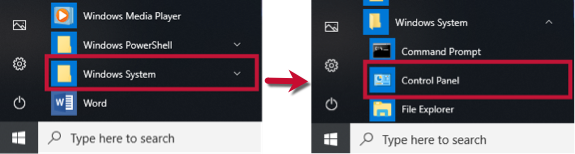
- In Windows 10, the Control Panel is located in the Windows System folder in the Start menu.
- Select Network and Internet, then Internet Options.
- Go to the Advanced tab.
- Scroll down to the Security Section.
- Verify TLS 1.2 is checked.
- If it is not, check it.
- If it is already checked, continue to the If the issue persists section below.
- Click Apply then OK.
- Try to run Quicken again.
Quicken Subscription HBRP - Windows 105

Answers
-
Check your Internet Security Settings:
- Click the Start button and select the Control Panel.
- In Windows 10, the Control Panel is located in the Windows System folder in the Start menu.
- Select Network and Internet, then Internet Options.
- Go to the Advanced tab.
- Scroll down to the Security Section.
- Verify TLS 1.2 is checked.
- If it is not, check it.
- If it is already checked, continue to the If the issue persists section below.
- Click Apply then OK.
- Try to run Quicken again.
Quicken Subscription HBRP - Windows 105
This discussion has been closed.