


future entered reminders not showing in register due to user's filtering transactions

sstoenner
Quicken Windows Subscription Member ✭✭
In my register, I have it set to show reminders 14 days into the future...
however, if I enter a reminder that is in the future, it STOPS showing that reminder in the register...
Not only that, the balance showing in the register is messed up because it no longer takes that reminder into account!! What gives??
however, if I enter a reminder that is in the future, it STOPS showing that reminder in the register...
Not only that, the balance showing in the register is messed up because it no longer takes that reminder into account!! What gives??
Tagged:
0
Answers
-
If you haven’t already, you may want to verify the register is sorted appropriately and there aren’t any unexpected filters being applied: open the register, select the Date column header (you want the small triangle to right of Date to point up) and Reset.
1 -
I've done that - no difference.0
-
Can you show us an example of the reminder and your register? Before & after the reminder is entered? Here's what I see with entered reminders. I'm using deluxe R32.12, what are you currently using? I will say that the note about entry date is incorrect, all these reminders were "entered" sometime in late April to indicate a payment was scheduled for the date shown.

Quicken user since 1995
Win11 Deluxe Subscription thru 20240 -
[EDIT] - added instream images for easier viewing -OK - here in first image I am entering a reminder in the bank register screen...
[EDIT] guessing the State Farm entryIn second image, I have entered the reminder and you can now see that the reminder is no longer visible.In the third image, I am now looking at the "Upcoming Bills and Income" page
and I can clearly see the entered reminder, yet I cannot see it in the Bank Register!!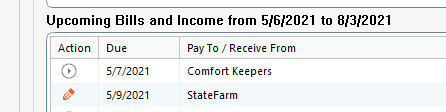 0
0 -
The register is behaving as if you have still have a filter set. If you are certain you followed the direction you were provided yesterday as you said you did - that you have selected Reset at the top of the register, I suggest you try toggling the date range from All Dates to something else and back to All Dates. If the issue persists and the problem is only impacting one register, I suggest you recreate the register. Otherwise, you may want to review: https://www.quicken.com/support/advanced-data-file-troubleshooting-correct-problems-quicken-windowssstoenner said:OK - here in first image I am entering a reminder in the bank register screen...
In second image, I have entered the reminder and you can now see that the reminder is no longer visible.
In the third image, I am now looking at the "Upcoming Bills and Income" page and I can clearly see the entered reminder, yet I cannot see it in the Bank Register!!0 -
what version of Quicken - Win vs Mac ...... Help --> About Quickenas I don't see this screen layout in my Register, and the "rounded corners" - Qwin R32.12 -[EDIT] - I updated your posting with instream images for easier viewing
0 -
The rounded corners appear on the Projected Balances view in Quicken for Windows.Ps56k2 said:what version of Quicken - Win vs Mac ...... Help --> About Quickenas I don't see this screen layout in my Register, and the "rounded corners" - Qwin R32.12 -[EDIT] - I updated your posting with instream images for easier viewing0 -
The bank register is configured as one-line per transaction, not two...
Have you tried doing just as I showed I was doing??... Did it give the same result or not?0 -
The only way I have been able to reproduce your result is by setting a filter to exclude the future transaction in the register. For example, by selecting Last 12 Months in the date range pull-down menu.sstoenner said:The bank register is configured as one-line per transaction, not two...
Have you tried doing just as I showed I was doing??... Did it give the same result or not?0 -
I cannot reproduce it either. Once I enter the transaction, the clock changes to the pencil and it's there. The only thought I have is that maybe it was entered into a different register. That would happen if you changed to a different payment account when entering the transaction.
Quicken user since 1995
Win11 Deluxe Subscription thru 20240 -
Ok - so I have turned off filters and they show up - but WHY is this??...
I have it set to show "Next 14 days" of future reminders... why do they NOT show just because I have entered them?... and why would this not work just because I am filtering past transactions??0 -
sstoenner said:Ok - so I have turned off filters and they show up - but WHY is this??...
I have it set to show "Next 14 days" of future reminders... why do they NOT show just because I have entered them?... and why would this not work just because I am filtering past transactions??- A filter excludes transactions.
- A reminder is not a transaction.
When you enter a regular reminder, a new transaction is created and the reminder's Next due on: date is pumped. If the Next due on: date is not in the next 14 days, the reminder would no longer appear and, if you set a filter that excluded the transaction, the transaction would not appear.
I suspect you were filtering future transactions. For example, if you had select Last 12 Months, Quicken will filter future transactions (as well as, transactions with dates earlier than 12 months ago).2 -
I understand this problem is due to my filtering - I'm just saying there needs to be more filtering options.-1

This discussion has been closed.