What is the proper way to account for Principal and Interest in payments/transfers to a loan?

I have tried a few options and think I am missing something, hopefully something simple.
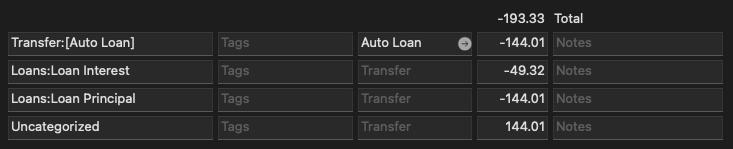
I would like to see my loan payments in the “category by month summary” report. But I can not figure out what combination of split entries are correct.There are just 2 accounts; [Auto Loan] and [Checking]. It seems like it is related to the amount being a transfer and categorized as “Loan Principal”
These are all splits from [Checking]
This one shows the total loan correctly in the report but there is no entry in [Auto Loan]

This one properly deducts the principal from the {Auto Loan] but does not show the principal in the report.

This works but then I have the uncategorized item.
This is the report

This is the Auto Loan account

This is the Checking account

Answers
-
You should have the actual loans setup in Q as Liability accounts.
THEN, the principal payment(s) should be shown as transfers to those accounts … which will reduce the amount owed.
Q's Loan Wizard can set this up for you.
Q user since February, 1990. DOS Version 4
Now running Quicken Windows Subscription, Business & Personal
Retired "Certified Information Systems Auditor" & Bank Audit VP0 -
I'm still using an older version of Q, but here is what I have always done. I have three accounts for my real estate:
Stoneybrook Mortgage - liability for the mortgage balance
Stoneybrook Escrow - asset for the escrow payments and balance.
Stoneybrook Home - asset for the real estate value.
I like to keep all my expenses in the banking/credit card accounts, so I do this:
After making the mortgage payment, I use the split from my mortgage statement to later divide the previous payment into principle/interest/escrow, using the transfer ability for the principle to the mortgage balance account, the escrow to the escrow account, and leaving the interest cost in the checking account as Interest Expense.
Then when things like taxes and insurance are paid, I record transfers BACK into the banking account and then enter the payment data there, thus keeping all the records together for reporting expenses and tax preparation. This will also work if insurance is included in your mortgage payment.
Now here is an additional tip: I'm 81 years old but still carry a mortgage on my real estate. Here are the reasons:
My state has property tax reduction benefits called a Homestead Exemption that reduces property taxes if you hold a mortgage. So on my last two homes I have invested my equity in the markets and use the investment growth to make the mortgage payment. Here is the reasoning:
- Mortgage interest is income tax deductible. That offsets the capital gains tax on the investment income.
- Payments are made automatically without depending on my cash account balances.
- Payments are made two weeks early which significantly reduces the monthly interest amount actually paid.
- Holding the mortgage at my age and paying early improves my credit report to 'exceptional'. (I also pay my single credit card twice a month and have not paid any interest in over two years)
I also have re-negotiated my mortgage both times resulting in currently having a 2.75% interest rate.
Ó¿Õ¬
Faithful Q user since 1986, with historical data beginning in 1943, programmer, database designer and developer for 42 years, general troublemaker on Community.Quicken.Com0 -
Thank you @NotACPA, I tried liability and that did not change the report. The payment still does not show up in the category report. Changing to liability allowed me to change it back to an Auto Loan. It was a generic loan. The Auto Loan setting didn't seem to change the report at all.
0 -
As @NotACPA tried to explain, you need to set up the loan payment transaction as a Split transaction in your Checking account.
Look at your example #3, but only use the first two lines:
This will correctly reduce the outstanding loan balance by the amount of principal paid.
The interest goes into the Loans:Loan Interest category.For budgets and other reports be sure to include the Transfer-To the Auto Loan account in the report as if it was an expense and the report will be OK, without the additional (and unneeded) 3rd and 4th split lines.
1 -
@UKR Thank you for the information. The principal/interest is handled correctly in the transaction. The only option I see is to do the split in the checking account. The second example is the one you show and does not show up in the report. If I include transfers there are so many that show up and are noise. If I could just include the loan/liability accounts that could work. But, I don't see a way to filter for specific accounts.
 0
0


