Reordering transactions in the register?

Is there a trick to change the order of my transactions in the Quicken register to reflect my statement? It would help me a lot prior to reconciling with my statement. Sometimes I can work around it by manipulating the dates but that's not always possible. Thanks.
Comments
-
What order do you want them in? Like newest at the bottom? You can sort by most columns by clicking the column heading like DATE. If you click it again it will reverse the sort. Also you can sort by Order Entered, which is handy when doing a lot of entries. While in a register, click on "Account Actions", select "Sorting Options", select "by order entered" should get you what you are looking for. Or for earlier versions click Options at the top of the register on the right side. If you sort by anything other than the Date column you might not get a true running balance. So after you sort and look around be sure to sort it back by the Date.
I'm staying on Quicken 2013 Premier for Windows.
1 -
Thank you for responding. Yes the "running balance" per the monthly statement is what I'm trying to achieve. Is there a way to rearrange the order of the downloaded and "out of order" transactions to mirror the bank's statement? If I could cut and insert an entry that would be great but I can't get the entry to paste where I want it.
0 -
I selected Sorting by Date /and Order Entered. It does what I'm trying to do. Thanks!
0 -
If you want the transactions in your register more closely match the bank statements order of transactions consider enabling the following global Preferences setting:
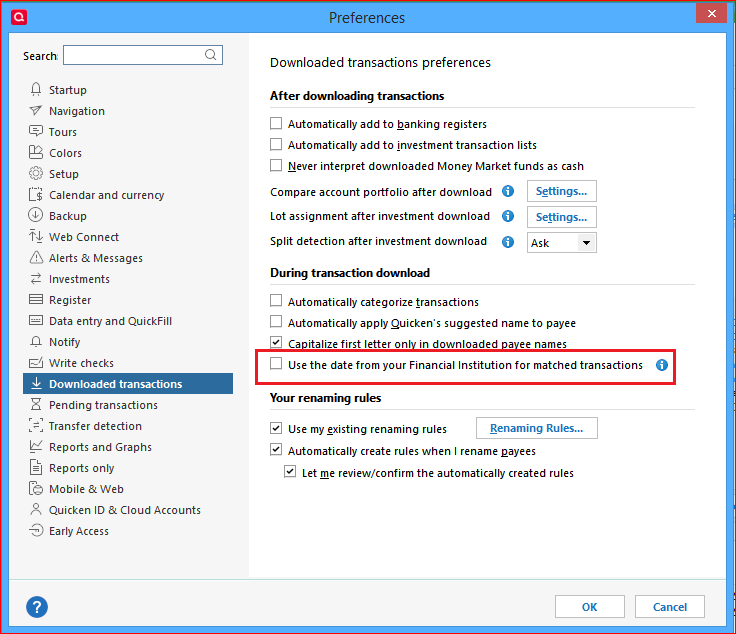
When a transaction clears the bank and is downloaded, Quicken will adjust the register transaction's date to the "Date Posted".
For example: You wrote and mailed a paper check on 1/2 and recorded it in your register with a date of 1/2. The check finally clears the bank on 1/10 and you download it into Quicken. The register transaction will be changed to 1/10.This way, a register's transactions, when simply sorted by Date, will more closely match the bank statement's order of transactions.
0 -
While there are some good suggestions re: this request, there are also some logistical problems with the request.
For example, an ATM or EFT transaction for a weekday will post well before a check written the same day. And weekend transactions will thoroughly confuse things.
Downloaded Posting Date will help, but I don't believe you'll be able to get a perfect match of Q to bank statement order.
Q user since February, 1990. DOS Version 4
Now running Quicken Windows Subscription, Business & Personal
Retired "Certified Information Systems Auditor" & Bank Audit VP0


