Wells Fargo No Longer Connects (Also Bank of America and Charles Schwab)

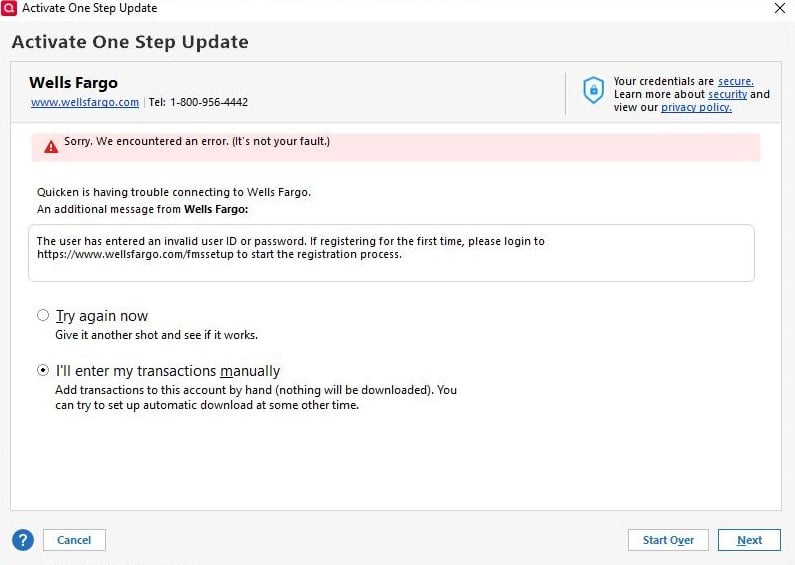
Was working fine until Sunday 5/18/2025 when Quicken suddenly made me reauthorize ALL of my accounts. All accounts except Wells Fargo, Bank of America and Charles Schwab reauthorized successfully.
Comments
-
@DOS for your Wells Fargo accounts, you need to log into the website provided to verify your identity. After you successfully do so, you will have 10 minutes to return to Quicken and complete the process.
0 -
@DOS the error message you got is for a Direct Connect connection. I wanted to point this out just in case you weren't aware of it.
0 -
Thank you for your post. For the record the error message I posted is after successfully logging into the Wells Fargo site from Quicken and being returned to Quicken. As I posted everything was working fine until Sunday when for some unknown reason Quicken required I reauthorize all of my accounts. In addition if you read the error message, it's not my fault.
0 -
@DOS I can't speak to the other error messages your received for your other financial institutions, but the one you received for Wells Fargo is a standard message that indicated that you need to verify your identity to use Direct Connect. It really isn't an error, but an extra step needed.
I am not sure why you were asked to reauthorize all your accounts on Sunday. In the past month or so, there seems to be posts from other uses indicting that they were were required to reauthorize as well. The common thread seems to be that the accounts were using EWC or EWC+
0 -
I am having a similar issue where the Express Web Connect wizard will not continue once authorized with Wells Fargo. I do not see an option for the EWC+ only Express Web Connect. If I leave the wizard there log enough it just times out waiting for a response.
Direct Connect works BUT it will NOT download pending transactions only EWC did that.0 -
@UpSurge to connect Wells Fargo accounts with EWC+
- In Account Details, deactivate all Wells Fargo accounts by clicking "Deactivate" in the Online Services tab.
- In Account Details, blank out FI Name and Account Numbers in the General tab for all Wells Fargo accounts.
- Reactivate the account by using "Add Account". Type in "Wells Fargo".
- Click on "Advanced Options" on the righthand side of the screen.
- Click on "Continue" until you get to a screen that lists out the connection methods and select the option "Express Web Connect".
- If you see a screen that asks what type of account, choose "Banking accounts".
- Keep clicking next to come to the screen where you need to put in your user name and password.
- After entering your user name and password successfully, you will then see a list of your accounts with Wells Fargo. Carefully link your accounts with WF to the accounts on Quicken.
1 -
This worked for me, BTW. I have no idea why if you choose the 'icon" Wells Fargo it doesn't use EWC+ or Direct Connect and seems to rely on old EWC which doesn't work.
Anyway, thank you for the detailed instructions.
0 -
@mjonis glad it worked and you are now connected with EWC+. That icon probably has an old link that needs to be updated. I never click on the icons for this reason.
1 -
Curious success to share:
Reached the WF screen that sends 2 factor code to phone. Entered the code on the next and screen and it timed out. This happened several times.
Finally I kept requesting and entering the new codes and WF responded with approval screen.
It seemed to want two or three codes.
Now it works but is not inspiring confidence.0 -
@P...B... what usually happens is that there is a delay in getting the text message with the code. Sometimes, if you requested a code multiple times, they will come all at once after a long delay.
0
![[Deleted User]](https://us.v-cdn.net/6031128/uploads/defaultavatar/nTYA6S0SVB4GN.jpg)
Categories
- All Categories
- 45 Product Ideas
- 36 Announcements
- 229 Alerts, Online Banking & Known Product Issues
- 21 Product Alerts
- 498 Welcome to the Community!
- 677 Before you Buy
- 1.3K Product Ideas
- 54.5K Quicken Classic for Windows
- 16.5K Quicken Classic for Mac
- 1K Quicken Mobile
- 816 Quicken on the Web
- 116 Quicken LifeHub