HSA Transaction - Auto created in HSA Investment Account issue

I have a Health Savings Account, which auto-invests into an HSA Investment account that Quicken created within Quicken. As the HSA account downloads the HSA investment transaction, it appears in the HSA account; however, when I accept the transaction, it does not update the HSA Investment account that Quicken created.
The auto-transactions have only updated once from the HSA Account to the HSA Investment account. Is there something I should be doing to have the HSA Investment account auto-updated, or is there an issue with this?
Comments
-
I'm not exactly understanding the issue here.
"I have a Health Savings Account, which auto-invests into an HSA Investment account…"
In the real world - forget Quicken for the moment - your words here suggest to me that you have two "HSA" accounts, one that has cash in it, maybe held in a bank, and then another one that has securities in it, probably held by a broker. Is this correct?
(In my case, I have cash held by the financial institution HSA Bank, and I have securities that are held by Schwab.)
"…Health Savings Account, which auto-invests into an HSA Investment account that Quicken created…"
In the real world, and assuming that the answer to the above question is "YES", have you set up regular transfers of cash from the bank to the broker?
Now, assuming that the answer is "Yes" to that question, what I'm guessing is going on here is that the Bank Account in Quicken is receiving downloads from the real-world bank account, and one of these downloaded transactions is the transfer of cash to the investment account, an Investment Account in Quicken that is NOT receiving downloads from the real-world broker. If that's accurate, then the problem is that the download from the bank is not accurately formatted as a TRANSFER from the bank to the brokerage Account, even though the transaction IS reducing the Bank Account balance in Quicken.
The downloaded transaction from the bank should specify in the Category box that the "Category" being affected is the Investment Account and should look like this: "[Name of Investment Account]". Probably what's actually being shown in the Category is this: "[Name of Bank Account]".
If that's correct then what you need to do is either change the "Category" to show that it's a transfer to the Investment Account or, if it's possible, initiate downloads into the Investment Account.
1 -
This is somewhat confusing as I have never seen Quicken auto-create accounts. I am adding a couple of screenshots for more clarification. Also, this HSA is through HealthEquity and the Investments is also through HealthEquity, though they use Vanguard funds.
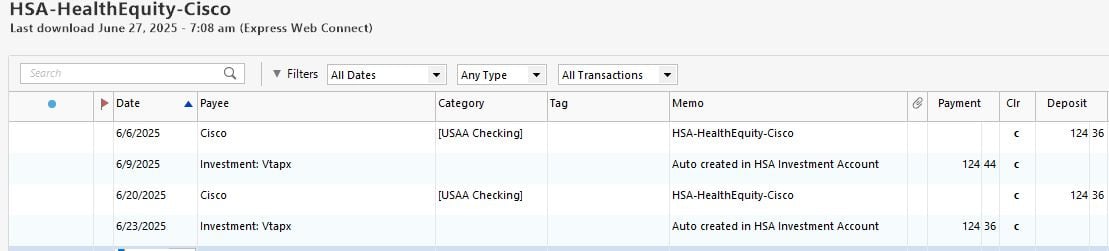
The screenshot below shows the transaction from my actual check transaction. The second transaction shows the downloaded transaction from HealthEquity a few days later, when the money is moved to the HealthEquity Investment account. You can see where this transaction indicates "Auto created in HSA investment account". This is the issue, as it does not update the HealthEquity Investment account automatically each time, when accepting the transaction in the HSA account. It seems random.
The other screenshot shows the only transactions that were automatically created in the account Quicken created for the HealthEquity Investment account.
Hope this clarifies a little more. Let me know if any more questions.
0 -
@John McCurdy how do you have the HSA Investment account set up? Is the option to show cash in a checking account enabled? I think that is what might be needed to get the HSA Investment account to work properly.
0 -
@CaliQkn It was not set up as I just left the defaults for that account since Quicken created it. I just enabled it, but nothing additional shows. Also, when that "investment" transaction is done, it already has automatically invested into a Vanguard fund and is not going to cash.
0 -
@John McCurdy do you have two HSA accounts set up in Quicken? One for the cash account, and one for the investments? That is typically how an HSA is usually set up. It can be either two separate accounts or an investment account with a linked checking account.
0 -
@John McCurdy also, when you down load transactions, are they being downloaded as investment transactions, or cash transactions?
0 -
@CaliQkn There are two accounts. One account I created that downloads transactions from HealthEquity. The other Quicken account was automatically created, which is the "HSA Investment Account". I accept the transactions from the account I created, and those transactions downloaded from HealthEquity that invests in Vanguard funds, sometimes those transactions update the "HSA Investment Account" that Quicken created, and sometimes it does not.
The first transaction downloaded is a cash transaction showing as Savings. The 2nd transaction is done 2-3 days later as an Investment transaction. This downloads to the account I created, and once accepted it updates the "HSA Investment Account" that Quicken created. It just does not update this account every time I accept.
0 -
@John McCurdy I think the set up you have with the two accounts is what it should be, but I am hearing that your main issue is that when you update via the HSA cash account, it doesn't consistently update the HSA investment account.
I have seen only one FI that had HSA investment accounts that worked properly with Quicken. So getting the HSA investment transactions to download properly with Quicken isn't an easy thing to do. My own HSA downloads only cash transactions, so I need to update the HSA investment account manually. That is typically how it's been with these HSA accounts.
After reviewing the transaction screen prints you provided, my suggestion would be to review the transactions history (both cash and investments) in your online account and see how the downloaded transactions compare. Then you will be able to determine what needs to be adjusted in the downloaded transactions to make them equate to the actual transactions.
The investment transactions in your screen print are "Adds" because they are to establish a beginning position for your securities. Hopefully, you will also see security buys and sells, along with corresponding cash transfers.
I think @Tom Young's comment about transfers is true. The only interaction you will have between the two account is cash transfers so some of these transactions most likely need to be adjusted for transfers.
0 -
I'm not exactly sure what's going on here, but I think that you very well may have two "real-world" accounts, maybe, or maybe not. I keep emphasizing "Real World" because YOU have to understand what accounts you have in the Real World in order to accurately model the real world in Quicken. You may have to have a conversation with HealthEquity to get a real understanding as to what's going on.
Since HealthEquity is not a bank and not a broker, they appear to be a middle-man "administrator" of HSAs, which suggests that cash in going to HealthEquity from your employer or checking account (I'm assuming that these are contributions from a job), who then passes the cash over to Vanguard, who then buys one or the other of their mutual funds based on your instructions.
I think you need to have a conversation with HealthEquity to get a good understanding of how the cash flows work and where the transactions might be available to you via downloads to Quicken. Maybe that information is available at HealthEquity but I'd be inclined tho think that the investment transaction information is more likely to be available at Vanguard.
Looking at your first snippet (note: snippets without column titles are very difficult to understand) it looks like that $124.44 transfer out is actually going to an expense Category of "Auto created in HSA Investment Account" instead of an Account. Transfers between Accounts are accomplished by putting the name of the Account between square brackets: [Name of Account] and what you've shown here doesn't have those brackets.
0 -
@Tom Young - For the 124.44, when I accept this type of transaction from the HSA Account I created, Quicken updates the balance in that account correctly, and when this works the "HSA investment" account that Quicken auto-created is updated correctly.
@CaliQkn By the way, for some odd reason, another auto-created account appeared this morning when updating all my accounts. I only noticed it as it was at the top of my Banking accounts list. The account is named: "HSA Investment Account Investment-Cash". I have never seen this before until this morning. Quicken is creating these, so not sure what is going on. Also, no transactions in that account. So, now I have two of these auto-created account.
Anyway, the investment numbers are correct if I login to HealthEquity and check. I can figure out how to update the Quick HSA investment account manually, if that is the only way to do this.
0 -
@John McCurdy the latest account created looks like a linked checking account for the investment account that was created previously. I would keep them and see which one gets updated with transactions when you update.
0 -
@Tom Young - snippet with column names.
 0
0 -
The latest snipped shows that the transfers out have NO Category specified. I can only do that if I override Quicken's warning:
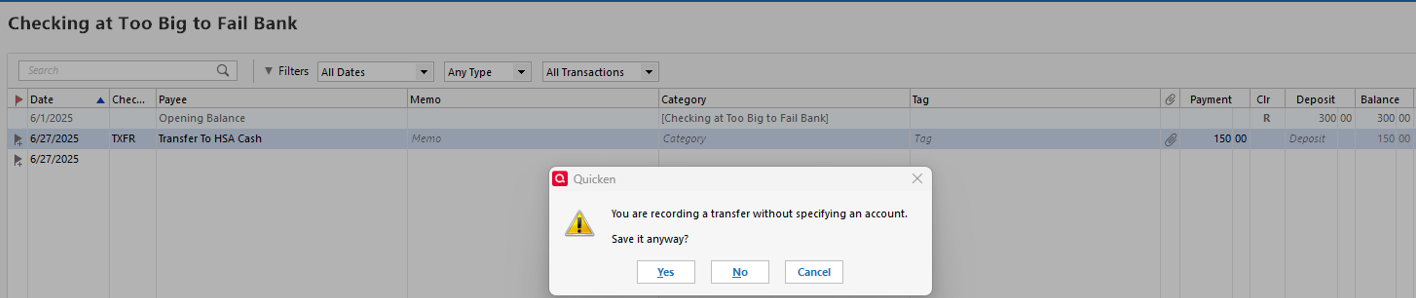
Now that I think of it, I have in the past seen Quicken "auto create" three Checking Accounts. These were created when the downloading method for the "associated" existing Quicken Accounts - credit card and investment - were using one of the Express Web Connect downloading methods. That's what you might be experiencing here.
ASSUMING that the actual cash flow is Employer Pay Check > Bank Account > HSA (cash) HealthEquity > Vanguard HSA then the last 3 transactions would be TRANSFERS with entries in the Category box being the name of the Quicken Account, surrounded by square brackets.
0 -
@Tom Young Next time I am paid, I will check the category and look for the warning. I am just unsure if I can add the category before accepting the transaction. Or should I just add the category after accepting?
@CaliQkn I will keep the new account created and see what happens with the next check.
Thank you both.
0 -
IF the money coming out of your paycheck is going directly to HealthEquity and that's a real world account, then the "Category" associated with that deduction is a TRANSFER to [HealthEquity cash Account]. Then if HealthEquity sends that money to Vanguard, then that "Category" is also a TRANSFER to the [Vanguard HSA investment Account]. There isn't a true "Category" - in the sense of "expense" - that's involved here.
If you download a Transfer into an Account you can ALWAYS change the Category box to whatever you want, be it a real Category (income or expense) or a TRANSFER. YOU SIMPLY CANNOT depend on "downloads" to "do your accounting for you." You're the chief accountant of your enterprise and YOU decide how transactions get recorded.
1

