TD Bank Accounts Not Updating
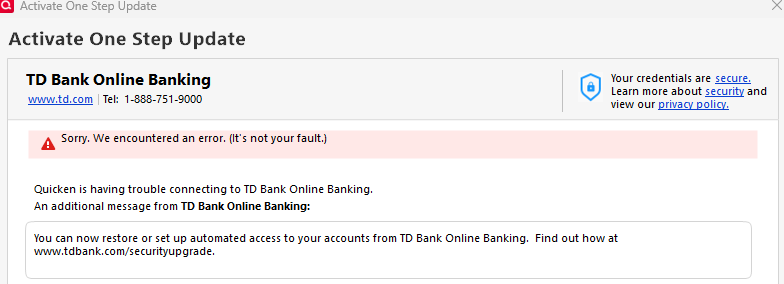
Hi. My TD Bank accounts aren't updating. It goes through the sync process but no transactions are downloaded. I do not get an error message. Please advise. Thank you.
Answers
-
Hello @Karen04,
Thanks for reaching out and letting us know about this issue.
I checked your account on our end, and there are no internal errors currently occurring for your TD Bank accounts.
To help us better understand what might be happening, could you please provide the following details?
- Where is your Quicken data file stored? Is it on your local hard drive (C: Drive) or a cloud-based/external drive (e.g., OneDrive, Dropbox, USB, etc.)?
- Have you attempted any troubleshooting steps so far? If so, what were they?
- Are you using a VPN while updating your accounts? If so, does disabling it make any difference?
- Do you have any antivirus or malware protection software running that might interfere with Quicken? Have you tried temporarily disabling it to see if that helps?
- When did this issue first start occurring?
- Were there any significant changes to your system or software before the issue began (such as updates or new installations)?
In the meantime, we also recommend reviewing and following the steps in this support article.
Looking forward to your response!
-Quicken Anja
Make sure to sign up for the email digest to see a round up of your top posts.0 -
I'm having the same issue.
to the steps above:
-file is stored locally.
-deactivated all accounts. Cannot reactivate them.
-No VPN
-not impact deactivating antivirus
-issue first start occurring last 36 hours
-no significant changes to my system or software
Any suggestions?
0 -
@Vincent M have you tried going on to the website noted in the message? If so, did it give any insight to what the issue might be?
0 -
Hi Anja,
This issue started a few days ago. To answer your questions:
- My data is stored locally.
- I have deactivated the accounts (several times) and reactivated. Quicken finds them successfully, but is still not downloading transactions. I've also checked to see that the connection is authorized at TD.
- No VPN use.
- Yes, I have antivirus software, but it's never interfered before… and all my other accounts are downloading as usual. It's just TD Bank that doesn't.
- I'm not aware of any significant updates, but the antivirus updates regularly as does Windows.
Karen
0 -
Do you have any updates? I'm still having the issue!!!!
0 -
@Karen04 Thank you for following up, though I apologize for the delay.
After reviewing your account, we’re not seeing any internal errors on our end. To start troubleshooting, please review and follow the steps outlined in this support article.
Let us know how it goes!
-Quicken Anja
Make sure to sign up for the email digest to see a round up of your top posts.0
Categories
- All Categories
- 56 Product Ideas
- 36 Announcements
- 225 Alerts, Online Banking & Known Product Issues
- 22 Product Alerts
- 703 Welcome to the Community!
- 671 Before you Buy
- 1.2K Product Ideas
- 53.7K Quicken Classic for Windows
- 16.3K Quicken Classic for Mac
- 1K Quicken Mobile
- 812 Quicken on the Web
- 111 Quicken LifeHub