Account balance incorrect after transaction downloads

Recently, when I download a transaction, the account balances in my checking account are off by the selected downloaded transactions.
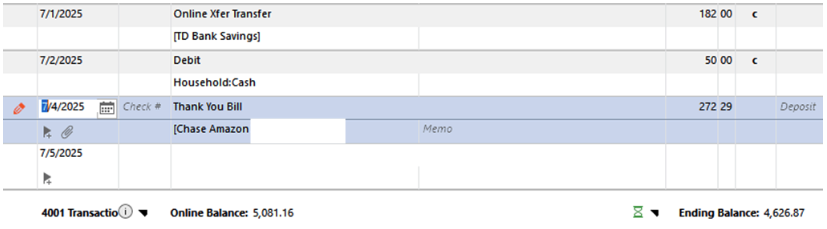
The 7/1 $182 entry (previously marked with a pencil until I cleared it) and the 7/4 $272.29 entry are the cause of the Online Balance and Ending Balance differences.
The corresponding transaction for the 7/1 entry was as shown and the balances were correct in this account

For the 7/4 entry, the corresponding transaction was
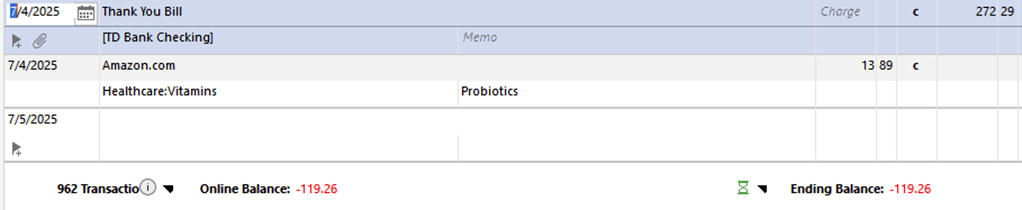
How do I correct this??
[Edited - Removed Personal Information]
Comments
-
It looks like this is an account that is connected for downloading via EWC or EWC+. Am I correct?
If you run OSU, again, about 12-24 hrs later does this issue self-resolve?
Quicken Classic Premier (US) Subscription: R66.23 on Windows 11 Home
0 -
Yes, the checking account is EWC+ and for the 7/1 entry, I did wait 3 days but it did not self-resolve.
Why do these download appear with a pencil icon?. It only started lately.
0 -
It happened again, but this time with Ally Bank
A transfer from my broker account was entered into Ally Bank with the pencil icon, but the account balances did not update with the amount of the transfer.
Ally Bank is updated by EWC.
0 -
When you waited 3 days were there new transactions that downloaded at that time? If so, it is quite possible that it did not self-resolve because of the newly downloaded transactions, not because of the ones from 2-3 days prior.
This happens to me with a couple of accounts in which I have a fairly high number of transactions. Sometimes it will take several days before I don't have any new transactions downloaded at which time the Reconcile to the Online Balance then completes properly. But until then, the accounts cannot be reconciled using the Online Balance without first unchecking the newest transactions which will clear them.
What some people have done to eliminate this issue is to disable Reconcile using the Online Balance (uncheck the box for it on the Online Services tab of Account Details) and instead do manual reconciliations.
Regarding pencil icons: See the following Help article and discussion thread (click on the "Dec 3, 2019" date to view the entire thread) about this subject. Do they answer your question?
- .
Quicken Classic Premier (US) Subscription: R66.23 on Windows 11 Home
0 -
The 7/1 entry of $182 downloaded today, 7/7 as a match, but when accepted, the checking account balance was still off by this amount and also by the 7/4 entry of $272.29 — which is still displaying the pencil icon.
Also, my Ally Bank account is still off by a penciled entry from my brokerage account.
Why is this downloading this way all of a sudden?? What's changed in the downloading process??
Also, the link that you posted to the Status Icons lists the yellow pencil as "A transaction that has not been reviewed and cleared." For the 7/1, $182 entry, I did change the Clr column to C, but the balances are still off!
0 -
Ah, so this issue is about the Account Balance being off and not the Online Balance being off? These are 2 different issues that have different potential causes.
If so, did this issue start after you had changed the connection method in any way, such as, Reset Account, Reauthorize, Deactivate/Reactivate, Add Account or Set Up Now?
There is a known issue with EWC and EWC+ accounts that sometimes (not always) when the connection method has been changed the dollar amount of the Opening Balance transaction gets changed. When it gets changed it generally gets changed to the amount of the sum of the transactions in question.
Check your Opening Balance transactions dollar amounts. Have they been changed from what they used to be?
You might need to restore a backup file dated from before when this issue was first observed to see what the Opening Balance transactions dollar amounts are in there. That should then tell you whether or not you need to correct the dollar amount in your primary data file.
Or you might need to back into it using bank statements, reconciliation reports (if you have them), etc.
If the Opening Balance dollar amount is wrong, correct it and let me know if that resolved the issue for you.
What many people have done as a proactive measure for the future: Enter and save the correct Opening Balance transaction dollar amount into the Memo field of that transaction. Do this for every Spending account (i.e., checking, savings, credit card, etc.). Then if this issue should occur in the future it will be a fast check to see what the dollar amount of the transaction should be and what to correct it to.
Quicken Classic Premier (US) Subscription: R66.23 on Windows 11 Home
0 -
I don't recall if I made any changes to the connection methods to the TD Bank account, but I do know that I did not change anything for the Ally Bank account.
And all my opening balances are correct. I did notice this when I had to reset accounts earlier this year because some transactions were coming in mis-categorized and I had to reset the accounts to correct.
So now I am left with a $251.31 discrepancy in my TD Bank Checking account balances - a $69.31 entry with a pencil that has not cleared (as yet) and the original $182 entry that I previously cleared. Both entries have a matching transfer. The Ally Bank transaction cleared on the last download.
Assuming the $69.31 entry clears on a subsequent download, how do I correct for the $182 discrepancy?
BTW, I do like the suggestion of entering the opening balances in the first account transaction.
0 -
It's good to hear the Ally transaction issue is now resolved.
Regarding the TD Bank $182 transfer issue: The pictures you posted above show a debit of $182 in the TD Bank savings account and a credit of $182 in the TD Bank checking account with the transfer categories being correct. Both transactions are also marked with C so that indicates to me that both were downloaded from TD Bank. So, I'm not understanding what the issue is with the transfer transactions. What am I missing?
Regarding the TD Bank $251.31 transfer issue: This was a payment transfer from your TD checking account to your Chase credit card account? If so, the payment from the TD checking account would have been recorded at TD on the date the payment was made. But the payment transaction in the Chase account could take 1-3 days to post at Chase which is the standard amount of time for ACH transfers to be completed. It can be even a little longer than this around holidays and weekends because it is not uncommon for such transactions to not be processed on these days. If this is the case, then I would think the transaction should download today or tomorrow.
Does your Chase account show that the payment has been received and does it show it is pending or posted? Generally, until a transaction has posted, the Online Balance in Quicken should not be updated to include it. Once the Online Balance has been updated and the transaction has posted, only then will Quicken be able to reconcile the transaction to the Online Balance.
One other thought: Do you have your Preferences set for Pending Transactions to be downloaded? If so, are your accounts set to have the downloaded Pending Transactions to be shown in the Account Registers and Account Balances? You can confirm your Pending Transactions setting at Edit > Preferences > Pending Transactions. If it is set to ON, click on Account Settings and tell me what you see there.
Quicken Classic Premier (US) Subscription: R66.23 on Windows 11 Home
0 -
The TD Bank $182 transfer issue was initially downloaded with a pencil icon. I changed the Clr column to C, but the balances remained unchanged and off by that amount.
As of today's download, the $251.31 difference remains and is the result of the $182 transaction that I manually cleared and the $69.31 transaction that is uncleared and has a pencil icon. That entry is 4 days old and has not yet cleared.
WRT to Pending Transactions, I do have that option checked and that shows up in the downloads but not in the balances.
Basically, what I am at a loss to resolve is:
- How do I correct the $182 balance difference in the checking account when there is a matching transfer in the savings account and that account balances?
- Why are some transactions coming in with a pencil icon? This has started in the last month or 2. Why and how can I stop it?
0 -
Back up your data file before proceeding.
Then you might want to try clicking on the icon that is immediately to the left of the Online Balance below the register:

That will open the following popup. Click on Online Balance not right?:
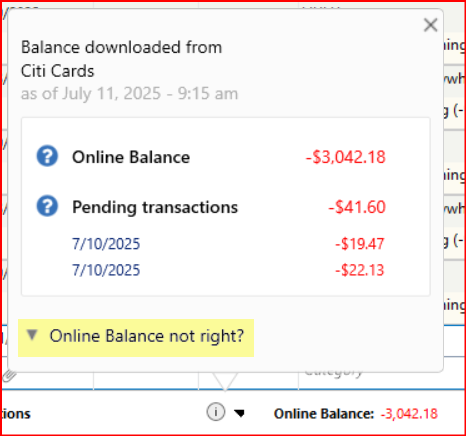
That will open the following popup. Does the Leave as is amount match what is shown in your online account at the bank? Or does the Exclude pending amount match what is shown in your online account? If the Exclude pending amount is the correct amount, select it and then click on Save.:
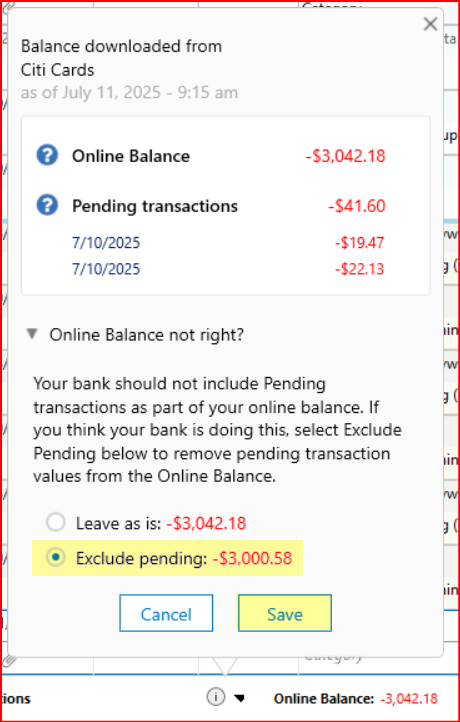
Did this resolve the Online Balance issue?
Regarding the red pencil: I am surprised that it did not go away when you marked it as cleared. My understanding is that should have removed the red pencil.
Do you use the Status column (the one on the far left with a blue dot in the column header) for anything? If not, you can hide that column by going to Account Register > upper right Gear icon > Register Columns > uncheck the box for Status > Done.
Quicken Classic Premier (US) Subscription: R66.23 on Windows 11 Home
0 -
Perhaps I misspoke. My online balances are correct. It is the Quicken ending balance that is off so the
solutions that you propose do not seem applicable.
(Also, when I cleared the red pencil, it did disappear.)
I am basically trying to reconcile why the following 2 transactions have downloaded incorrectly- A 7/1 $182 transaction that should have been a transfer from Savings to Checking
- A 7/7 $69.31 transaction that should have been a payment to the CitiBank Visa card.
I went back and restored my July 1st back up and then downloaded transactions individually.
For the Checking Account, I reviewed only the 7/1 $182 download
a. Highlighting the transaction before accepting it gave the following description
“Online Xfer Transfer-Renamed from Online Xfer – Transfer to SV xxxx”.
That referenced the savings account and when I checked the Renaming Rules, there was no such
listing.
b. Accepting the entry gave a warning that it was a transfer back to the same account. I accepted it
anyway and the transaction posted as
Obviously, there was no matching transfer.
So, while the transaction before posting it to the account shows as a transfer to savings, the accepted
transfer was posted as a debit to the same checking account!
Again, working with the checking account downloads, I reviewed the 7/7 $69.31 entry.
a. Highlighting the entry before download stated
“Citibank Crdt Cd-Renamed from CitiBank Crdt Cd Online Payment”
b. When I accepted the entry, I again got the warning that I was recording a transfer back into the
same account. I accepted it anyway.
It was miscategorized as a debit to the same checking account.
The savings account had only 3 transactions downloaded. I accepted all downloads.
The $182 entry was correct as a transfer to checking
When I went back to savings, there were now 2 $182 entries
I changed the 7/1 $182 transaction with the checking category to $0 to see what would happen.
I then deleted it.
I changed the category for the 7/7 $69.31 transaction into the checking account to the Citi bank
credit card
The Citibank account now shows the $69.31 deposit and the balances agree.
I then accepted all the checking account transaction thru 7/11, and the balances now agree!
So, the problem seems to be that the 2 downloaded transactions, while correctly categorized before
acceptance, download incorrectly when posted and I don’t know why!0 -
Do you have this Preference (highlighted in yellow) selected? If not, you might want to do that.
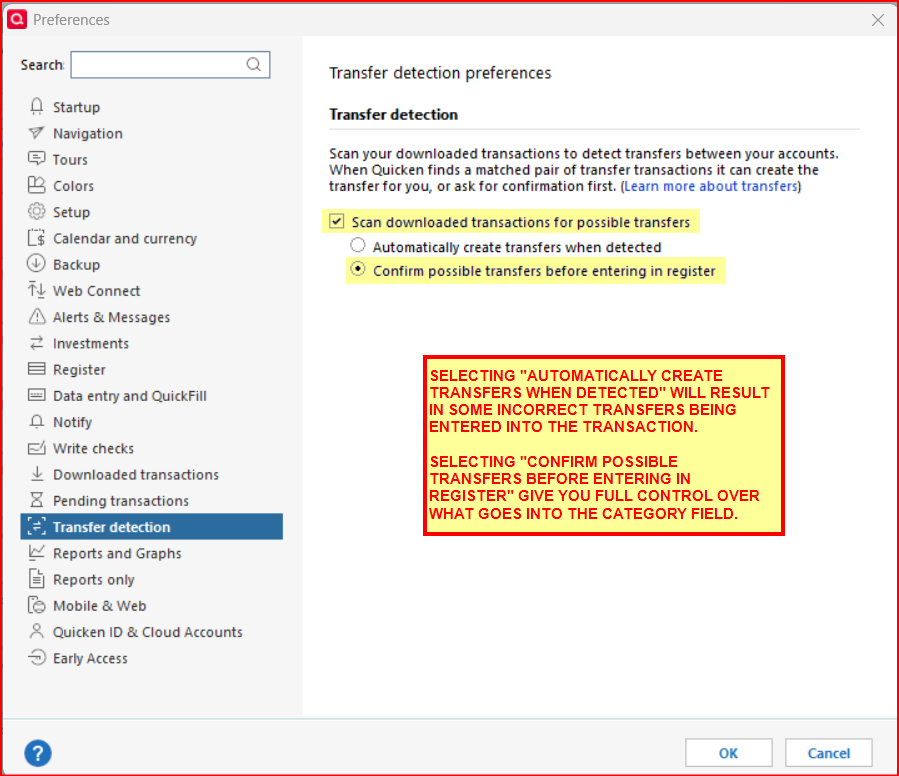
Also, are you manually entering the transfer transactions into one of the account registers before you download the transactions? Doing that will enter matching transactions in the other accounts. Then when the transactions are downloaded, Quicken should be matching to the previous manually entered transactions.
Quicken Classic Premier (US) Subscription: R66.23 on Windows 11 Home
0
