Fidelity account issues: balance variance and unaccepted transactions
My Fidelity account is my 401K with my current employer. The balance differs considerably from what shows on the Fidelity website and has for a very long time. I am often prompted for the "cash balance" but I do not see that on Fidelity's websites so I always enter $0. I have wondered if that is the difference in value.
In the hopes of resolving the balance issue, I have tried to reset (and even deactivate) my account, in the hopes it would adjust, but when I do that, I receive an error stating: "…. cannot be reset because there are downloaded transactions that must first be accepted into the account register or transaction list. Finish accepting the downloaded transactions and then try again."
When I attempt to reconcile the account, I am prompted to review the unaccepted transactions. Quicken then opens the window for my account and I do not see any unaccepted transactions.
I have included screenshots and appreciate insight/feedback. Thank you!
Answers
-
This sounds like a Quicken Windows issue; are you using Windows or Mac?
0 -
Hello @annetteward5,
We appreciate you bringing this issue to our attention! I went ahead and moved your post to the proper Windows category.
Before we begin any troubleshooting, please make sure to save a backup of your file, just in case.
Next, try the following steps:
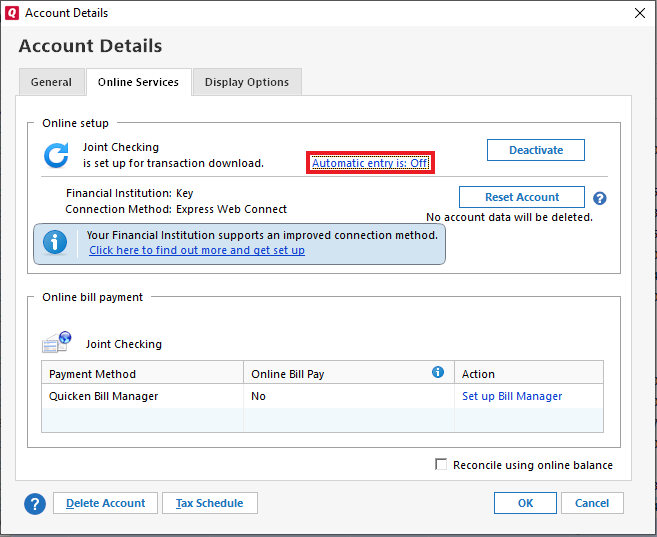
- Right-click the affected account in the Account List (sidebar) and choose Edit/Delete Account.
- Go to the Online Services tab and check if “Automatic entry is:” is set to On or Off.
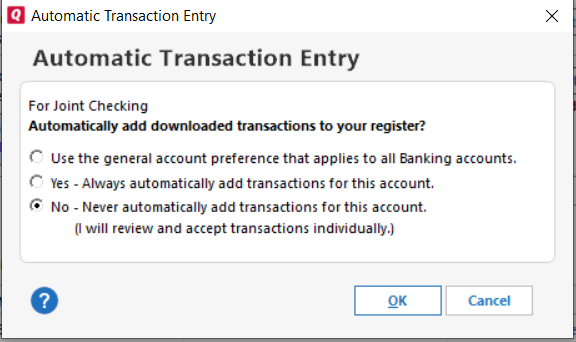
- Click on that setting and select the opposite option of what is currently selected:
- Choose "Yes – Always…" or "No – Never…" as appropriate.
- This temporary change should allow you to deactivate the account without encountering the error. You can switch the setting back afterward if you prefer.
- Once the setting is updated, proceed to deactivate the account. If needed, refer to this support article for detailed steps.
- After deactivation, go to Tools > Add Account, search for your financial institution, and follow the prompts to reconnect. When your accounts appear, make sure to link them to the existing account(s) already set up in Quicken.
Let us know how it goes!
-Quicken Anja
Make sure to sign up for the email digest to see a round up of your top posts.0 -
@Quicken Anja thank you! Sorry for not posting sooner (have been out of town). This did help and did allow me to "reset" the account! The balance is still off but it has been for a while so I'll just continue to "deal with it" as I have for a while now. Being able to reset/deactivate/add the account again did resolve the immediate issue I was having so I appreciate your assistance with that - thanks again!!
0 -
@annetteward5 No worries at all, and I’m glad to hear that the reset helped resolve the immediate issue!
If you ever decide you'd like help digging into the balance discrepancy, feel free to reach out when you're ready. In the meantime, thanks again for the update, and I’m glad things are at least back to functioning smoothly for now!
-Quicken Anja
Make sure to sign up for the email digest to see a round up of your top posts.0
Categories
- All Categories
- 56 Product Ideas
- 36 Announcements
- 223 Alerts, Online Banking & Known Product Issues
- 22 Product Alerts
- 701 Welcome to the Community!
- 671 Before you Buy
- 1.2K Product Ideas
- 53.7K Quicken Classic for Windows
- 16.3K Quicken Classic for Mac
- 1K Quicken Mobile
- 813 Quicken on the Web
- 111 Quicken LifeHub