Register Entry

Version R63.21 build 27.1.63.21
I've my Bill and Income Reminder set up for years and I've always done what i describing below. But for the last 2-months, I entered my mortgage payment prior to it being due about 2-weeks ahead because I wanted to see my balances after debits and credits were applied to my checking; but even though I entered the transaction, quicken was reminding me of the mortgage payment even though I had already entered it into the register for that particular month and it showed in the bill reminder as a current bill
Comments
-
How is Quicken reminding of the previously entered mortgage payment?
Would you be able to take a screen shot of that reminder and post it here? You could use a tool like Snipping Tool or Greenshot to take that screen shot, hide any personal/confidential information, save it as a jpeg or png file and then click an drag that file to your response in this thread.
Quicken Classic Premier (US) Subscription: R66.23 on Windows 11 Home
0 -
I'll wait till next month and take a snap shot
0 -
Here is what my Bill reminder looks like…the line item for the mortgage payment is highlighted. I will enter it today and see if it reminds me in July. I hope this helps
0 -
Unfortunately, these pics don't show what I was looking for. I would like to see what the actual prompt looks like that is reminding you to enter the Loan Reminder that has already been entered.
If I understand you correctly, entering that 7/15 Loan Reminder now will, if history repeats itself, prompt you to enter that Loan Reminder, again in July?
If so, does it prompt you to enter that Loan Reminder, again, 7 days prior to the payment date (or on 7/8)? (7 days prior to be reminded is what the Loan Reminder is set for.)
Did you try entering the 7/15 Loan Reminder already? Are you getting that prompt now?
If not, maybe try changing the notification in the Loan Reminder from 7 days to 27 days and then enter the 7/15 Loan Reminder? Do you get that prompt now?
Quicken Classic Premier (US) Subscription: R66.23 on Windows 11 Home
0 -
let me not change anything and see what happens 7 days prior to 7/15. Yes I entered the 7/15 payment into my register. so now we'll wait and see.
0 -
OK. The moderators will often close discussion threads after 3-4 wks of no activity in them. If you come back to this thread and find that it is closed you can start a new discussion in which you can copy/paste the url for this discussion thread in it for reference. That way you won't need to repeat everything in the new post.
Quicken Classic Premier (US) Subscription: R66.23 on Windows 11 Home
0 -
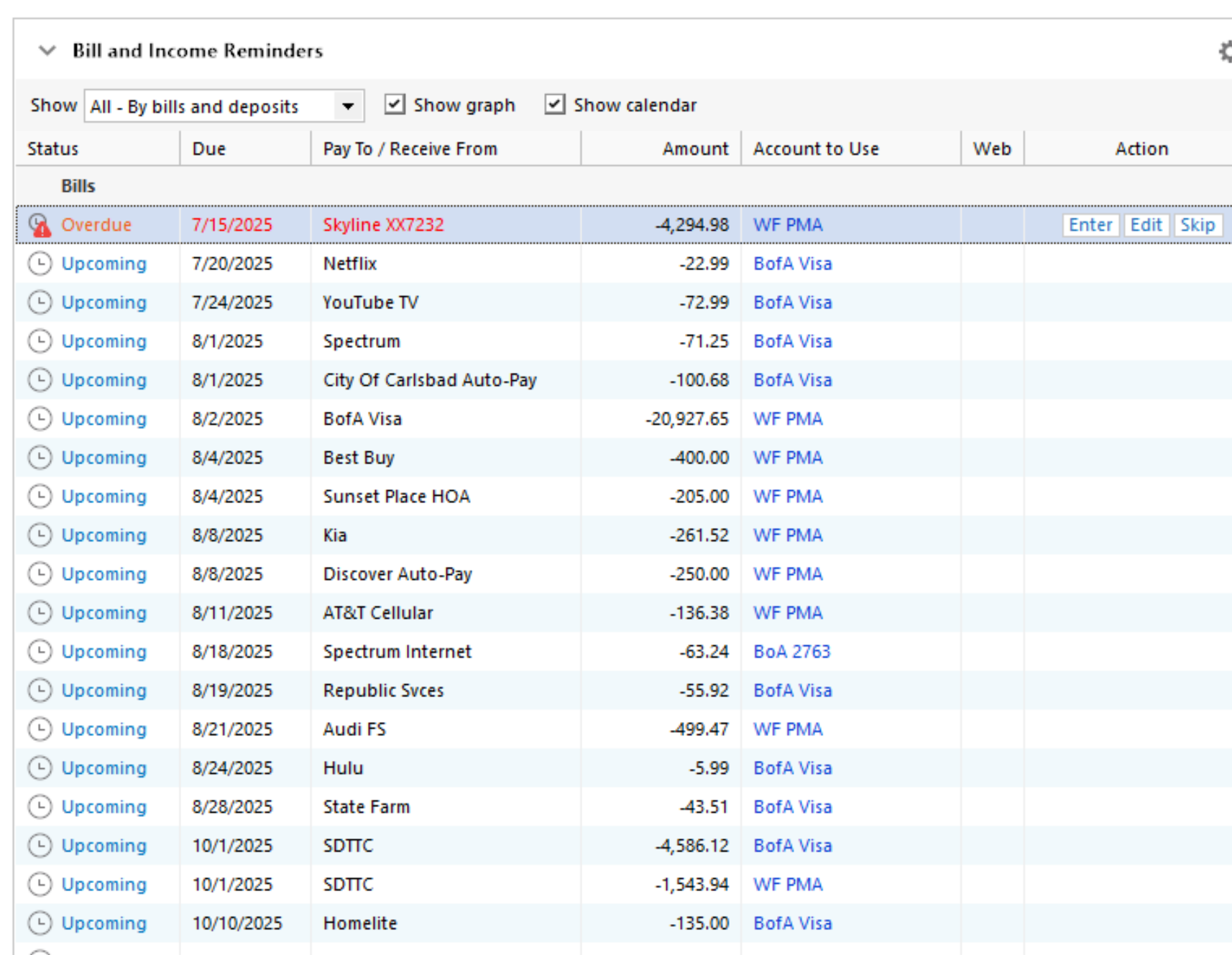
it just did it. It shows the mortgage payment was not made

 0
0 -
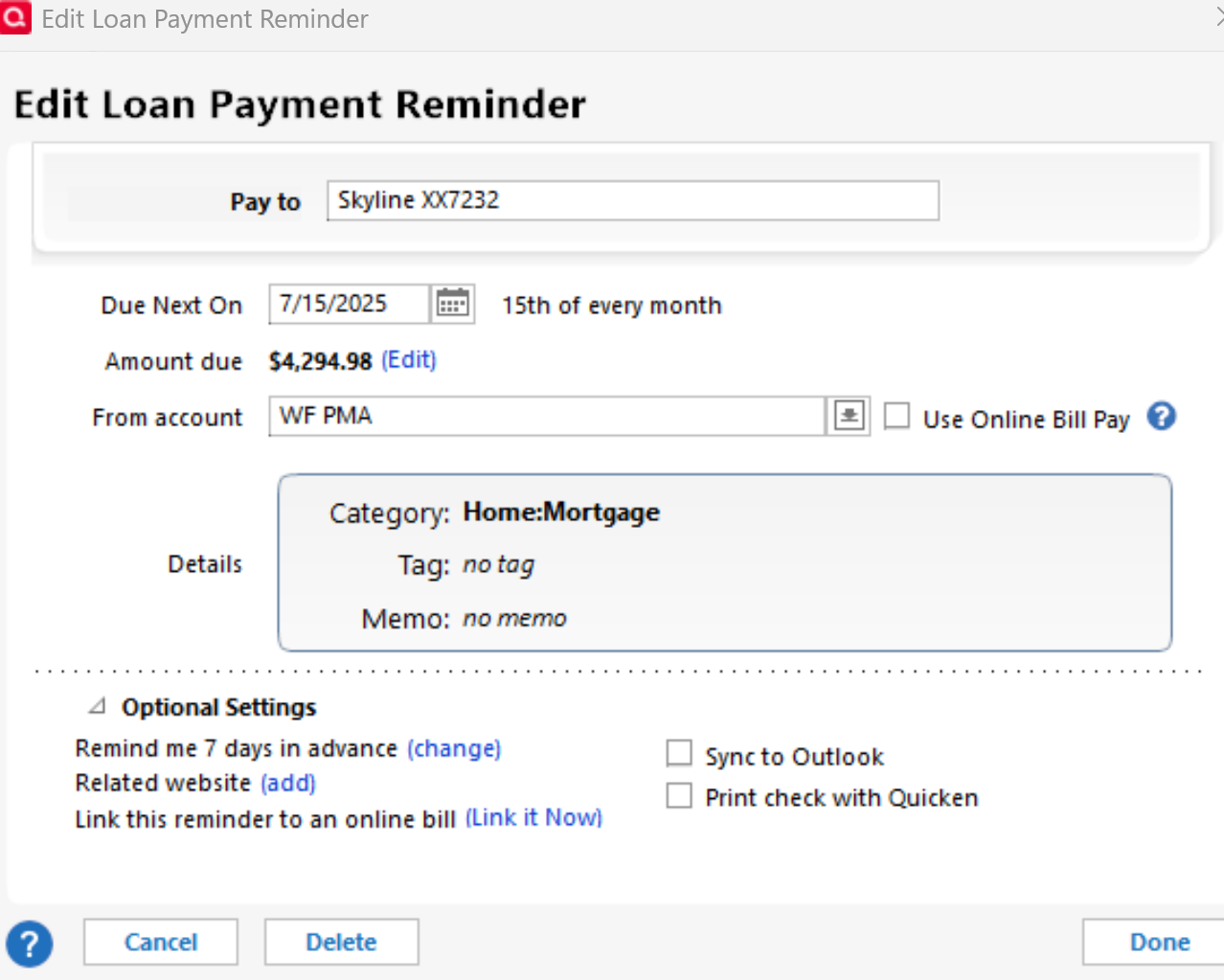
Looking at the image "Edit Loan Payment Reminder" above …
The reminder is set to Remind me 7 days in advance.For the reminder to be turned into a real register transaction you must take manual action and Enter the reminder ("Enter" button on the Overdue line).
OTOH, if you want the reminder to be turned into a real register transaction automatically every month, you need to change the reminder's Remind me … setting so that it reads Auto enter xx days in advance.
For this month, first enter the reminder manually, then change it to Auto enter for next month and all future instances.
0 -
A couple of observations and comments:
You have Bill and Income Reminders set to show All - By Bills and Deposits. The issue with this setting is that it does not show Reminders that have been completed both in previous months and in the current month.
Try changing that setting to All - By Month. This will allow you to see the Reminders by month, including the status of Reminders for previous months. Do you see a Reconciled Reminder for this Bill in the Month of June? How about in the month of July?
Another question: Is your mortgage account linked for downloading or for Quicken Bill Manager Check Pay or Quick Pay? If so, do you have another Bill Reminder (via QBM) set up for the payments?
Have you tried manually entering the overdue Bill Reminder? Does it try to match to the downloaded 7/15 payment transaction?
Quicken Classic Premier (US) Subscription: R66.23 on Windows 11 Home
0 -
I will try that. And see what happens next month. Thank you
0




Categories
- All Categories
- 6 Product Ideas
- 34 Announcements
- 249 Alerts, Online Banking & Known Product Issues
- 19 Product Alerts
- 266 Welcome to the Community!
- 301 Before you Buy
- 1.5K Product Ideas
- 55.8K Quicken Classic for Windows
- 16.9K Quicken Classic for Mac
- 1K Quicken Mobile
- 834 Quicken on the Web
- 129 Quicken LifeHub