Setting ETrade account with complete investing not available

rstoltz
Quicken Windows Other Member
When trying to setup a new ETrade brokerage account in Quicken Windows 11 Home (Version R63,21), only Simple Investing is available for the account (Express Web Connect method). Why isn't Complete Investing an option similar to all my past ETrade accounts I have used for many year in Quicken (setup with Direct Connect method)? How can I get Complete Investing for my ETrade account? Note that I cannot choose which connection method during Quicken's ETrade account setup. Never had to before either, as Quicken automatically chose the Direct Connect method which allows for Complete Investing.
0
Comments
-
Back up your data file before proceeding.
- If your new E*Trade account is already set up in Quicken, I suggest you delete it. Simple Tracking downloads only cash transactions, not securities transactions. If you don't delete the account and instead simply deactivate the account and change it from Simple Tracking to Complete Tracking you will be missing the securities transactions.
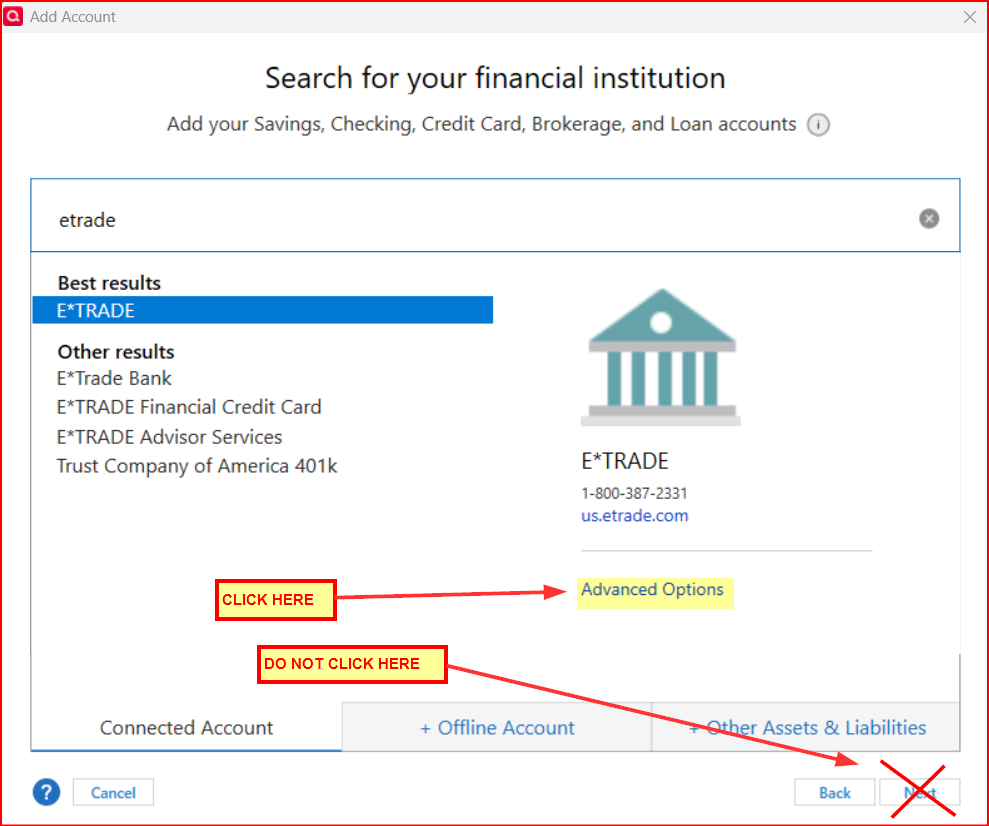
- Then go to Tools > Add Account > select E*Trade > click on Advanced Options….do NOT click on Next > Continue > select Direct Connect > Next > enter your E*Trade login information > Continue > when prompted, be sure to LINK the download(s) to the appropriate account(s) in Quicken.
Did this resolve the issue for you?
Quicken Classic Premier (US) Subscription: R66.23 on Windows 11 Home
0

This discussion has been closed.