"Add time" to backup file name is always checked [solved]

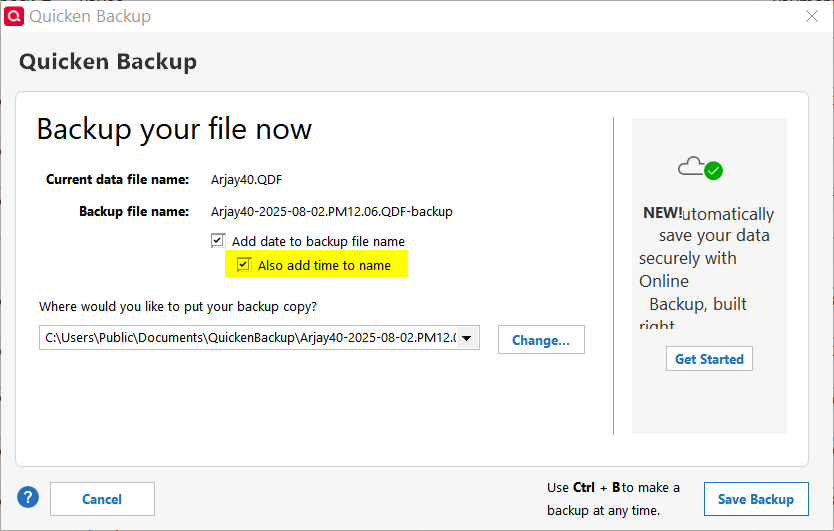
I routinely do NOT add the time of day to backup file names. But I recently did so once due to a special case. Now, every time the Backup dialog opens, "add time" is ALWAYS checked. I un-check it every time, but it returns. Anyone else seeing this?
Quicken user since version 2 for DOS, as of 2025 using QWin Premier (US) on Win10 Pro & Win11 Pro on 2 PCs.
Comments
-
Have you tried tried unchecking both Date & Time, doing a backup and quitting Quicken and then restart and only check the Date box to see if that resets it properly?
-splasher using Q continuously since 1996
- Subscription Quicken - Win11 and QW2013 - Win11
-Questions? Check out the Quicken Windows FAQ list2 -
@splasher Thanks! Clearing both boxes and backing up worked, and I didn't even have to restart QWin.
Quicken user since version 2 for DOS, as of 2025 using QWin Premier (US) on Win10 Pro & Win11 Pro on 2 PCs.
0 -
Just found this question. I have the exact same problem for the exact same reason. I tried Splasher's suggestion and it did not work. Here is what I did: I unchecked both Date & Time, did a backup, Quicken shuts down "automatically." When I restarted Quicken and went to do the backup, both boxes were checked. If this makes a difference, under Backup Preferences I have Manual backup reminder checked, with remind me after running Quicken 1 times. Then I go to exit Quicken using the X in the upper right hand corner of the screen. That brings up the "Quicken Local Backup Reminder" box. I click Backup which takes me to the "Backup your file now" box. Both "Add date…" and "Also add time…" are checked. Again, the "Also add time" box was never checked until I used it once. I have been backing up this way forever.
I wrote all this in case Splasher's suggestion was based on backing up some other way. If this the procedure that RJS used, it is very strange that it worked for him and not for me.
0 -
I unchecked both Date & Time, did a backup, Quicken shuts down "automatically."
This is different. When I manually backed up, QWIn did not shut down. What option have you got set that causes QWin to shut down "automatically" after a manual backup?
Quicken user since version 2 for DOS, as of 2025 using QWin Premier (US) on Win10 Pro & Win11 Pro on 2 PCs.
0 -
In Edit>Preferences>Backup>Backup preferences, I have Manual backup reminder checked with Remind me after running Quicken = 1.
I do not do a manual backup from File>Copy or Backup File…
I use the Windows "x" in the upper right corner of the monitor to close Quicken (like any other windows program). That brings up the Quicken Backup popup. I click "Backup." The next popup is where the "Add date…"and "Also add time…" check boxes are.
Clicking "Save Backup" does just that, then Quicken shuts down. What I meant by "automatically" shutting down was when I click the Windows "x," the process of backing up first then shutting down starts.
I also noticed that other are complaining about the exact opposite problem, i.e., they had the date and time boxes checked before and now they are not checked.
0 -
I forgot to ask, how do you do your backups?
0 -
I normally have QWin show me a local backup reminder at shutdown time. To implement splasher's solution, though, I did a manual Ctrl-B backup with the 2 boxes un-checked.
Quicken user since version 2 for DOS, as of 2025 using QWin Premier (US) on Win10 Pro & Win11 Pro on 2 PCs.
0 -
Looks like we do it the same way, just that my explanation was more verbose. :)
Anyway, I did the Ctrl-B backup and now everything is back to normal. Go figure.
0

