Q for Mac - Budgeting - monthly goals change each month?

Hello,
I'm beginning to dive in to budgeting and I'm quite flummoxed.
My main issues, that might be related, is that Quicken's guess of what I spend is off for many categories I have. Furthermore, if I click back a month or two, the "goal" numbers and budgeted numbers are different than the current month. Huh? Isn't the whole point that the goal or allocated amount is the same each month?
An example: I pay for a service that I receive each month. However, the invoices and payment of the invoices don't come perfectly each month. One month might show $0 spending, the next $2000. I want the budget for that category to be the average of all the spending, divided by 12 (months).
I see that I can change the budgeted amount for each month in the Budget→Edit view, but then I'm having to do the math of adding up expenses over a year, dividing by 12, etc. instead of Quicken doing this, which is the whole point of using the software.
I hope I'm making sense! Help needed!
Answers
-
@bdkauff You don't need to do the math to calculate your monthly budget amount. Let's say you have a category in which you spent $1,000 last year (or otherwise want to budget $1,000 this year); if you type 1,000 into the first (January) cell for that category, there's a pop-up window with lots of options:
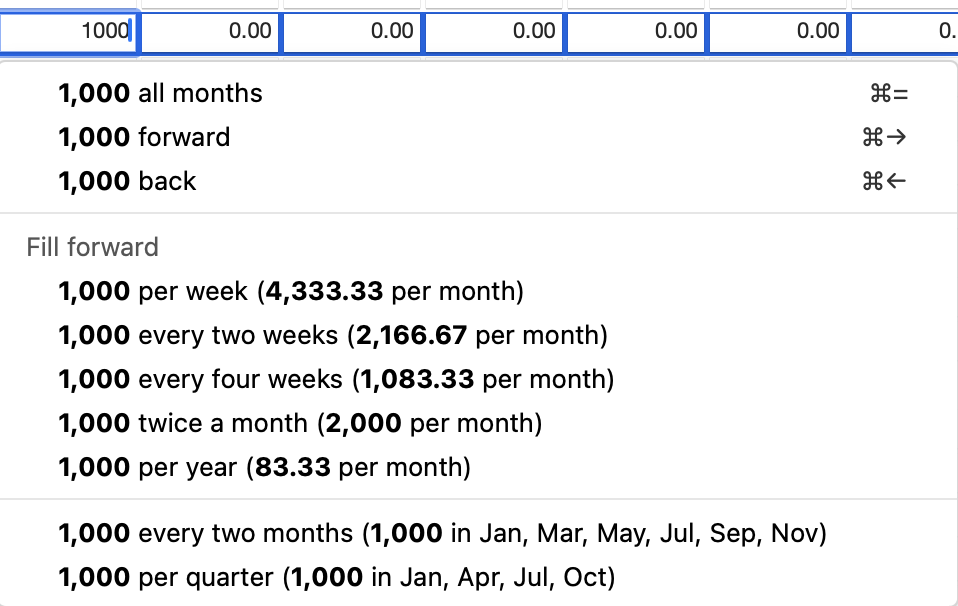
So if you want 1,000 per year, click the option for "1,000 per year (83.33 per month)" — Quicken has done the math for you, and automates the entry.
Quicken Mac Subscription • Quicken user since 19930 -
Gosh, not sure how I missed that! Thank you!
Doesn't totally solve the question of categories where the amount every month isn't predictable/consistent (groceries, for example). See the attached image. This is 12 months of groceries, with the yearly total at the far right ($9405). 9405 / 12 is 783 but that is not the goal amount in any budget view. The "goal" fluctuates month to month. In this case, do I need to enter 9405 into the first cell and then let Quicken populate the average I want?
A related question: does the default budget for the current year use the data just from the last year, or can I set it to average several years in the past? Might produce more accurate numbers.
 0
0 -
In this case, do I need to enter 9405 into the first cell and then let Quicken populate the average I want?
Yes, if you choose a budget amount for the year — based on the prior year amount or your own guesstimate/expectation — then Quicken can split that evenly over the year (or remaining months in the year).
You can have Quicken create a new budget based on actual spending from the prior year, but there’s no feature for using an average of multiple prior years. You could create a report with several years of data, exports that as a CSV file, open it in a spreadsheet, and create a column which averages the multiple prior years. Then you’d enter those values manually in the budget, category by category. You can decide if it’s worth it to you to do that work. Everyone creates and uses budget data differently.
Quicken Mac Subscription • Quicken user since 19930

Categories
- All Categories
- 15 Product Ideas
- 34 Announcements
- 248 Alerts, Online Banking & Known Product Issues
- 20 Product Alerts
- 516 Welcome to the Community!
- 680 Before you Buy
- 1.5K Product Ideas
- 55.6K Quicken Classic for Windows
- 16.8K Quicken Classic for Mac
- 1K Quicken Mobile
- 834 Quicken on the Web
- 126 Quicken LifeHub