Question - Is there a way to enter a "hidden" transaction to a brokerage account

I am attempting to bring a very old brokerage account up to date through reconciliation. Unfortunately, due to the age of the account I do not have access to all of the statements. The best data I have begins 10 years ago. So, I am attempting to 'reset' the account and begin in August, 2015. The inventory of stock and the amount of shares matches the statement. The cash balance is off a bit. To bring in alignment I entered a XOut transaction so now the cash balance matches the statement.
When I reconcile the account the difference is $0.00 the ending cash balance in the reconciliation dialog matches the statement and there is joy.
However, when I hit <DONE> and verify the cash balance in the registry it is off by $63.93. If I enter another transaction depositing that amount to bring the cash registry into alignment with the statement, and then attempt to re-reconcile the account, the transaction appears and if I select it the difference is not $0.00 it is $63.93. Undoubtably this is caused by some missing transaction or placeholder prior to Aug, 2015. I have run validate and repair to see if that might eliminate the problem to no avail.
Ideally I could enter some sort of "hidden" transaction that would bring the registry into alignment and that transaction would be ignored by reconciliation. Does anyone know of a way to do this?
Thank you.
Comments
-
Click on the gear at the top right of the account and select Update cash balance. Enter the correct balance as of the statement date and you should be done.
This generates a MiscInc or MiscExp transaction as a transfer to the same account for the amount of the correction. The self-transfer makes cash magically appear or disappear from the account.
QWin Premier subscription0 -
Thank you Jim. I appreciate the help as this has been a multi-day bug now.
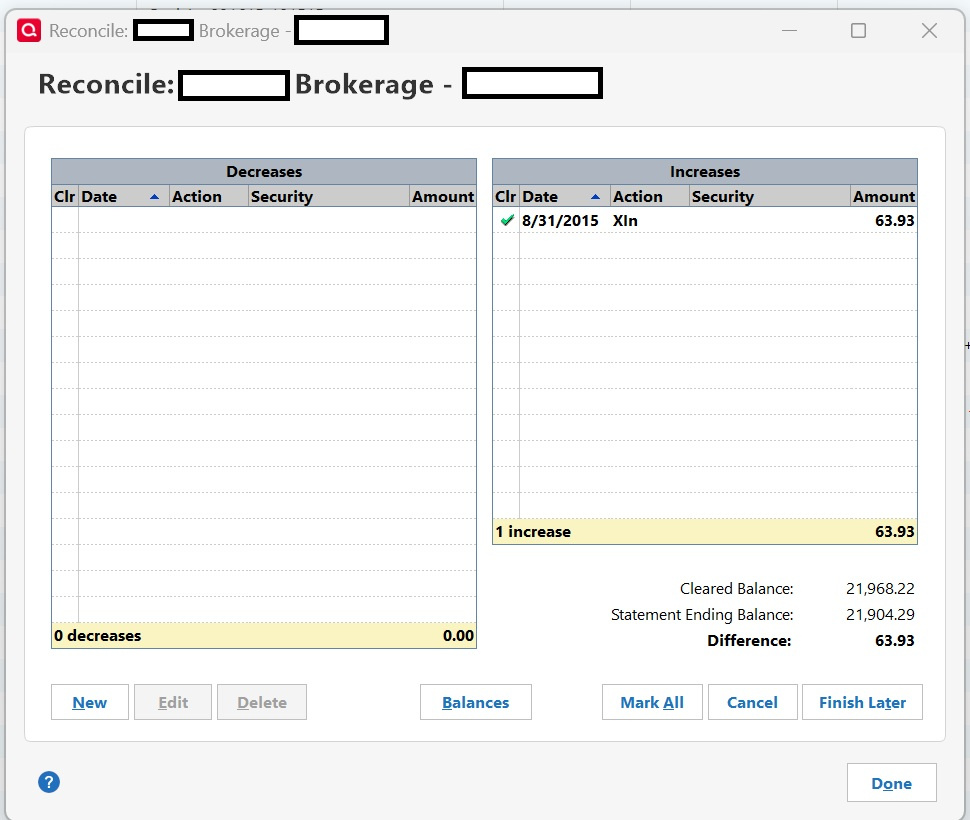
While correcting the cash balance updates the registry cash balance bringing it in line, it also creates a transaction that is visible for reconciliation (see image below). This still leaves a $63.93 difference in the reconciliation process.
 0
0 -
Just uncheck that transaction when you reconcile. I sent a small check from my personal account to a cousin (a few dollars left over from from a family trust), and he never cashed it, so I was always a few dollars out of balance. I just unchecked it when I reconciled the account, because I knew what it was. Pretty sure you know which transaction from 2015 is the make-up one, so just uncheck it and reconcile normally. Eventually, Quicken seemed to figure it out and didn't add it into the transactions anymore (don't know how long it took). Of course, you'd want a clear memo as to why that transaction exists for anyone in the future, so they don't go down the same rabbit hole.
0


Categories
- All Categories
- 6 Product Ideas
- 34 Announcements
- 249 Alerts, Online Banking & Known Product Issues
- 19 Product Alerts
- 266 Welcome to the Community!
- 301 Before you Buy
- 1.5K Product Ideas
- 55.8K Quicken Classic for Windows
- 16.9K Quicken Classic for Mac
- 1K Quicken Mobile
- 834 Quicken on the Web
- 129 Quicken LifeHub