Can't Paste From Clipboard Into Transaction Memo Field

I can view the windows clipboard, and see the item I copied. But it won't paste. This occurs for the Transactions screen and the Bills & Income screen.
The problem seems to occur over time. If I restart Quicken, it doesn't correct the problem.
If I do a Windows restart, I believe it fixes it (for awhile). But I need to do more testing to verify that.
Thank you.
Comments
-
In Quicken, in Edit / Preferences / Setup, is the setting Keyboard mappings set to "Windows standard"?
0 -
@estevehannon this issue has been discussed on an off over the years. It seems like Quicken gets "tired" or runs out of memory. It's almost like the clipboard isn't being cleared after each use, so copied items just accumulate.
I have found that restarting Quicken or Windows fixes the issue.
One of the things I noticed is that Quicken doesn't automatically close account registers and screens during a session and these open account registers and screens accumulate and take up memory. So that leads me to believe that if you close out of Quicken routinely, you might not have the issue.
0 -
I don't have an answer based on the description, but I will make these comments.
- Not likely the problem is the keyboard settings since @estevehannon is able to paste into the memo sometimes.
- If Quicken ran out of memory it would crash. Quicken has had bugs in the past where it was leaking memory and ran out of memory, that was the result.
- Quicken definitely caches register data in memory. This is the reason that the first time you open a register in a new session it takes longer than when you do it a second or more times. But the amount of memory used is nowhere near the limit that Quicken has available to it.
- It is a good practice to shutdown Quicken when you aren't using it. Some people tend to keep all their applications up all the time. In a perfect world that might be fine, but what is happening is a program is going through many different states, and it is possible for it over time to get into states that weren't planned for and restarting clears that state. This goes for Windows too, that is why restarting your computer "fixes" things. Also, it is possible people are putting their computer into sleep or suspend mode. This is another area where the computer/Quicken might not behave as expected when it comes out of this mode. But given that @estevehannon said that restarting Quicken didn't fix the problem. I would have to assume this isn't the problem.
- The fact, that restarting the computer fixes the problem (at least for some times) suggests the problem is deeper than just Quicken.
- And last, I will say that because of the way the registers are setup, it is more complex than it looks like. You will notice that Quicken overrides the normal context menus and shortcuts. And the only way to paste into the register is with Ctr+V. This might be part of the problem (contention of what a given shortcut should do). But I don't think that is the case in the Bills area, so again this points to something more low level, even at the Windows level.
0 -
@estevehannon just a thought. I used to have the same issue as you do. I use Ctrl- V and Ctrl-C a lot in Quicken. But I realized now, ever since I purchased my latest laptop with 64 GB of RAM, I no longer have an issue with the copy and paste shortcut keys not working.
I clicked on Help → About Quicken, while holding Ctrl-Shift to get to the System Resources information -
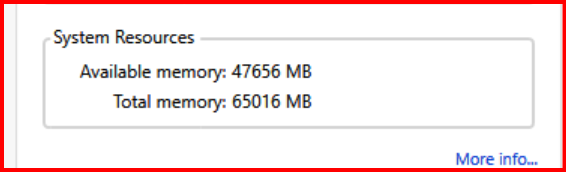
Just for curiosity, you might want to check your available memory to see if that might be a determining factor for this issue.
0 -
That is interesting that Quicken's About is now showing the actual system resources of the machine now. (It used to show what the Quicken process actually had access to.) (There is also a new "More info…" that is pretty interesting)
But this isn't the memory that is available to Quicken. Quicken is a 32-bit application. A 32-bit number and therefore the max memory address, is 4GB. And in fact, because of the way memory gets mapped into a 32-bit application, it typically restricted to 2GB.
This isn't really a problem though, because Quicken doesn't use that much memory. I just clicked through all of my active accounts to get them cached in memory and Quicken is only using 240MB.
On the other hand, other programs like web browsers tend to be memory hogs. I could certainly see something like if you had lots of memory hogging processes running, that they might affect the behavior of pasting into Quicken. And if that is the case certainly either adding more memory or restarting Quicken where there isn't as many processes running might affect this.
Note this can also be a quirk/bug in Quicken, where they are using some old API or such that does get affected by these external factors where you wouldn't see it in other applications. In fact, Quicken overrides a lot of default Windows system GUI like the context menu and the main system window, and that might be part of the problem.
0 -
the only way to paste into the register is with Ctr+V
Actually, the old Copy and Paste keystrokes Ctrl-Ins and Shift-Ins continue to work regardless of the keyboard mapping set in Preferences.
Quicken user since version 2 for DOS, as of 2025 using QWin Premier (US) on Win10 Pro & Win11 Pro on 2 PCs.
2 -
Good information, I wasn't aware of that. That might be another thing to try if it stops working.
0



Categories
- All Categories
- 6 Product Ideas
- 34 Announcements
- 249 Alerts, Online Banking & Known Product Issues
- 19 Product Alerts
- 266 Welcome to the Community!
- 301 Before you Buy
- 1.5K Product Ideas
- 55.8K Quicken Classic for Windows
- 16.9K Quicken Classic for Mac
- 1K Quicken Mobile
- 834 Quicken on the Web
- 129 Quicken LifeHub