Viewing Savings Goal amounts in an account

I use Savings goals for big purchases and estimated taxes. I like knowing that I have the money set aside and knowing how much I have unallocated in an account by just looking at a balance. What I would like to know is if there is a way to see the breakdown of amounts in an account allocated to Savings Goals and unallocated. This could be a separate report or a summary within the account. To explain futher: Let's assume that I have a Checking account with $10000. Let's say I have set aside $2500 for house upgrades and $3000 for a family trip. I know that I can look at the Ending Balance on the Checking Account and see that the online balance is $10000 and the Ending Balance is $4500, telling me that I have $4500 unallocated and $5500 set aside in Savings Goals but it is unclear where and how much is set aside in each goal. I can go to the goals and can see the amounts set aside but it unclear what account (or accounts) are feeding those goals.
Is there a report or view that would show me (in the example account)
Savings Goal: House = $2500
Savings Goal: Vacation = $3000
Unallocated = $4500
Thank you.
Comments
-
I'm not completey clear on what you are looking for, but are you aware that you can have Savings Goals listed in the Account Bar? It provides the breakdown of each goal, but not the unallocated.
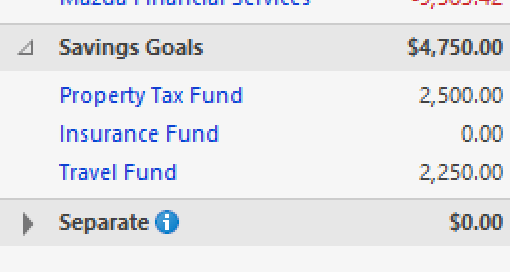
Also, I would advise against using your checking account to manage Savings Goals. It makes reconciling a nightmare. I used to use a savings account, but since the interest is a joke, I moved to an investment MMF. To make reconciliation even easier, I created a separate investment account just for savings goals. The balance in the account is my total Savings Goals total. When withdrawals are needed, I transfer the money out.
 0
0 -
The basic problem with your request is that the Savings Goal amounts aren't actually removed from the originating account … they're just hidden.
And there's no logical way that those funds can be in 2 accounts at the same time.
What you can do, however, is detailed in Quicken Help if you search on Savings Goal and look there for "Snapshot". It seems to me that such will do what you're asking.
Q user since February, 1990. DOS Version 4
Now running Quicken Windows Subscription, Business & Personal
Retired "Certified Information Systems Auditor" & Bank Audit VP0 -
If you take the Account Balances report and select the savings account and the savings goals assigned to it, it will show you the bank account net after savings goals, each saving goal, a total of the savings goals, and the grand total which is the actual account balance. In my case, there are some CDs in the mix, which are 100% dedicated to one goal or another, and I have the interest automatically transferred to a savings goal, keeping the unassigned balance of the CD to zero.
I set this up in an on-line bank when their rates for savings were better than brokerage money markets and their CD rates were better than brokered CDs and Treasuries. This has reversed some in the current market. But the interest rates in the on-line banks are still considerably less of a joke than those in brick-and-mortar banks.
Harry0

