How can I remove closed accounts from dashboard

I have done everything possible, and reset my cloud data several times and they keep popping back up
Answers
-
Do those accounts show on your Q Desktop? If so, where?
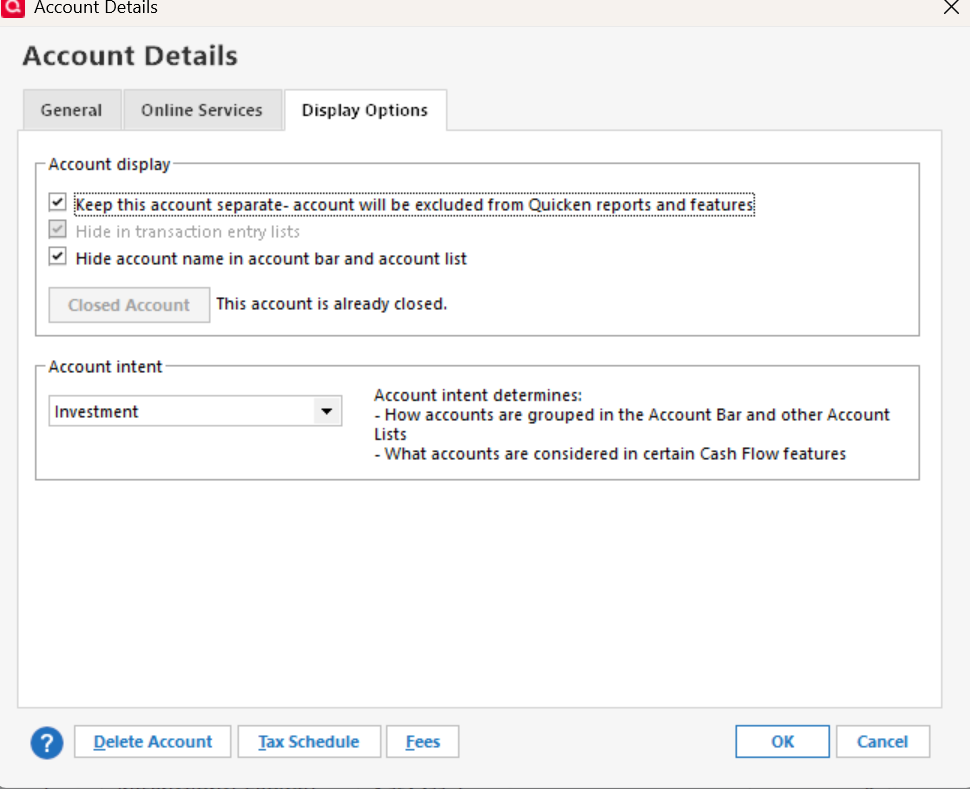
Have you tried, on Q Desktop, to mark them as "Separate"?
What HAVE you tried re: this?
Q user since February, 1990. DOS Version 4
Now running Quicken Windows Subscription, Business & Personal
Retired "Certified Information Systems Auditor" & Bank Audit VP0 -
When you say :
dashboardWhat exactly are you referring to?
There is a tab in Home Page that has a dashboard: Most of those Tiles are customizable to select accounts.
If you are referring to the account bar, You would need to edit account details and select Display Options and then Check the box for Hide account name in account bar and account list
0 -
Yes I am referring to the account bar, and the accounts are hidden.
But all the accounts are showing under the account tab.

I reset my cloud data, they disappear and then reappear
0

