Is there a way to disable "Save this to memorized payee list" popup?

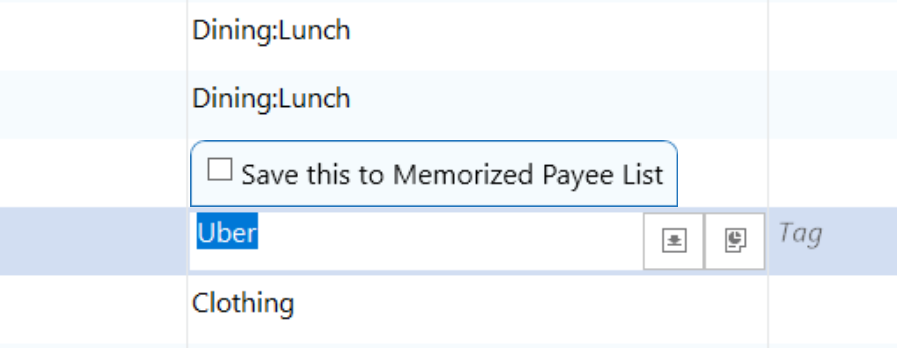
My Quicken upgraded to R64.23 and now every time I try to change or enter a Category for an existing transaction there is this extremely annoying popup "Save this to memorized payee list". Is there a way to disable it?
"Automatically memorize new payees" is off, checking it "on" has no effect on the popup being there.
Answers
-
@Alina1317 I completely agree with you. You might want to suggest they add an option to disable in the Preference Menu.
0 -
There is a lengthy discussion on this topic here:
Quicken user since Q1999. Currently using QW2017.
Questions? Check out the Quicken Windows FAQ list0 -
It's a handy option, in my opinion. If you don't like it, don't click on it.
-1 -
I find it a bit annoying especially since you can right click and get it on the context menu, or do like I do and type Ctrl+M.
Here is an idea that people can vote on:
2 -
I find it annoying as well. Thank you for the link @Chris_QPW
- Q Win Deluxe user since 2010, US Subscription
- I don't use Cloud Sync, Mobile & Web, Bill Pay0 -
Most useless feature Quicken has come up with. To have the Payee disappear behind the pop-up is especially annoying. Pressing ctrl + m will memorize payee just fine.
1





Categories
- All Categories
- 6 Product Ideas
- 34 Announcements
- 249 Alerts, Online Banking & Known Product Issues
- 19 Product Alerts
- 266 Welcome to the Community!
- 301 Before you Buy
- 1.5K Product Ideas
- 55.8K Quicken Classic for Windows
- 16.9K Quicken Classic for Mac
- 1K Quicken Mobile
- 834 Quicken on the Web
- 129 Quicken LifeHub