Q Mac Upgrade from 8.2.1 to 8.3.1 = no bueno

I innocently went along with the Quicken upgrade popup window as I started my day yesterday. It downloaded, relaunched, said it was upgrading my database, and then this:
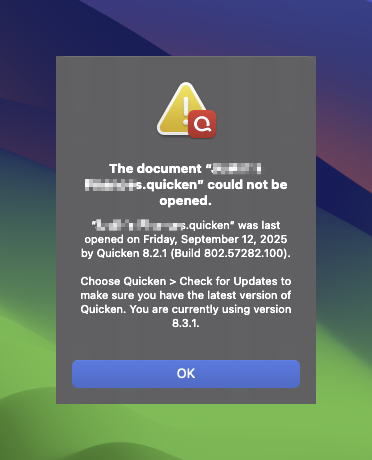
So I sent the error in, still haven't heard anything from Quicken. Reluctantly, I go the chat support. "Alma" sends me this link, implying it's a known issue - You can click on the following link:
At no time did I state my membership has expired, perhaps he was just giving me this link so I could redownload 8.2.1 (which I did). Uninstalled 8.3.1, reinstalled 8.2.1, data file loaded with no issues. I was able to download transactions, everything looked great.
I decided to try the upgrade again today, and got the identical error above.
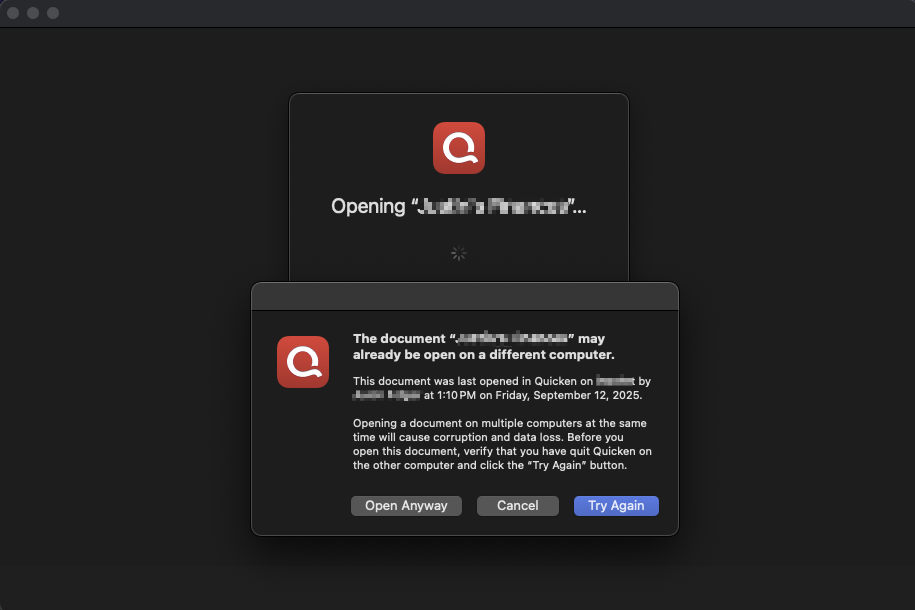
I am then presented with the usual no data file 'welcome' screen. I tell it to try and open my data file and it gives me this:
Any tips/advice appreciated.
Comments
-
Assuming you don't have your file (or a copy of your file) open on another computer…
I would try restarting the Mac, then download and install 8.3.1 directly from your account at quicken.com, then try opening your file.
Quicken Mac Subscription; Quicken Mac user since the early 90s1 -
***Update - same error. Thanks for the suggestion, though. 🙏
Thanks RickO. No other computers, I know that, though I haven't tried downloading 8.3.1 -directly-. I supposed it's worth a shot. Will update.
0 -
Reboot your computer to make sure there's no Quicken stuff running in the background. If you still get that "may already be open" error, click on "Open Anyway". I'd make a backup copy of your data file first.
0 -
We worked with a customer who called into Support who was seeing this same error ("…could not be opened"). They sent us their file, and it opened just fine for us. So it has something to do with your Mac or your macOS user account or something else that's local to you. If you can't try a different Mac, try creating a different user account in macOS, then sign in to that user account and try it?
I wouldn't expect re-downloading Quicken to make a difference.
If the different user account in macOS doesn't make a difference, then I would try reinstalling macOS? I think you can do that without affecting user data (just install it on top of the current installation). But that's definitely a last resort!
BTW, when you see the "…may already be open on a different computer" alert, that's just a warning. As long as you're not opening your file simultaneously on multiple Macs by sharing it through Dropbox or iCloud Drive or something, you can just ignore that warning and click "Open Anyway"
When Quicken opens a file, it creates a little metadata file inside the .quicken folder, in a "locks" folder. And when Quicken closes the file, it deletes the file it created. So if Quicken encounters a file in the "locks" folder that it didn't create, it warns you, because that's exactly what would happen if you were sharing the file between multiple Macs using Dropbox, and it's still open on your other Mac. That was a big issue in the past, and this warning is how we try to prevent people from accidentally screwing up their file. Hope that helps!
0 -
BTW, if you're willing to send your file to Support, they can do the update for you (e.g., just open it in Quicken 8.3 on their Mac) and send the updated file back to you. But you could also do something similar yourself if you have a friend or family member with a Mac: have them install Quicken, copy over your file, use their Mac to update your file by opening it (don't even need to do anything in Quicken after it opens your file), then copy it back to your Mac.
1 -
Thank you Chris - I appreciate that offer, and I may take you up on it. I just find it hard to believe that the system was working flawlessly through every update in the past couple of years, and after the 8.3.1 update, my OS or data file has suddenly got an issue. I open Quicken at least once a day, and have for years.
Additionally, I can remove 8.3.1, reinstall 8.2.1, and it works fine again. So again, I understand your guidance, but for now I'm not convinced this isn't a result of some overlooked condition that some of us have. I know, I know, 2 users so far….. :)PS - do all the logs and data files that are sent to support through the app not shed any clues on why this is happening?
0 -
Hi @frankfurter,
Sorry to hear you’re experiencing this problem. I see that you mentioned sending in an error report about this yesterday and I was able to locate the feedback you submitted.
I took a look at the ConsoleLog.txt file that was provided and what I noticed are disk I/O errors that might be preventing the upgrading of the database. You might be able to see these messages if you open Console.app and look.
There have already been some good suggestions, but I’d like to add a few more. You might try duplicating your file and then attempting to upgrade the duplicate version. Another option is restoring a backup and checking if that succeeds.
I hope this helps!
1 -
Ugh, what a pain in the [Removed - Language]. Thank you all who volunteered suggestions.
I tried a 3 month old backup data file, had the same issue. So put a copy of my latest data file on another user account on the same Mac, installed 8.2.1 in that other user account, and like magic, it upgraded everything with no issues. Brought that data file back to my own account, opened it, everything is working as expecting.
God help me if this happens with 8.4.1…..Thanks again, all.
0 -
I am glad you got it working.
To assist support: has this file ever been accessed stored in a non-routine location outside of the default hidden user Libray/Appliaction Support folder, or networked, shared, backed up to a cloud service?
Is the application in it's default location or networked?
Your case may be unique. But historically, files that refuse to open like this are often from those being shared, accessed from backup cloud accounts, different user accounts, etc.
The program is extremely reliable, but problems set in when people deviate from default locations.
0 -
Hey John - I'm not sure I have ever had the Quicken file in the default location. I keep it in /Users/frankfurter/Documents/Finances/file.quicken. The app is in its default location. I agree, it's historically been very reliable, at least since they had that major overhaul or commitment to Mac several years ago, which is more the reason I was surprised it was having problems.
0 -
Howdy, @frankfurter
Your Documents folder is likely synced with iCloud, unless you have turned that feature off.
I don't know if that caused your particular issue, but we have seen issues where cloud backed up files (Dropbox, iCloud, etc.) can have issues with in-use/syncing issues.
The default location would be HD/Users/frankfurter/Library/Application Support/Quicken/Documents
When in the Finder, you can hold down option while clicking on the Go menu and that will temporarily unveil the hidden hidden Library folder. I suggest you move your file there.
It is safe to manually save backups to cloud storage.
0 -
I
amwas experiencing this same issue with the 3.1 upgrade. In past upgrades I also experienced this issue but if I would quit and then restart Quicken everything would then work fine. However, in past upgrades the database would be updated so the restart would not attempt to update again. But in this update it tries to update the database each time it starts and so fails every time.The folder containing the database was being backed up. After turning that off, all worked fine.
0 -
I just (foolishly) installed this update as well. Although I did not experience this particular problem, the first time I sync'd with my bank, I got 14(!) errors, but it looked as though it had downloaded the data. I tried again, and got a connection error right off the bat. I gave up, as it looked like all the transactions for the account I was trying to reconcile were there.
I'm going to just wait it out. There's clearly something wrong with this Quicken Mac update, so they will hopefully issue a fix soon.
And no, there is absolutely nothing non-standard about my installation. And it has worked (including updates) for 10+ years.
1 -
Thanks John, I will try to remember that for next time. I am not using iCloud backup, but do use Time Machine and the stellar BackBlaze. Regardless, I can't think of the last time I had an issue with any upgrades on my device (Quicken or anything else), so hopefully Quicken can get their arms around this situation.
0 -
Thanks for the input, Steve. You reminded me that a credit union I have with 6 accounts came back as unsynced or whatever. I had to re-connect to just that credit union, it found my accounts and linked them, but more behavior I haven't seen before. My other 6-7 financial institutions were fine. 🤷♂️
0

