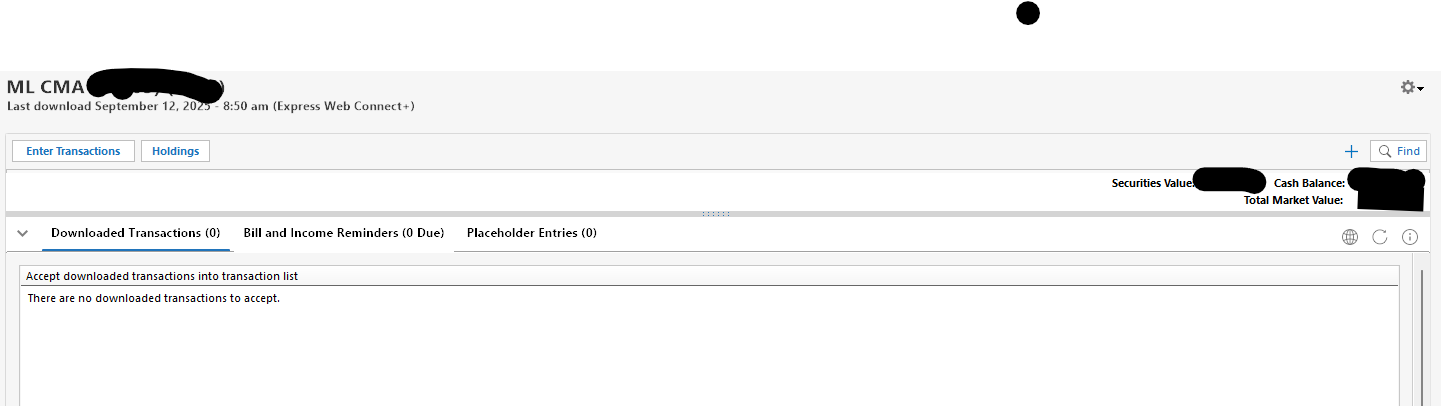
Downloaded Transactions Screen Takes Up Whole Screen

Downloaded Transactions takes up the whole screen so I can't see the register. This is a new problem and it only seems to be happening on on one accoun
t which is a Merrill Lynch account if that matters.
It is happening on three different windows devices (two PCs and one laptop) two of which are Windows 11 and one is Windows 10 so it is unlikely to be a computer issue.
Fully updated windows pemiere Build 72.1.64.25
Comments
-
I have the same problem, except that it happens for ALL accounts that used transactions download.
1 -
thank you. I was thinking I was the only one.
0 -
If you hover your mouse over the thick gray bar above the Downloaded transactions area, the cursor should change to an up/down arrow. You should be able to click and drag the gray bar down to make the Downloaded Transactions area smaller.
Does that work for you?
QWin Premier subscription0 -
Thanks for the feedback. I'm able to drag the bar nearly all of the time but sometimes I have to restart the program to get the bar within reach.
0


Categories
- All Categories
- 6 Product Ideas
- 34 Announcements
- 249 Alerts, Online Banking & Known Product Issues
- 19 Product Alerts
- 266 Welcome to the Community!
- 301 Before you Buy
- 1.5K Product Ideas
- 55.8K Quicken Classic for Windows
- 16.9K Quicken Classic for Mac
- 1K Quicken Mobile
- 834 Quicken on the Web
- 129 Quicken LifeHub