Fidelity 401(k) securities going to new name

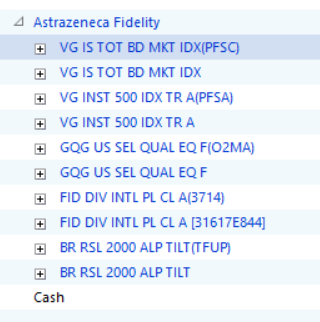
In my Fidelity 401(k), the last three transactions for all of my securities are using a slightly different name. How do I get it to still use the same security?
Comments
-
How about selecting one and then doing a 1:1 Corporate Acquisition of the others by that one?
Be sure to take a backup before trying that.
Q user since February, 1990. DOS Version 4
Now running Quicken Windows Subscription, Business & Personal
Retired "Certified Information Systems Auditor" & Bank Audit VP0 -
First, are they really the same securities? Same number of shares before and after? Same pricing?
In the security list (ctrl-y) what does it show for Symbol and CUSIP for the two similarly named securities?
Likely, I would edit the security details for the two, uncheck the box about “Matched with online security” for each, and then with the next download properly match what Fidelity is downloading to your desired security. Actually, if the transactions using the undesirable name have been edited to the preferred name, I’d delete the undesired name from the security list before that download.
Hope this helps.
1 -
So here's what I see, I'll just use one security, but I think each one follows the same pattern:
BR RSL 2000 ALP TILT (TFUP) - the 3 most recent purchases are to this.
- no symbol
- no CUSIP ID
- Type: Stock
- Download Quicken is unchecked
- grayed out Matched with online security
BR RSL 2000 ALP TILT- since 2021 purchases have been here, except the last 3 transactions
- no symbol
- CUSIP ID TFUP
- Type: Mututal Fund
- Download Quicken is unchecked
- Matched with online security is checked
0 -
I’ll assume you edited the three recent transactions changing the security name to exclude the “(TFUP)” appendage and match the prior commonly used security name. If so, you should be able to delete that security from the security list.
At that point, I think I would edit the remaining (since 2021) security to add the “(TFUP)” appendage to the name. I would also uncheck the Matched with online box.
It is baffling to me that the second version got created lacking the CUSIP. The info should not come from the financial institution without that ID. I am hoping then that the next download matches up correctly since the security names now match correctly even if the CUSIP remains absent.
2 -
Thank you very much, that allowed me to match the new securities again, and that fixed it.
I think what happened is that for some reason, Fidelity wasn't downloading. So I manually downloaded a QIF file from Quicken and then imported it into Quicken. That appears to have been when I created these new securities (the second version) that threw it off.0 -
That’s likely. QIF files go in unfiltered which can lead to problems.
0 -
So it looks like when I made those fixes, right around the 19th of September, I lost all my history for those shares in my Fidelity 401(k). So if I look at the portfolio value on that account before Sep 20, it's missing a huge amount of money, because those stocks are zero. I restored a Backup, and the Sep 19 backup is correct, but then the Sep 24 backup is missing money, before Sep 20 (in portfolio value), but present it is correct.
0 -
Yea, so my transactions are not correct and amounts going back in the past. I think I'm going to have to restore a backup from before when I made these changes, and then find another way to resolve this.
It seems on 6/16/2025, there was some exchange that happened to multiple funds in the 401(k).
0

Categories
- All Categories
- 6 Product Ideas
- 34 Announcements
- 248 Alerts, Online Banking & Known Product Issues
- 19 Product Alerts
- 265 Welcome to the Community!
- 301 Before you Buy
- 1.5K Product Ideas
- 55.8K Quicken Classic for Windows
- 16.9K Quicken Classic for Mac
- 1K Quicken Mobile
- 834 Quicken on the Web
- 129 Quicken LifeHub