Custom Category Groups in Budget Duplication

Hello,
I want to view my automated savings (transfers from checking to investment account) as a single category in the budget. If I change the category on the transaction, it messes up the flow of money and balances. I found out you can add a custom category group and re-assign categories to this group. It doesn't impact the flow of funds but groups the original categories under a custom one.
To do this, go to Category List > Options > Assign Category Groups > Add/Rename Custom Groups and then add categories to the new custom group.
This works fine.
However, when I go to the Budget > Manage Budget Categories and add the categories under the new custom groups, it adds it to the budget twice.
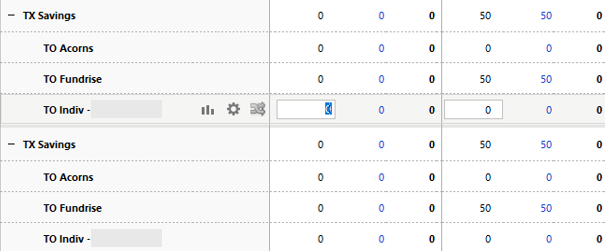
Everything else seems to be working just fine except that it is in there twice.
I spoke with customer service two times. The first rep didn't give me this option. I found it later. The second rep said it wasn't a bug and that I was effectively adding the category twice which didn't make sense. I asked for a ticket to be opened and they refused.
It seems to me like this is a bug.
Answers
-
Budgets track income and expense items. A transfer is neither, it doesn't make you any wealthier (income) or poorer (expense).
BUT, if you click on "Manage Budget Categories" in the upper right corner of the Budget screen, you can select to include Transfers, and which to include
Q user since February, 1990. DOS Version 4
Now running Quicken Windows Subscription, Business & Personal
Retired "Certified Information Systems Auditor" & Bank Audit VP0 -
Savings in personal finance is a budget category. While yes from a pure accounting standpoint there is no change, I want to designate that excess cash towards savings accounts.
If I have $100k in cash inflows, spend $80k of it on expenses, I'll have $20k surplus.
If nothing is done, that $20k stays in the bank. If I want to save half of that and move $10k to investments, I want to be able to budget that in so rather than my bank increasing by $20k, it only increases by $10k.
I know that $10k in the bank plus $10k in the investments equal $20k but that's not the point.
I'm trying to illustrate that I'm saving 10% of income or $10k to investment accounts.
If I remove the custom category groups, I can "budget" all of the transfers individually but then it would be more difficult to see and in aggregate how much is going towards pre-tax or roth or taxable accounts.
0 -
Steps to Reproduce:
- Reassign transfer categories (e.g.,
TO Roth IRA) into a new custom group via Category List → Options → Assign Category Groups. - Go to Budget → Manage Budget Categories.
- Check the boxes under the custom group (e.g., “TF Savings”).
Expected Result:
Each reassigned transfer category should appear once under the new custom group.Actual Result:
Each reassigned transfer category appears twice (see original screenshot) under the same custom group. Selecting both causes duplicate budget lines.Notes:
- This is not about transfers being income/expenses — I already understand that distinction.
- This is a UI duplication bug when using custom groups with transfers.
1 - Reassign transfer categories (e.g.,
-
I'm having a similar problem with a category group called "NonDiscretionary". The group appears twice with identical data. It doesn't seem to impact the budget totals but does make the budget difficult to read.
0
