How do I enter employer 401k contribution if it's done annually?

My employer does their contribution to my 401k annually. It's not an exact match, and I have no idea what the amount will be until I see it on my 401k statement. Quicken is set up to download the transactions for my 401k, but it doesn't download this and now my account balance is way off. How do I fix this?
Answers
-
"Quicken is set up to download the transactions for my 401k, but it doesn't download"
I find that odd. If the Financial Institution holding your 401(k) is downloading other transactions - buys, sells, dividends and the like - then you'd think this annual deposit would also show up. What is the Financial Institution, and have you contacted them to ask them "Why?"
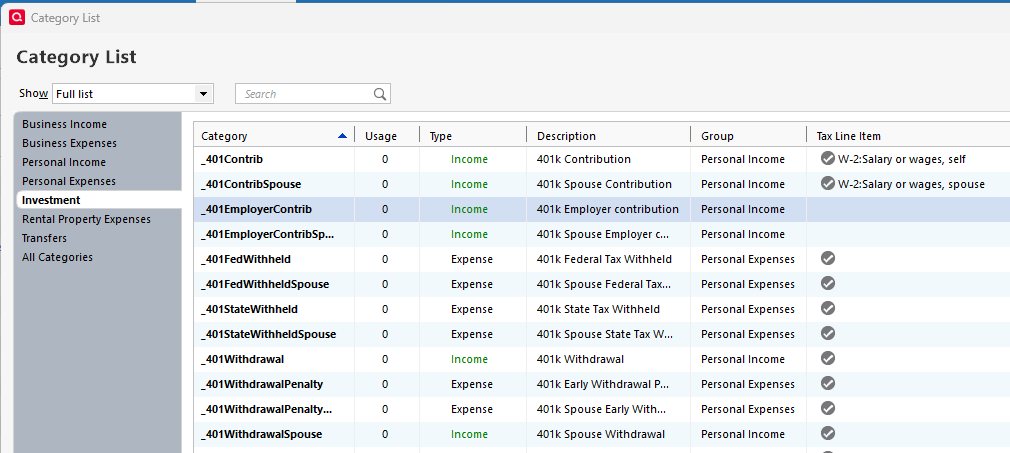
Since it only happens once a year it shouldn't be too hard to simply enter it manually. You should be able to simply make a "Deposit" entry for any missing entries. There's a built-in
"_401EmployerContrib: Employer contributions for a 401(k)" that would be appropriate for the Category.1 -
Ok I did that and it added cash to the account balance. Now when I enter the Buy transaction and check "from this account's cash balance", it makes a "balancing cash adjustment" and I still have cash in the account when there should be none.
0 -
Go here:
to Quicken Help on the subject and starting at the sentence "If you're using an investment account to track your employer's contributions, do the following for each contribution:"
try their suggested method to see if that makes a difference. (In my opinion it's really the same accounting as I suggested, just taking a slightly different route.)
If that doesn't work then it seems like there may be a Placeholder of some sort in the Account.
0 -
Does the employer contribution only show up once a year on the statement or do you know when they usually drop it in?
0 -
Yes, I tried that one before. The category "comp401k" does not exist. I even checked the hidden categories. There is a placeholder, but it's for a very small amount, most likely the admin fee because that doesn't download correctly either.
0 -
Just once a year, and I don't know what it is until I get my statement.
0 -
Maybe the Help file is out of date but I'd this Category would serve:
 0
0