LL Bean credit card at https://citiretailservices.citibankonline.com will not download.

This problem was mentioned in a previous string which is now closed because you claimed that the issue has been resolved. I have had this problem for months now and have had to manually enter my transactions in Quicken. The issue is certainly not resolved for me. I have Quicken Classic version R64.29, build 27.1.64.29 on Windows 11.
Comments
-
Hello @dgcoonesq,
Thank you for expressing your concerns. I can understand how frustrating it is to have issues connecting accounts in Quicken.
I appreciate the details you have added, like version, build, URL, etc. Those definitely help! I do have some follow-up questions for you, so I can determine what steps will be appropriate for us to try.
- How are you currently trying to connect this card?
- There is an instance in Quicken "L.L.Bean Mastercard". The URL matches the one you have provided. Have you tried using this?
- When it worked, months ago, how were you connecting then?
Thank you.
Quicken Alyssa
Make sure to sign up for the email digest to see a round up of your top posts.
0 -
I'm not sure what you are looking for in your first question. I'm trying to connect by using "setup online" when in the account on Quicken.
Don't know what you mean by "an instance." I don't know how to make quicken go to a URL other than the one Quicken chooses when trying to connect. When I click on "visit financial institution homepage" it takes me to the correct URL. I can sign on to the card account there but Quicken still won't connect.
I've always connected the same way.
0 -
Hello @dgcoonesq,
Thank you for following up, and I apologize if my wording was confusing.
When I asked how you connected in the past and which instance you're trying to use now, I was referring to which financial institution name you’re selecting when attempting to add the account in Quicken.
Here are the steps to confirm you're using the correct one:
- At the top of the Accounts Bar, click on the plus sign + button.
- A box where you can choose a financial institution should open. Type in "L.L.Bean".
- Select "L.L.Bean Mastercard".
- Follow the prompts and enter your credentials.
- If successful, Link to the existing account in Quicken.
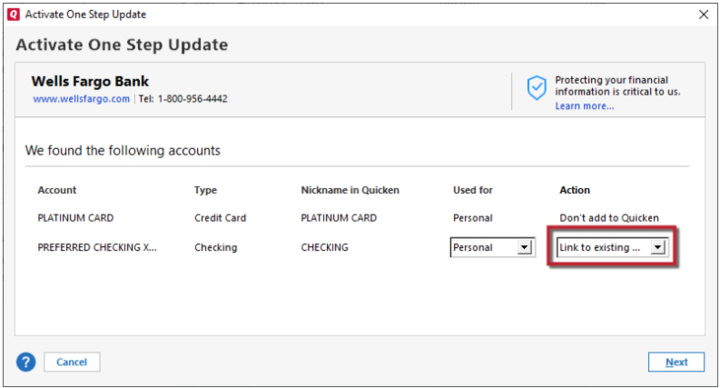
Here is a Help Article with more detailed instructions, if needed.
Is this what you were already doing? If not, it's a good place to start.Hope this helps!
Quicken Alyssa
Make sure to sign up for the email digest to see a round up of your top posts.
0 -
Well. it worked. I swear I tried this several time without success. But apparently not.
Thanks!
0 -
Hey @dgcoonesq,
You are so welcome! Happy to hear it worked.
And thank you for coming back to update us. Your experience could help others who are having similar issues in the future.
Thank you.
Quicken Alyssa
Make sure to sign up for the email digest to see a round up of your top posts.
0
