R64.29 Invalid Data in Biller Memo Field


After upgrading to the new bill pay, I have irrelevant data (mostly names of other credit cards) in the memo field for most of the Online Billers under the Bills and Income tab. I cleared it when I made recent payments, but it did not go away. I also tried going into checking and changing the memo there, but it did not update the biller list. How do I clear this? (I saw in one of the updates this was supposed to be fixed, but it did not say if it was a fix for those who already upgraded.)
Comments
-
Screen grab for above post.
0 -
Hello @James118,
Thank you for all the details and your questions. Sorry to hear you are experiencing this.
Have you had a chance to try restoring a backup from before the update? You can usually find it in your Backups folder — it should be labeled "pre-update". Restoring that might help determine if the issue is directly tied to the latest update, and get you back to where you were before this occurred. Here are the steps on how to restore a backup.
Also, can I ask where your Quicken data file is stored? And is it being synced with any third-party cloud services like iCloud, Dropbox, OneDrive, etc.? Sometimes syncing can cause unexpected issues with how data is saved or accessed.
Let me know — happy to help!
Quicken Alyssa
Make sure to sign up for the email digest to see a round up of your top posts.
0 -
I tried to restore, as I have done many over the years when I've had problems with updates. Unfortunately, the Billers under the Bills & Income tab were a complete mess after restoring the backup (almost like a switch was flipped or a conversion was done on the backend), so I had no choice but the move forward. It has been about a month since I installed the update, so restoring from backup now really isn't an option anyway.
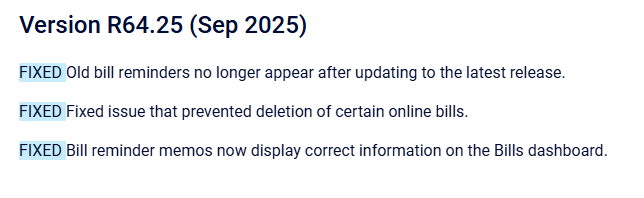
I installed R64.19 which had a lot of bugs from what I read online. It looks like there were some fixes released for this issue (see below), but mine did not go away. Maybe these fixes were for users who did not update (it's not clear). There is no doubt that this was a result of the update.
My data file is on my C: drive and I am not using any 3rd party services. If you want to reach out to me directly, I can send you a screen grab (I don't feel comfortable posting in the forum).
Is there a way to edit the memos in the Bills & Income tab under the Billers column? This would be the easiest fix.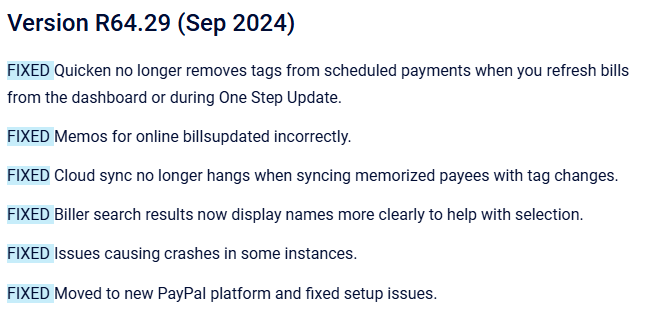
 0
0 -
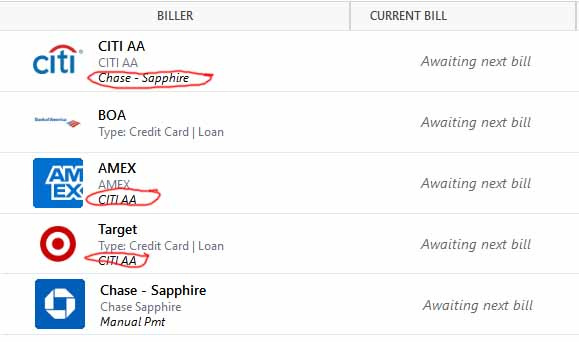
Screen grab of issue. The circled memos were not entered by me and appeared after the update to R64.19.
0 -
Hello @James118,
Thank you for following up and providing more details.
At this point, the best plan of action is to contact Quicken Support for further investigation/escalation. Sorry, I couldn't be of more help from this platform.
Thank you,
Quicken Alyssa
Make sure to sign up for the email digest to see a round up of your top posts.
0
