Truist delivering OL-297-A error after Quicken update on 9-23-2025

After the most recent Quicken update to version RT64.29, Build 27.1.64.29, I am consistently receiving the OL-297-A error "Quicken is unable to establish an internet connection" message. I have rebooted my computer and have connection to the internet. Anyone else affected?
Comments
-
I haven't been able to download transactions from Truist for several days. Today I tried resetting the account in Quicken using the "Truist Online Banking - WC" connection alternative. It appeared to be successful, but when I try to download transactions I now get the message: CC501: We are unable to update this account due to an unknown error." I can see that a check has cleared Truist, but the transaction is not being downloaded.
0 -
Hello,
Thank you both for voicing this issue here, and thank you for all of the details you both provided.
These errors usually appear when your computer cannot establish an internet connection with Quicken. Please note, these errors do not mean the computer has lost internet connection, simply that Quicken cannot establish an internet connection. Please review and try the recommended steps in this Support Article.
After checking internally, I do not see the CC501 that you are seeing from your end. Can I have you go to Help>Report a problem, from within your Quicken software, and send log files to Quicken? Once you have done that, I can take a look and see if any errors are showing there.
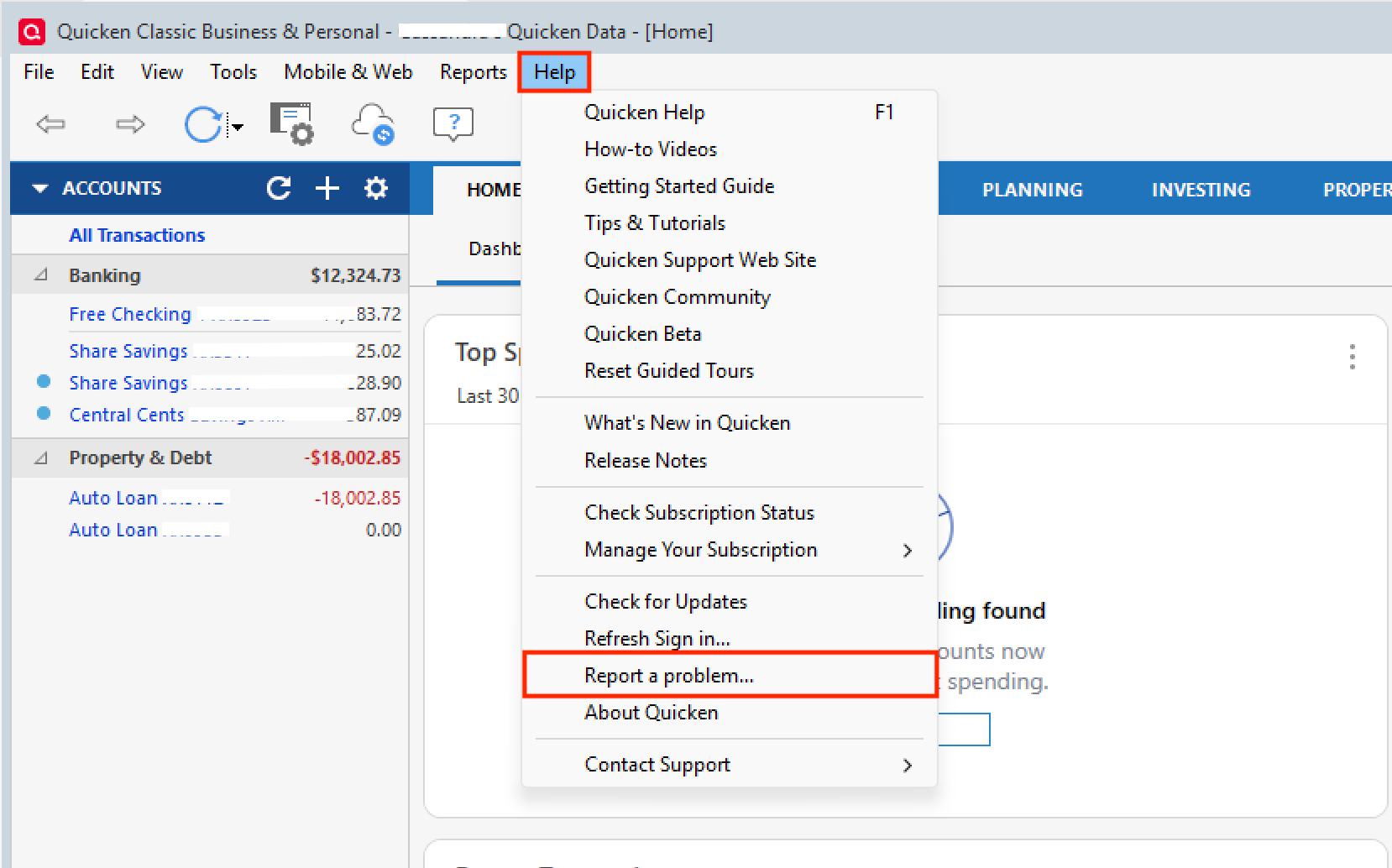
Thank you!
Quicken Alyssa
Make sure to sign up for the email digest to see a round up of your top posts.
0 -
The last successful connection to Truist was on September 19 (I don't bother to check on Sundays and Mondays). I followed your suggestions and cannot find anything in my Windows Security or ESET antivirus that is interfering. Should I try resetting the two accounts with Truist (the only accounts I have)? Any other suggestions?
0 -
Hello @Hayden,
Thank you for following up after trying the steps. Sorry to hear that they didn't resolve the issue.
Unfortunately, if the issue is not resolved after following the steps, you will need to contact your financial institution to resolve this issue.
Quicken does not have access to the financial institution's servers to correct the problem. This may require you to ask to speak with an online services specialist who handles transaction download issues at the financial institution. If your financial institution states it can't assist, an escalation with the financial institution may be necessary.
Sorry, we couldn't get it resolved from here!
Quicken Alyssa
Make sure to sign up for the email digest to see a round up of your top posts.
0 -
Hi Alyssa
As it turned out, it was an old issue — I was logging into a BBT direct connect (I ended up with Truist after Suntrust merged with BBT). The Truist rep was very patient and helpful — we reregistered my accounts through the Truist online account website and then, after several tries, got the accounts recognized and I was able to log in through Quicken and download transactions. The error message in Quicken turned out not to be helpful and I found this issue through looking at the Ongoing problems part of this website.
0 -
Hello @Hayden,
Thanks for the update!
Sorry that the error in Quicken wasn't helpful, but I am happy to hear you were able to get everything straightened out.
Thank you!
Quicken Alyssa
Make sure to sign up for the email digest to see a round up of your top posts.
0

Categories
- All Categories
- 6 Product Ideas
- 34 Announcements
- 249 Alerts, Online Banking & Known Product Issues
- 19 Product Alerts
- 266 Welcome to the Community!
- 60 Before you Buy
- 1.5K Product Ideas
- 55.8K Quicken Classic for Windows
- 16.9K Quicken Classic for Mac
- 1K Quicken Mobile
- 834 Quicken on the Web
- 129 Quicken LifeHub