Adding new Fidelity Accounts

I am having a hard time understanding whether or not I should be able to add a new Fidelity accounts to Quicken Classic. I've gone through the add process several times and each time it appears as though the process was successful, but the accounts never appear. Should I be able to add these new accounts now or is this still being restricted? The "know issue" posts on the Support page are unclear about this.
Answers
-
Hello @St. Anthony,
Thank you for your question.
Yes, you can add new Fidelity accounts to Quicken. Now, let's try and figure out why yours aren't coming in.
What types of accounts are the ones you are trying to add(e.g., checking, savings, credit card, etc.)? Also, are these accounts you own directly, or are you an authorized user on them?
Looking forward to your reply!
Quicken Alyssa
Make sure to sign up for the email digest to see a round up of your top posts.
0 -
Thank you for your response. I have two cash management accounts and one brokerage account. I own all of the accounts directly.
0 -
Hello again, @St. Anthony,
Thank you for following up with those details!
As far as I can tell, these account types are supported and you should be able to add them without issue.
That being said, can you please review this Support Article to ensure these are the steps you are taking to add these accounts?
Basically the process should be as follows:
- Add Account (through the plus sign or the Tools menu).
- Once you choose Fidelity Investments you will click through a few prompts and be directed to their website to enter your credentials.
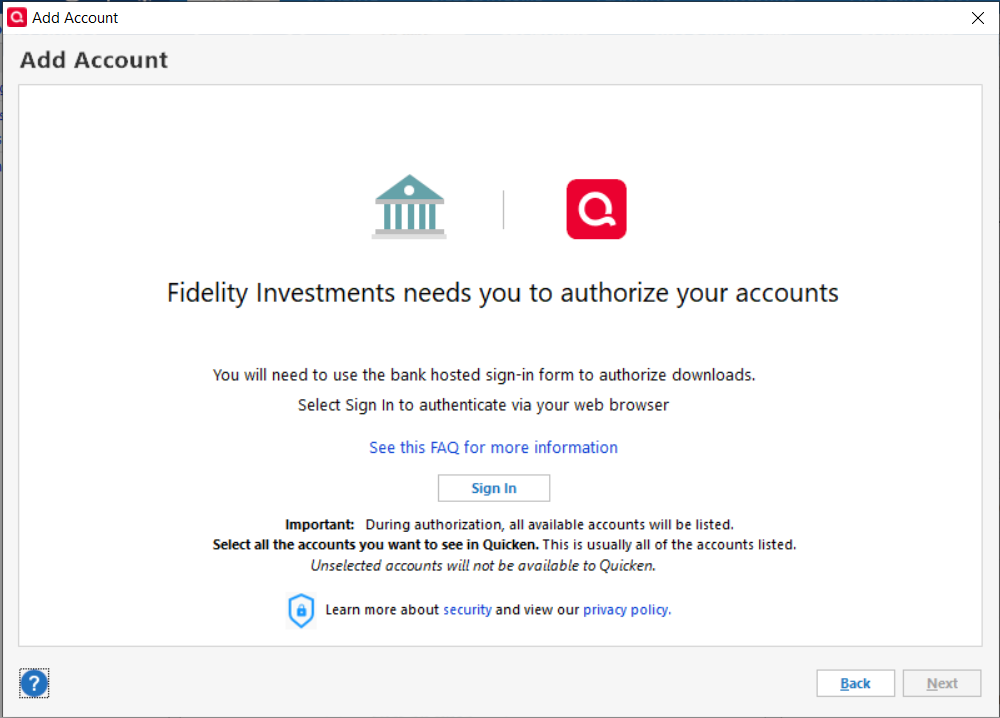
3. After inputting your credentials you should be prompted to authorize your accounts, and choose which ones you want to track in Quicken.
4. You should then be redirected back to Quicken where your list of accounts should be displayed again, and you would click Finish.
5. At this point, your accounts should have been added and be visible from the Accounts bar(on the far left or far right of your Quicken).
Is this what you are going through? If not, how far are you getting through these steps?
Looking forward to your response!
Quicken Alyssa
Make sure to sign up for the email digest to see a round up of your top posts.
0 -
Thank you.
Yes. I have gone through these precise steps numerous times. I can, seemingly successfully, get all the way through step 4. When I'm redirected back to Quicken after authenticating with Fidelity, I am able to see the three accounts in a Quicken popup that allows me to choose which accounts I want to add. I want all three accounts in Quicken, so I make the appropriate selections in the dropdowns and click finish; the popup goes away and the account never appear in my list of accounts.
0 -
Hi @St. Anthony,
Thank you for returning with additional information. I do have a couple more things we can check.
In some cases, Quicken will not add an account if it is the same account type and has the same account number as an existing account. Is this the case with this new account?
Sometimes, if an account is created but it is not displayed in the account panel, the account may have been hidden, separated, or closed. To verify: Select Tools menu > Manage Hidden Accounts.
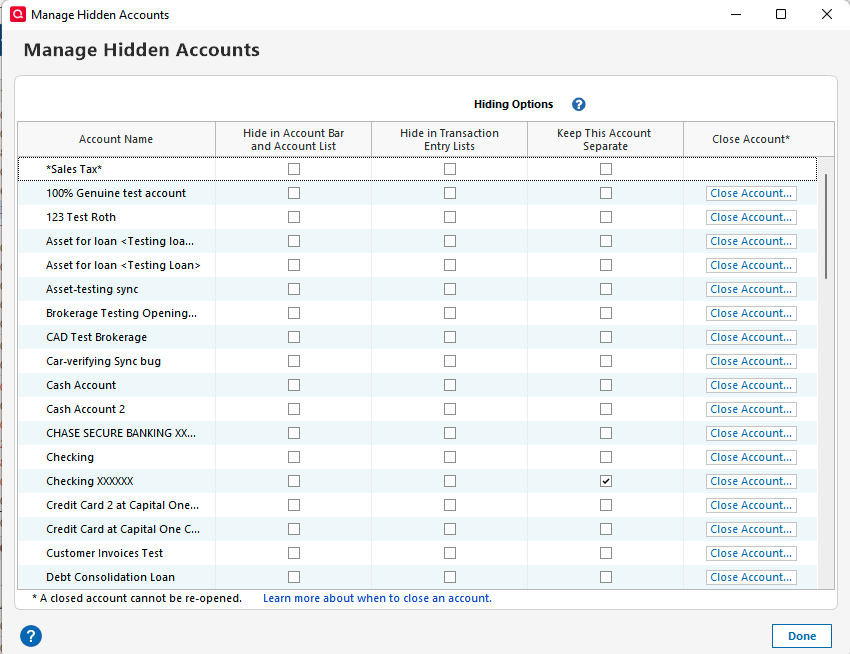
Then look through the list and make sure it's not hidden.
Let me know how it goes!
Quicken Alyssa
Make sure to sign up for the email digest to see a round up of your top posts.
0 -
These were brand new accounts when I tried to add them the first time, each with unique account numbers. In fact, I never had any Fidelity accounts prior to these three. I checked the hidden accounts and they are not there. Hopefully, you've got other ideas. Thanks.
0 -
Hello @St. Anthony,
Thanks for trying those suggestions and letting me know how it went.
At this point, the best course of action will be to contact Quicken Support directly, as further investigation and escalation may be needed.
I hope they are able to get to the bottom of it for you.
Thank you!
Quicken Alyssa
Make sure to sign up for the email digest to see a round up of your top posts.
0
