Fidelity – Cash Representation

Yesterday, I ran one step update and all accounts but my Fidelity accounts ran successfully. Fidelity got a 501 error. The previous day, all my accounts had 501 errors (discussed here - WindowsQuicken Classic - Hanging/OSU Freezing/CC-501 Errors ). I clicked on one of my Fidelity accounts and the message below came up. I have always tracked SPAXX as cash, so I proceed with the recommended option. This message came up for all eight Fidelity accounts. Seven of the accounts returned the correct cash amount, but one account returned an incorrect cash amount. When Quicken converted, it deleted some old transactions that were required to get the correct balance.
After updating the cash, my Fidelity accounts ran successfully.
Anyone else encounter this issue?
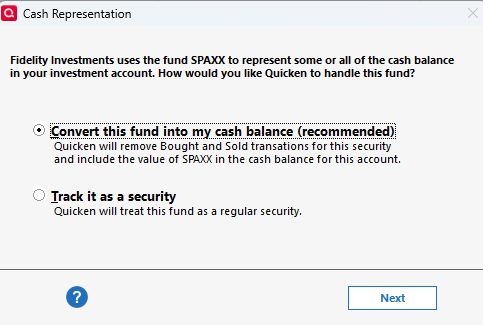
[Edited-Readability]
Comments
-
Hello @mvwabc,
Thank you for sharing your experience. I am happy to help.
I think we have two options here.
- You can add the missing information manually.
- Or restore a backup from before the issue occurred.
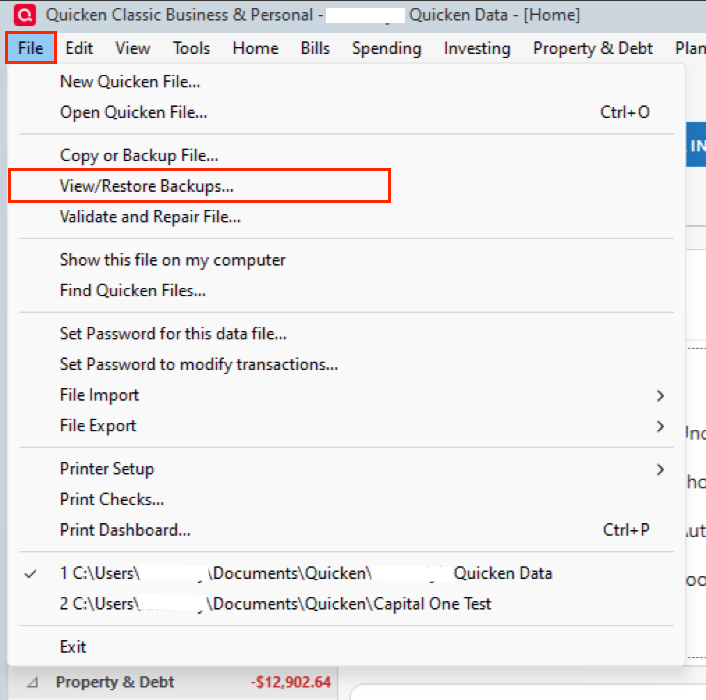
Restoring the backup sounds the easiest to me, unless you know exactly what information is missing to be able to reenter it. If you do decide to restore a backup and run into any issues along the way, let me know.
Thank you.
Quicken Alyssa
Make sure to sign up for the email digest to see a round up of your top posts.
0 -
Thank you for your suggestions. But as you point out, unless you know what is missing, the option to enter the missing transactions will not work. The second option to restore the file will also not work, because you will just end up back to where you started, being asked if you want to track as cash or a security. If you want to track as cash, Quicken will just give you the wrong balance again.
The two options that will work are -
- Update the cash to the correct balance. This is the easiest to do. Just click on the amount showing for cash and then the Update Cash Balance window opens. The problem with this option is you have no idea what Quicken did, but you have the correct balance.
- You must find out what transactions Quicken handled incorrectly by comparing the transaction report for the current file with the incorrect cash balance to the transaction report for the most recent backup with the correct cash balance. I used the Investment Transaction report with date range earliest to date, limiting the report to the account with the incorrect balance and No Security. When you identify the deleted transactions and add them back in, you will then have the correct balance. I chose this option.
[Edited-Readability]
0 -
Hello @mvwabc,
Thanks for following up and sharing what worked for you, as this could be helpful information for others.
Glad to hear you got the issue resolved. If you need more help, reach out!
Thank you!
Quicken Alyssa
Make sure to sign up for the email digest to see a round up of your top posts.
0
