Now I have TWO identical Fidelity 401k accounts. What do I do?

One has all my 8+ years of history, and the other (in ALL CAPs) has 1 month.
Answers
-
When you do TOOLS, Account List, what shows in the various columns to the right of these 2 accounts?
And why, after a precautionary backup, can't you simply delete the "1 month" account?
Q user since February, 1990. DOS Version 4
Now running Quicken Windows Subscription, Business & Personal
Retired "Certified Information Systems Auditor" & Bank Audit VP1 -
So, background, I had to reauthorize both my Fidelity accounts and my wife's, which is what started all this. That is when the new 401k account appeared. I went to the original one an did the "reset online" step, but it didn't have any more accounts to add (the new 401k was listed).
I'm sure I could delete that new 1-month account, but one step update still wants to re-authorize fidelity.
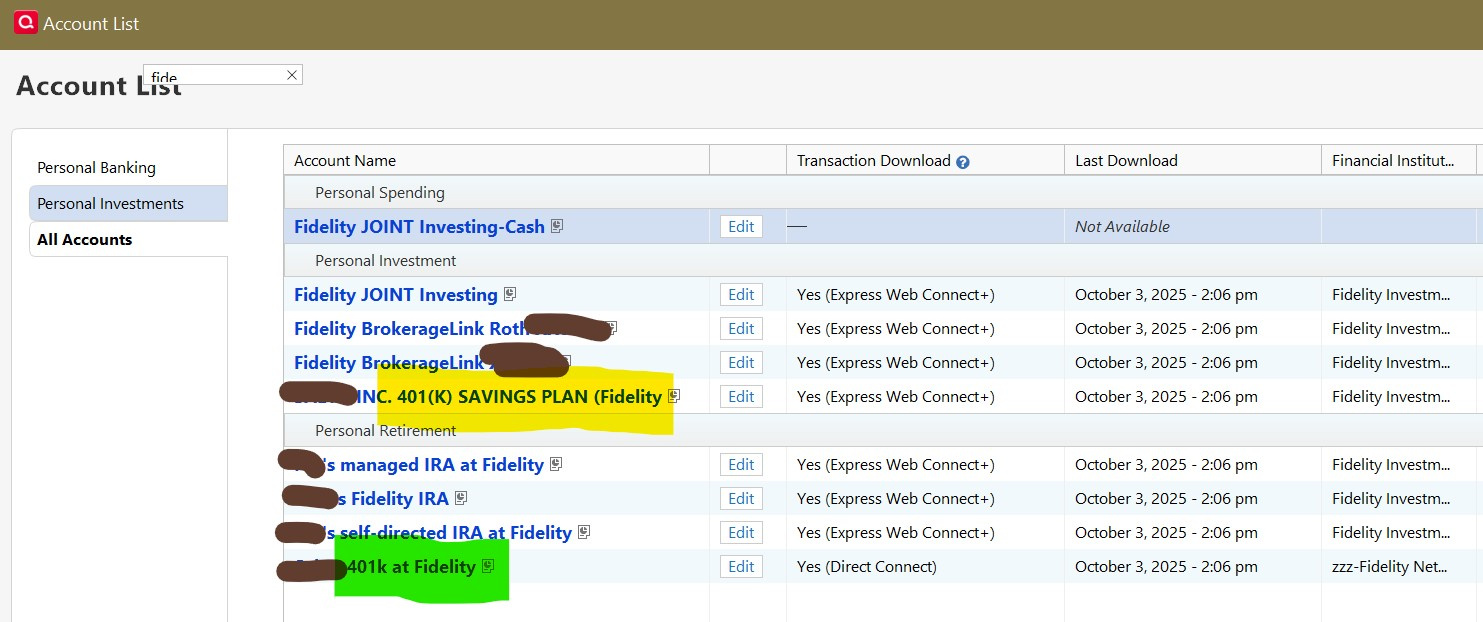
See screenshot (personal stuff redacted) of all fidelity accounts:
yellow is the new one, green is the original
 0
0 -
Update: Based on your advise, I did a backup, and deactivated online for the "new" 401k account, then did 'reset' on the original. This time it allowed me to 'Link to existing account', which I did, to the original one.
Then I did a one-steop update and it seems like it has all the new transactions I needed (plus 67-odd placeholders dating back 1 to 2 years ago). Based on that, I just deleted the 'new' 401k account. I hope this is the right answer.
Gotta say, though, that this reauthorize fidelity experience was horrible: not allowing me to link to existing, lots of bizarre questions about cash, and SPAXX, and other stuff. To make it worse, the whole process locks you out of accessing any other part of Quicken to be able to look at what you already have and make some educated guesses about how to answer these questions.
They should have provided a link to tutorials.
P.S. I'm a long time user of Quicken (since I guess Windows 3.1 era). I have 47 accounts in it, 22 boxes checked on 'One Step Update Settings', and transaction history back to 1998.
0

Categories
- All Categories
- 58 Product Ideas
- 34 Announcements
- 240 Alerts, Online Banking & Known Product Issues
- 19 Product Alerts
- 511 Welcome to the Community!
- 678 Before you Buy
- 1.4K Product Ideas
- 55.3K Quicken Classic for Windows
- 16.7K Quicken Classic for Mac
- 1K Quicken Mobile
- 828 Quicken on the Web
- 123 Quicken LifeHub