NetXInvestor rejecting request when attempting to update account OL-301-A

Running R63.21 Quicken Classic Premier for a couple of months with no major issues.
This is the error message I am getting over the past 48 hours or so when attempting to update my accounts. It was working without issues up through 10/3 (last successful update).
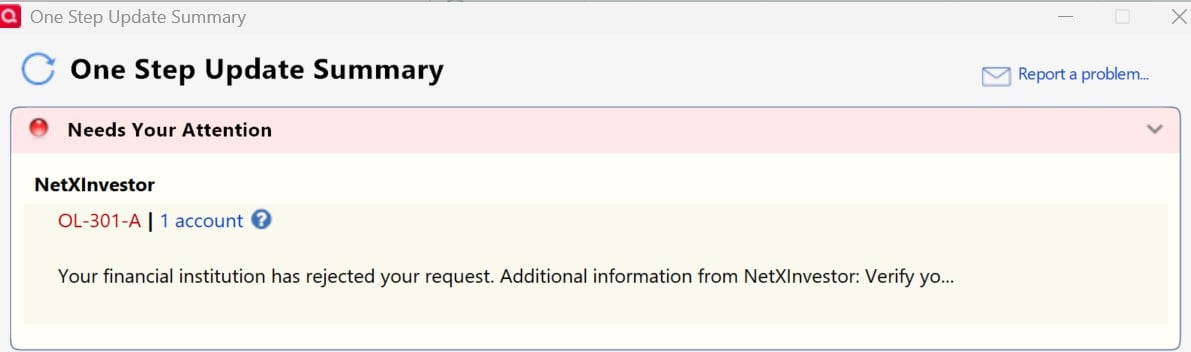
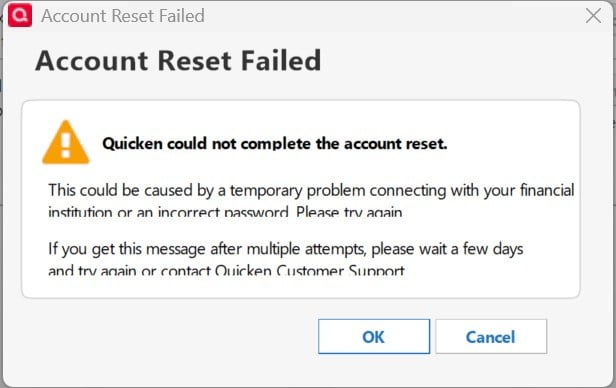
NetXInvestor has successfully updated for a very long time for me so this was a surprise. The rest of the message says to verify your account. I can login directly to their website without issue and have done so a number of times since getting this message to ensure my account is working correctly. I've attempt to reset the account connection through Quicken and I get a another error message shown below.
Is anyone else having this same issue as that would indicate a server side or provide side issue? Or, is it something with my end?
Any known issues with NetXinvestor after 10/3?
Quicken Classic Premier (US) Subscription: R65.15 on Windows 11 Pro
Comments
-
Same experience you are having. Have tried to reconnect and getting the same error message.
1 -
I have the same issue, and it also started on the 3rd.
1 -
Hello All,
Thank you all for sharing your experience. I am happy to help.
The OL-301 error occurs when there is an issue connecting to the financial institution while using Direct Connect. The situation may ultimately require the financial institution to implement a solution.
Also, you may be able to log in to the bank's website successfully and still receive this error in Quicken. This is because the error is typically caused by an issue on the bank's servers that Quicken uses to download transactions.
Please take a look at this Support Article and follow the suggestions therein.Thank you!
Quicken Alyssa
Make sure to sign up for the email digest to see a round up of your top posts.
0 -
Thank you @Potato and @bcsteves for adding your experience. Also, thank you @Quicken Alyssa for the timely response and support article. Unfortunately, while the article steps were straight forward to follow, it did not resolve the issue for me. I went through the steps a couple of times to no avail.
What should be the next steps? Thanks!Quicken Classic Premier (US) Subscription: R65.15 on Windows 11 Pro
0 -
Same issue here.
0 -
Ran into the same issue and here's how I solved it. In a browser, I logged into my netxinvestor account (actually osaic.netxinvestor.com). In the upper right hand corner I selected "settings and logout" and then selected security settings. I had to enter my password. The security settings page had a selection for Quicken. I clicked on that and I had to reauthorize Quicken. Apparently the authorization is good for two months. After doing that, Quicken was able to download my account info. I don't remember having to do this before. Perhaps it's new with netxinvestor.
3 -
Hello All,
Thank you all for chiming in on this thread.
Please try what @cdennett offered as a solution and let me know how it goes.
If those steps don't resolve the issue, please go to Help>Report a problem>Send to Quicken.
I will need to gather log files from as many people as possible if an escalation is required.
Thank you!
Quicken Alyssa
Make sure to sign up for the email digest to see a round up of your top posts.
0 -
Thanks @cdennett! That worked for me as well. When I went to the settings location you mentioned there was a Quicken Device Registration entry that I had to approve. This is absolutely new and the entry was created on 10/3 which corresponds with when Quicken was unable to update/download from NetXInvestor. So, it appears the entry was created when Quicken attempted to download on 10/3, and now approving the device registration allows connections from Quicken for 60 days as you stated. Thanks again.
Quicken Classic Premier (US) Subscription: R65.15 on Windows 11 Pro
0 -
@Quicken Alyssa I would say this specific issue is resolved.
Quicken Classic Premier (US) Subscription: R65.15 on Windows 11 Pro
0 -
Hello All,
Thank you all for adding to this discussion to let us know you were able to resolve the issue.
If you need further assistance, don't hesitate to reach out!
Thank you!
Quicken Alyssa
Make sure to sign up for the email digest to see a round up of your top posts.
0
