New Fidelity Download Problem

Just as the CD pricing download problem seems to have been fixed, another Fidelity download issue has popped up. Options transactions are not downloading correctly:
- A transaction that should show as a "Short Sale" transaction (short call option) is downloading as a "Sale" transaction.
- A transaction that should show as a "Cover Short" transaction (covering a short call option) is now downloading as a "Buy" transaction.
These are both completely incorrect and show up in the Fidelity register wrong.
Anybody see this issue? Anybody know of a workaround besides manually changing every single erroneous downloaded transaction?
Comments
-
Hello @DavidS,
Thank you for raising this issue, and I am happy to help!
I would like to take a look at your log files and see if these transactions were sent over this way from Fidelity, or if the disconnect happened somewhere in Quicken.
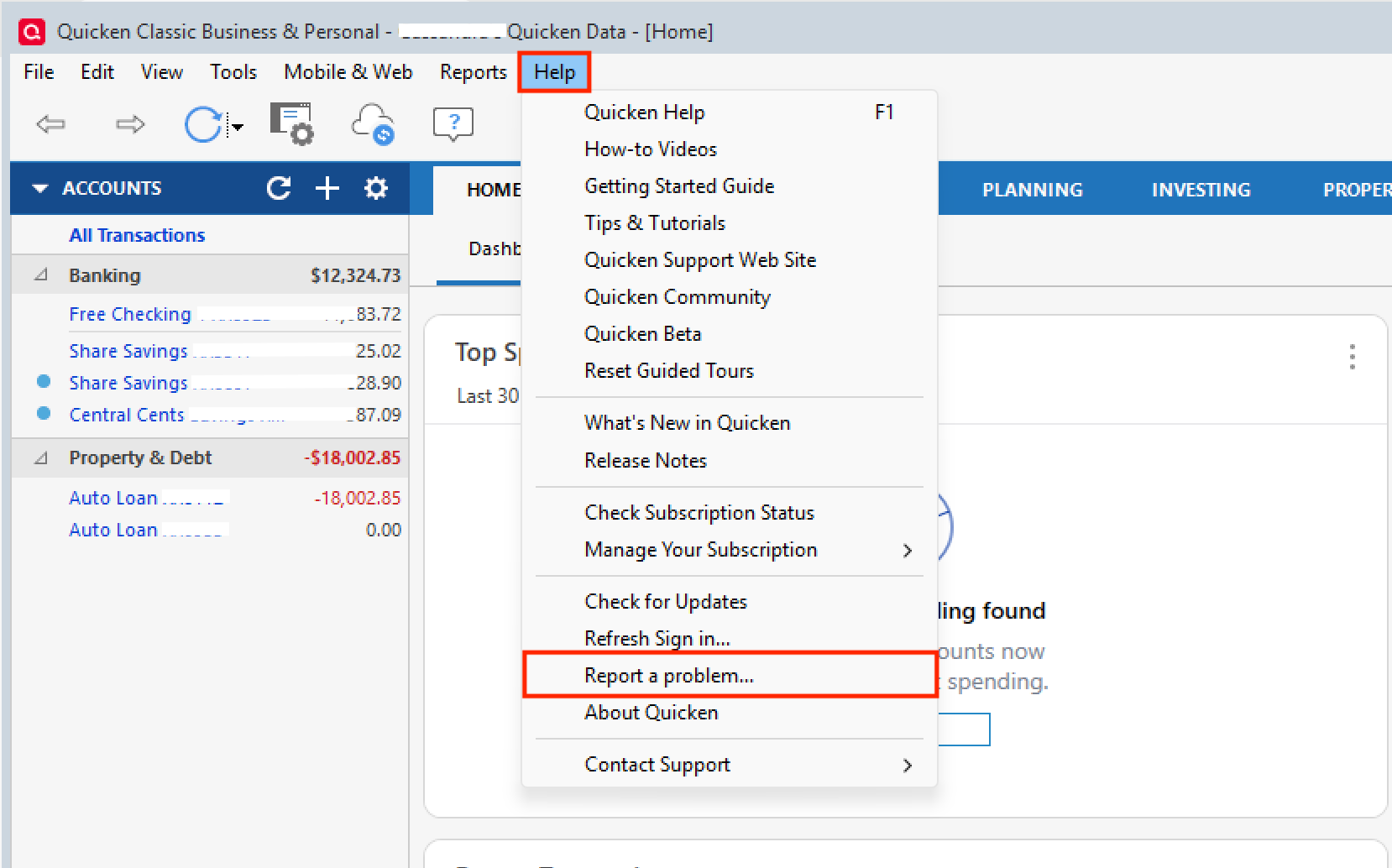
Please go to Help>Report a problem from within your Quicken software, and Send to Quicken. Let me know once they have been sent, and we can go from there.Thank you!
Quicken Alyssa
Make sure to sign up for the email digest to see a round up of your top posts.
0 -
Can we do it some way other than sending my files? I am not comfortable with that information going out in the unknown.
0 -
Hello @DavidS,
Thank you for following up!
Yes! If you feel uncomfortable with me reviewing it, that's no problem at all. You can contact Quicken Support directly and they can take a closer look for you.
Sometimes in these cases, where you are seeing things like "Sale" instead or "Short Sale", we check the logs and might see that this is how it is being sent to Quicken. When that is the case, we would usually refer you to the financial institution. However, currently with Fidelity, we are escalating most if not all issues internally.
In the event that the financial institution is sending it correctly, and it is not coming into Quicken that way, this may require an escalation as well. So contacting Quicken Support is probably your best bet for this one either way.
Hope this helps!
Quicken Alyssa
Make sure to sign up for the email digest to see a round up of your top posts.
0 -
Here's an observation of mine regarding short sell of options (covered calls, spreads).
After download, and upon selecting to Accept All, a prompt is issued that one or more transactions need attention. It's the same prompt that's used for specifying lots sold. It's leaving any transactions that would have been ShtSell as 'New'. On individually accepting the transaction that's still 'New', no further information is asked, and its immediately recorded as a 'Sell'.
My workaround has been to look for 'Sell' that show a negative share balance, and change those to ShtSell. I examine Holdings for positions having a 0 share balance, and that leads me to Bought that I need to update rto CvrShrt. It's not desirable. That's just what I've been doing.
I'd be willing to send transaction log to support, provided I could narrow it to isolated transactions. I suppose that I'd need to include which were expected to be shtsell and cvrshrt.
0 -
Helo @kenman38,
Thank you for sharing your findings and how you have made this work for you. This may be a helpful workaround for others experiencing the same issue.
If you can narrow it down and care to share that with us, that would be great. You can share the process here or contact Quicken Support directly, so they can get it documented for you.
Thank you!
Quicken Alyssa
Make sure to sign up for the email digest to see a round up of your top posts.
0 -
I have having the sale problem with but to cover transactions coming in as regular buys. I would be happy to send you the log files.
0 -
Thank you for adding to this discussion and offering to share your log files.
To do that, you would go to Help>Report a problem>Send to Quicken from within your Quicken software.
Once you have done so, please contact Quicken Support so they can review those and gather examples from you. They have tools that we don't have access to from the Community, and they can process an escalation if needed.
Thank you!
Quicken Alyssa
Make sure to sign up for the email digest to see a round up of your top posts.
0 -
In addition to Fidelity, I have a Schwab brokerage account that I don't use often. However, I did recently open an option debit spread in the Schwab account, and it downloaded as expected.
Schwab is also using Express Web Connect Plus, and it downloaded the debit spread as a Bought with ShtSell pair. These were the transaction types when downloaded, and as accepted, with no extra prompt to individually Accept the short Sell transactions (Schwab using EWC+). Share counts were properly +100 and -100, respectively.
I'm working on isolating to one opening and closing transaction of Fidelity that I'll send to Quicken support. My Fidelity transaction history shows words like "SOLD OPENING TRANSACTION" and "BOUGHT CLOSING TRANSACTION," so the underlying attributes to indicate short sale and buy to cover short are in the Fidelity source data at least before it gets to the EWC+ platform.
0 -
Thank you for sharing this information and keeping the thread active.
Let us know how your continued efforts on this turn out.
Quicken Alyssa
Make sure to sign up for the email digest to see a round up of your top posts.
0 -
I'm attaching the PDF that I just sent via Report a Problem. Thought I'd have to break the images out and send plain text, but the PDF appeared to be accepted.
This includes an opening order within a Schwab account, also using EWC+, which worked as expected (Bought paired with its ShtSell).
1 -
Hello All,
Thank you all for contributing to this thread and reporting this issue. @kenman38, Thank you for providing a detailed account of your experience. That is very helpful.
We will be forwarding this issue to the proper channels to have this further investigated. However, we request that you please navigate to Help > Report a problem > Send to Quicken within your Quicken program and submit a problem report with log files attached in order to contribute to the investigation.

Once you have sent logs over, let me know so I can add them to the ticket.
Thank you!
[CTP-15741]
Quicken Alyssa
Make sure to sign up for the email digest to see a round up of your top posts.
0 -
The change from DC to EWC has caused an issue with download my option positions from Fidelity. They currently download with an Action of "Sold" that requires me to manually accept each one. I have to hit accept individually for each transaction. Each time I do this, it takes 15-20 seconds to load the accept. Then once it shows up on the register, I have to edit from 'Sold' to 'ShrtSell' for each one. Another 10-15 seconds. Prior to the EWC change, this would have a category of ShrtSell (as it should) and would end up on the register when I accepted download transactions. Now I have to modify each option sale twice which takes a long time.
Is there any resolution to this?
0 -
Hello @DataDerek,
Thank you for sharing what you are experiencing. I went ahead and merged your post with this existing thread of users experiencing the same issue as you.
This issue has already been escalated, but we are waiting on log files currently. If you would like to aid in the investigation, please go to Help>Report a problem>Send to Quicken and send over your log files.

Once you have done so, make sure to let me know so I can add you to the ticket.
Thank you!
Quicken Alyssa
Make sure to sign up for the email digest to see a round up of your top posts.
0 -
@Quicken Alyssa Is it known which logs files are needed to be sent? Looking at them, the most valuable in this case appear to be OFX Log and Cloud Sync Log. These two have transaction detail. However, it's a lot of transactions and I'm not comfortable sending all of these. This would also take knowledge to isolate a couple key transactions. If I could know how to do this, meaning isolate a couple transactions, I have an example from last week buying a vertical option spread on Thursday and then sold on Friday.
Is there any way I can contribute (reveal) to Quicken support just a small set of data?
0 -
Thank you for posing this question.
No, as far as sending over log files goes, I don't know of any way that you can choose which portions of a log file to send.
If you are uncomfortable sending the information, that's ok. Alternatively, you can contact Quicken Support directly and see what options they may have. Phone support is available from 5:00 am PT to 5:00 pm PT, Monday through Friday. Chat support is available 5:00 am PT to 5:00 pm PT, seven days a week, excluding major holidays.
Sorry, I couldn't be of more help on that.
Quicken Alyssa
Make sure to sign up for the email digest to see a round up of your top posts.
0 -
I am going to submit a ticket on this as well. It's a relatively minor annoyance (and I'm delighted that my cash balances and fully-paid lending transactions are now working properly 👍️) but I would like to see this fixed.
Prior to the change to EWC+, the short selling of options (like covered calls) and related buy-to-close transactions were coded properly in Fidelity downloads. Right now, manual adjustments to the downloads are required.
1 -
Thank you for adding to this discussion.
If you would like to be added to the ticket I created, you can go to Help>Report a problem>Send to Quicken, and send over your log files.
If you do send them, let me know so I can get you added.
Thank you!
Quicken Alyssa
Make sure to sign up for the email digest to see a round up of your top posts.
0 -
@Quicken Alyssa - I sent my log files this morning.
2 -
I've got another observation that I'll be reporting via the Help, Report a Problem once I get my next transaction that seems to be working properly.
Cash Settled instruments seem to be properly downloading as CvrShrt as long as the opening transaction was manually set to ShtSell. I had done a few SPX butterfly spreads, and a couple times now I wondered if I fixed the transaction to CvrShrt on the center leg of the trade, or if it downloaded properly. This past week, I had a cash settled VIX, and I'm sure that I didn't fix that download that was CvrShrt. I've got an XSP spread that'll download Monday, and I'm going to be keeping a close eye on that one. This may tell Quicken download team at least a little something about detecting CvrShrt against an open position that was ShtSell.
1 -
Thank you both for adding to this discussion.
I have added the information you both provided to the escalation ticket.
Thanks again!
Quicken Alyssa
Make sure to sign up for the email digest to see a round up of your top posts.
0

