Fifth Third Bank OL-293-A error
Comments
-
RE: Turning off Bank Bill Pay solves the problem.
Question: If I deactivate this option, but I DO use the Fifth Third bill payer service (not Quicken's), what will be the affect on what transactions are downloaded by an update request? Will scheduled payment transactions be downloaded even if the option is deactivated in Quicken?
0 -
I deactivated online bill pay in Quicken this morning to get it to update my transactions this morning and that worked. However, I do use Online Bill Pay so I need that fixed.
0 -
I was successful on the second attempt to download transactions from 53 today
0 -
Hello Everyone,
I deactivated both of my 5/3 accounts from One Step Update and then reactivated them. I don't use Bill Pay, so no problem. Transaction downloads worked just fine. Glad this is working again. Hopefully, the Bill Pay feature will get fixed soon.
0 -
Worked for me this morning as well
0 -
Hello All,
Thank you all for coming to update the discussion and let us know what worked for you.
I am happy to hear that some of you have found success with downloading transactions. For those still experiencing the issue, please continue to refer to the Community Alert.
Thank you!
Quicken Alyssa
Make sure to sign up for the email digest to see a round up of your top posts.
0 -
I right-clicked on both my checking and savings accounts and then selected "Edit/Delete account". Click on the "Online Services" tab, and if the "Online Bill Pay" column shows YES, uncheck it to set it to NO. This must be done on all checking or savings accounts. This resolved all my connection and error issues. The Online Bill Pay was activated following a Quicken update, or soon after.
[Edited-Readability]
0 -
Hello @geo791,
Thank you for adding to this discussion with your experience. What worked for you may work for others.
Thank you!
Quicken Alyssa
Make sure to sign up for the email digest to see a round up of your top posts.
0 -
I did what geo791 recommended and it worked for me.
0 -
Having same issue with 5/3 bank connection to quicken. I'm no longer receiving the OL-293-A code but transactions are not downloading and bill pay requests are not uploading. The One Step Update Summary is nor indicating any errors, but shows 5/3 bank as being updated but the last online balance date is nearly a week ago on 10/3, and new transaction (bank bill pay) are not uploading.
0 -
Hello @James Heintschel,
Happy to hear that you were able to resolve the issue following those recommendations.
If you are not receiving an error, but transactions are not downloading, try signing out and back in to your Quicken software.
Please follow the steps below in order to do so.
- Navigate to Edit
- Preferences...
- Quicken ID & Cloud accounts
- Click Sign in as a different user (or it might say Sign in using a different Quicken ID)

- Follow the prompts to Sign Out

- Sign back in using your Quicken ID (email) and password
Once that is done, try updating your accounts again.
I hope this helps!
Quicken Alyssa
Make sure to sign up for the email digest to see a round up of your top posts.
0 -
For my checking and savings accounts I selected "Edit/Delete account", selected the "Online Services" tab, and set "Online Bill Pay" to NO. This eliminated the error message, but update is not downloading any transactions. Signed out and back in to my Quicken software as suggested by Alyssa. That did not help. Still no transactions are being downloaded from Fifth Third.
0 -
Can someone please explain exactly what the Online Bill Pay in a bank's Online Services tab of it's Account Details window actually does if it is set On. I DO use Fifth Third's bill pay service, but I have always used it directly from the bank's web site and never attempted to invoke the bank's bill pay service indirectly through Quicken. If I wish to continue using it directly from the bank's site, what should the Online Bill Pay be set to, On or Off. If Off, I assume my register entries will NOT be sent to Fifth Third from Quicken. But, will bank initiated payments then NOT be downloaded when requesting an update? And, if the option is set to On, and I initiate a payment via the bank's web site, and I also enter the transaction into the Quicken register, will the transaction that I enter into Quicken be sent to Fifth Third, creating an unwanted duplicate payment? Is there a description of how this feature works detailed somewhere on the Quicken web site, or perhaps in a Help file? If so, please advise where this can be found, so I can better understand whether I need enable or disable this feature.
0 -
Hello @BSJ,
Thank you for your question.
If your financial institution supports Bank Bay Pay through Quicken(Fifth Third does), it requires the Direct Connect connection method, and you would have two options in the Account Details window, under Online Bill Pay. One for Bill Manager, this is the service Quicken offers. And one for Bank Bill Pay, this is a service the financial institution offers. I personally don't have the option for Bank Bill Pay, but I have outlined where you would see it below.
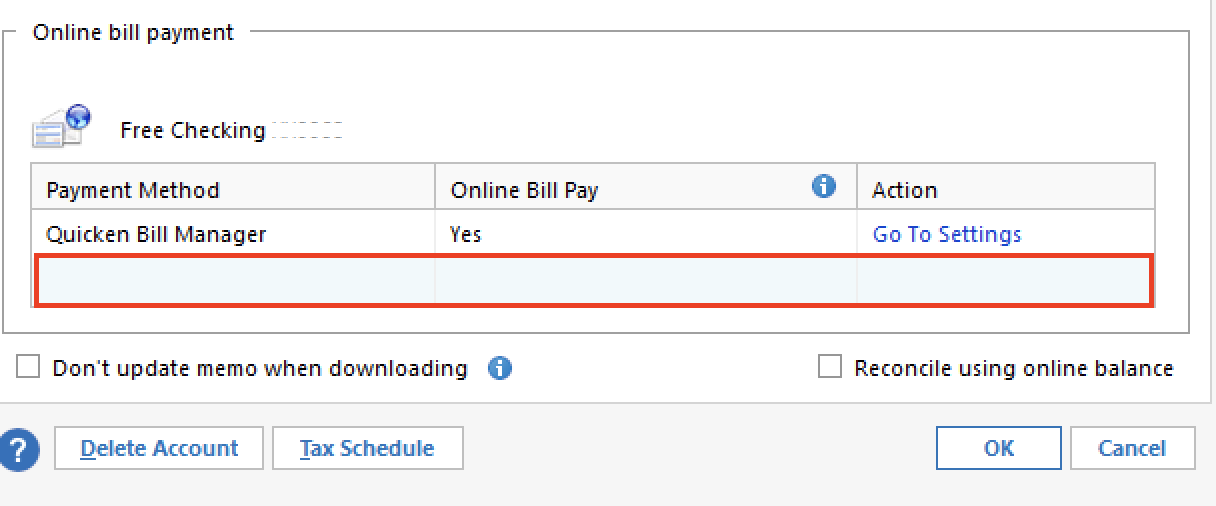
If you enable Bank Bill Pay, you will be able to pay your bills in Quicken, using the financial institution's service. If you have always paid your bills directly from their website, and not through Quicken, then having it enabled/disabled will make no difference for you. You will still be able to download transactions, and it will not cause duplicates.
Hope this clears up any confusion. If you have more questions, let us know!
Thank you!
Quicken Alyssa
Make sure to sign up for the email digest to see a round up of your top posts.
0 -
@BSJ I also do exactly as you by paying bills from Fifth Third's web site. I do have "Bank Bill Pay" set to NO. Activate this option if you want to enter bill payments in Quicken and send them to Fifth Third Bank. When you initiate "One Step Update", transactions will be downloaded to Quicken, including bill payments. I also have the box checked in the Online Services tab to "Reconcile using online balance".
0 -
@BSJ Also, forgot to add this detail. I have had issues at times with transactions not downloading with no errors. This has happened occasionally with Advia Credit Union for me. Whenever this happens, I have found the best remedy is to "deactivate" each account from them. Then select one of the accounts and go through the online setup process again. Quicken will go to the financial institution and find all of the accounts. Re-link each of the accounts to the accounts in Quicken. This usually resolves downloading transactions from them for me.😉
0 -
Thank you geo791. As a temporary fix, I had downloaded a QFX file directly from Fifth Third, so I'm currently up-to-date. If future updates continue to fail to download when requested then I will try deactivating the accounts and then repeating their setup. (I had attempted the Reset Account function in the Online Services tab of Account Details, but that function apparently doesn't do quite the same thing since it didn't fix the problem.) Thanks again very much for your suggestion.
0 -
Updates continued to fail to download, so I deactivated all accounts and then set them up again. When I set them up, I changed the connection method from direct connect to express web connect, since that method excludes the ability to pay bills and transfer money directly from Quicken (since I prefer to schedule my payments directly from the bank's web site). Following this change, I have started to receive update downloads again, and if that continues, then my issue would seem to be resolved.
0