No Value Investments

I am relatively new to Premier.
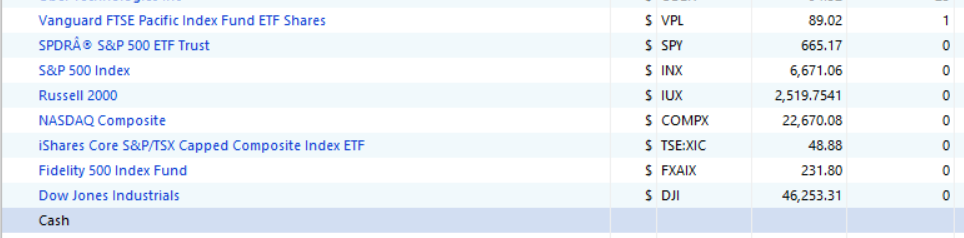
Inside Investing > Portfolio, I see some index and some funds I've owned in the past but sold. Does it matter if I remove them? Or are they there to help track historical returns?
Thanks
[Edited-Readability]
Best Answer
-
@Adience Some of the items on your list are stock market indexes, not securities you can buy.
The indexes are predefined in your Security list and have a Security type of "Market Index." The ones you show are INX, IUX, COMPX, and DJI. Quicken provides these so you can compare your performance to the standard indexes, for example on the Investing > Performance > Growth of $10,000 chart.
You can delete the built in indexes or add others if you want, but if they are getting in the way for some reason you can hide the ones you don't want or not include them in the Portfolio views. I find it useful to include the index INDEX:SPXT, which is the S&P500 index including reinvested dividends.
Also if the Portfolio views are showing securities that you no longer hold and you don't want to see them, you can click on Options at the top right and un-check Show closed lots.
QWin Premier subscription0

Answers
-
So, if you've purchased a security, you won't be able to move it without deleting the transactions associated with that security. And yes, your purchase and sale history is used to gather data about your performance. However, you can filter the portfolio views to suit your needs. Click on options in the upper right corner of the portfolio view section, customize portfolio. You can then edit what securities appear, what accounts appear, and what columns appear.
0 -
@Adience Some of the items on your list are stock market indexes, not securities you can buy.
The indexes are predefined in your Security list and have a Security type of "Market Index." The ones you show are INX, IUX, COMPX, and DJI. Quicken provides these so you can compare your performance to the standard indexes, for example on the Investing > Performance > Growth of $10,000 chart.
You can delete the built in indexes or add others if you want, but if they are getting in the way for some reason you can hide the ones you don't want or not include them in the Portfolio views. I find it useful to include the index INDEX:SPXT, which is the S&P500 index including reinvested dividends.
Also if the Portfolio views are showing securities that you no longer hold and you don't want to see them, you can click on Options at the top right and un-check Show closed lots.
QWin Premier subscription0 -
perfect, thanks @Jim_Harman
0
Categories
- All Categories
- 24 Product Ideas
- 34 Announcements
- 248 Alerts, Online Banking & Known Product Issues
- 19 Product Alerts
- 265 Welcome to the Community!
- 301 Before you Buy
- 1.5K Product Ideas
- 55.8K Quicken Classic for Windows
- 16.9K Quicken Classic for Mac
- 1K Quicken Mobile
- 834 Quicken on the Web
- 129 Quicken LifeHub