Can't Connect to Fidelity

My connection to Fidelity had been working until today. It says error but provides no additional detail. Not sure what to do.
Comments
-
Hello @CPFinance$,
Thank you for sharing your experience. I am happy to help.
I have moved this discussion to a Windows thread, because as far as I can tell you are on Windows. If that is incorrect, let me know.
I reviewed your account internally, and I see that you are on an older release of Quicken. Please go to Help>Check for updates, and update to the latest release.
I did not see any attempts to connect to Fidelity. Usually, this is the case if you are using the Direct Connect connection method. However, Fidelity has been migrating to a new connection method, Express Web Connect+. I am curious if you have migrated your accounts to the new connection method yet?
If you are still on Direct Connect, you can follow these steps:
1. Save a Backup. Steps can be found in this article if needed.
2. Disconnect ALL Fidelity accounts in Quicken. Here are the steps on how to do that.
3. Add accounts back into Quicken.
4. Make sure to take a look at the possible things you can run into in that article.
5. Once you choose Fidelity Investments, you will click through a few prompts and be directed to their website to enter your credentials.
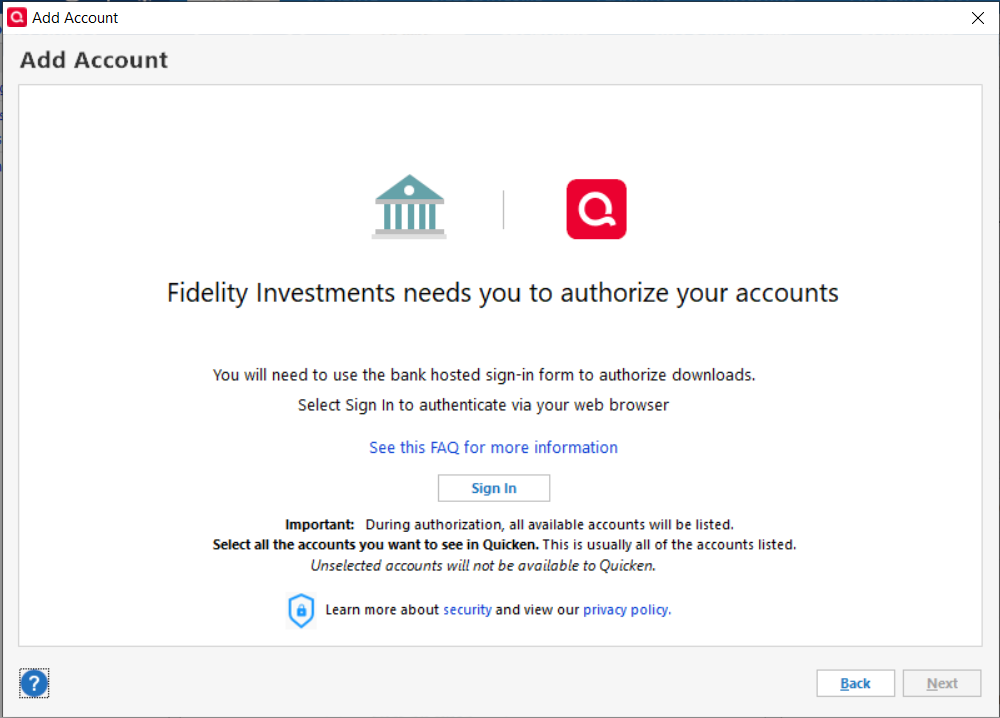
6. After inputting your credentials, you should be prompted to authorize your accounts and choose which ones you want to track in Quicken.
7. You should then be redirected back to Quicken, where your list of accounts should be displayed again. You will want to make sure you choose the "LINK to existing" option for any of the accounts that were already in Quicken.
Some things to note:
- You may experience duplicate securities. If you do, you should be prompted with a Security Mismatch prompt that will allow you to sort these out.
- You will most likely have 90days' worth of duplicate transactions. These duplicates are to be expected when switching connection methods and will need to be deleted manually. The good news is, it should be just a one-time thing and not something that continues happening.
- Turning off Automatic Entry can help sort through duplicates more easily. Here are the steps on how to handle transactions from the Compare to Register section as well.
If you had already migrated to the new connection method, let me know, and I can provide different steps. Hope this helps!
Thank you!
Quicken Alyssa
Make sure to sign up for the email digest to see a round up of your top posts.
0 -
I followed the above and deleted all connections to Fidelity, then added them back successfully. Was able to sync Fidelity for the first time in ca. three weeks. Following this, it seems that my OSU gets hung up. Not sure if it's the new Fidelity connection being unstable and creating the jam. I can't seem to update other accounts outside of the OSU, it seems.
0 -
Hello @jaydubbleyou,
Thank you for sharing your experience.
We currently have a Community Alert open that matches what you are describing. Please take a look at that and bookmark it to stay up to date on any progress or changes to the alert.
Thank you!
Quicken Alyssa
Make sure to sign up for the email digest to see a round up of your top posts.
0
