Archive Old Data

My current active Quicken file has over 11 years of data on it. I tried to do an archive to remove the older data and tried to keep just two years active. It creates an archive file, but the current working file remains unchanged I think the size of the file is really slowing down performance. What am I missing? Thanks for your help.
Answers
-
Hello @wgq,
Thank you for posing this question, and I am happy to help.
I would suggest making a copy of your data file. The copy feature allows you to specify a time frame you would like to keep in the file, which is nice.
Do keep in mind that after copying a data file, you will need to reconnect all of your accounts, as everything in the copy will be disconnected.
I hope this helps. Do let us know if you need further assistance.
Thank you!
Quicken Alyssa
Make sure to sign up for the email digest to see a round up of your top posts.
0 -
I did that and created an archive file. One of the things I selected was to keep the current year’s data in the original file. Executed the archive thinking only the current year data would be there after the archive, but all the data was there. I’m missing something. I want to archive all the data and only keep one year in the active file. How do I do that? Thanks.
0 -
Hello @wgq,
Thank you for following up.
You should be copying your file not archiving it. You can use file copies to start fresh while keeping your categories and setup. Use backups and archives when your goal is protection or cleanup—not continuation.
You said you want only one year in your active data file, to do this:
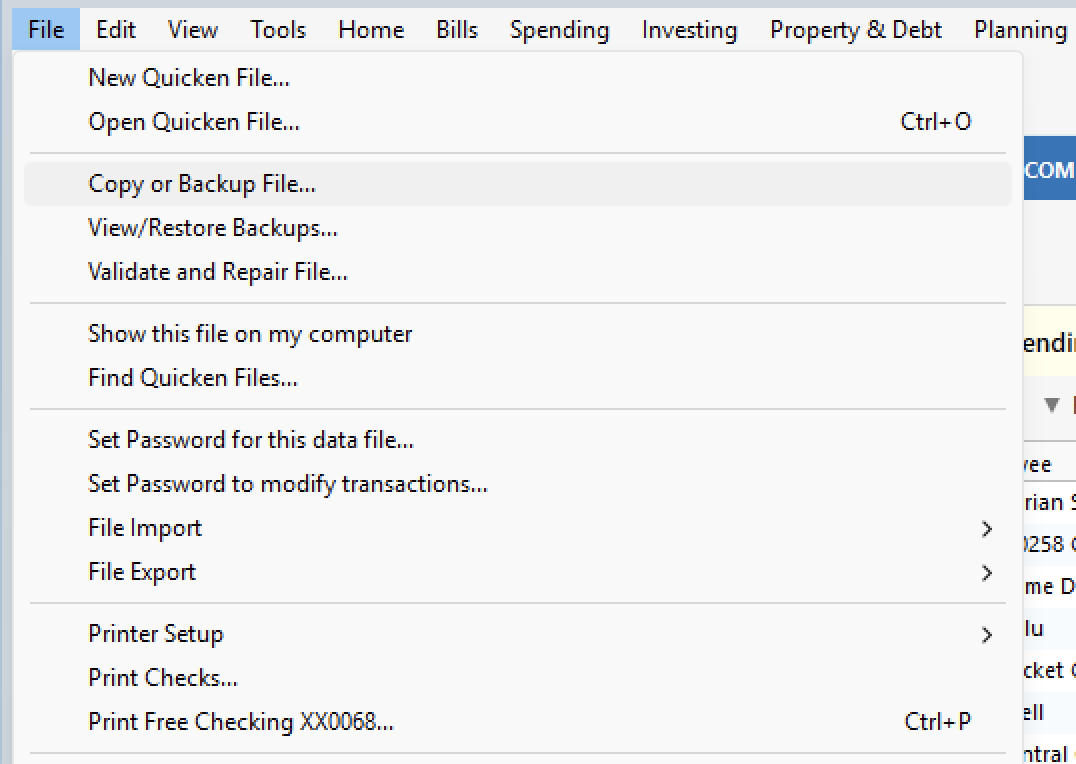
- Go to File.
- Select Copy or Backup file…
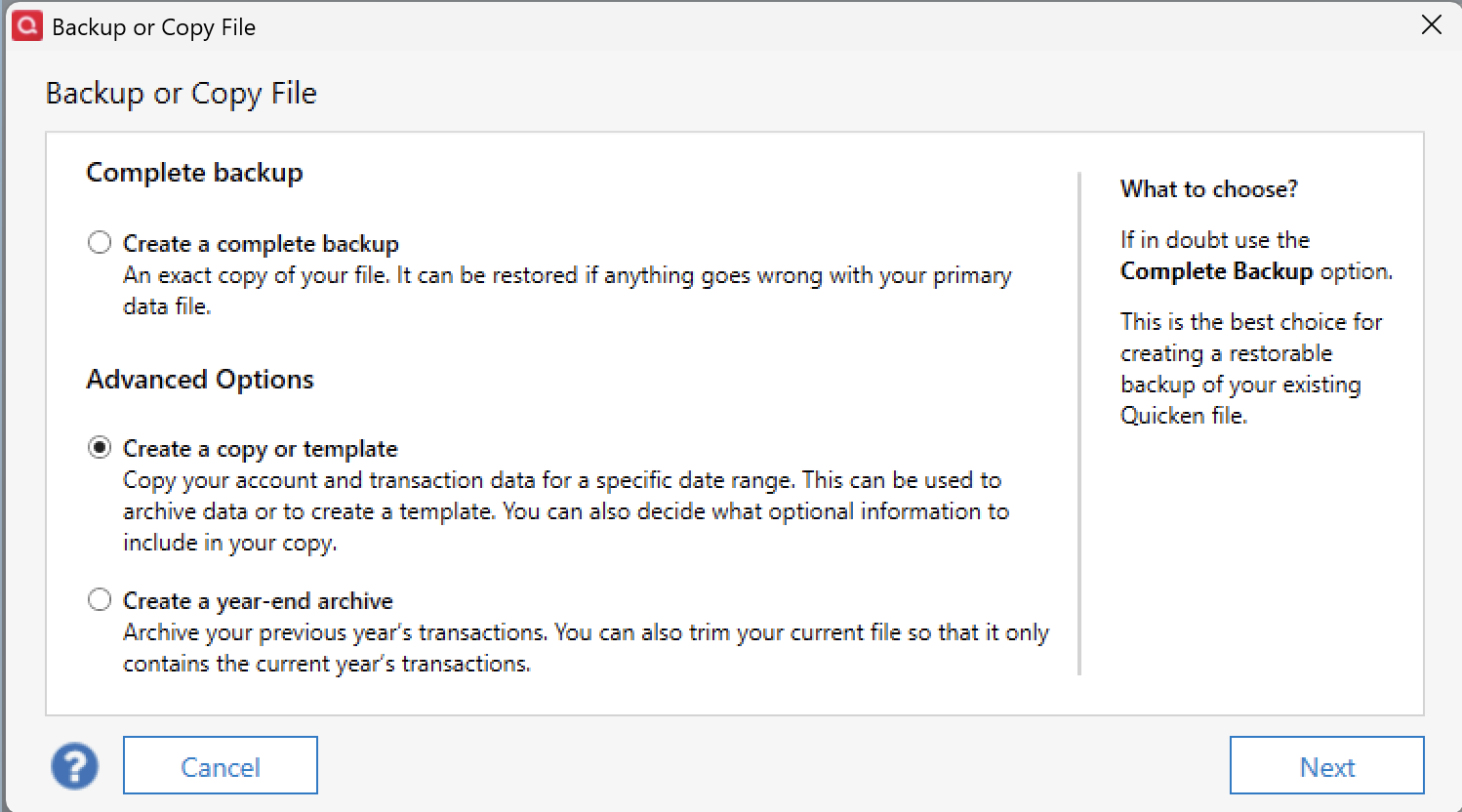
- Select Create a copy or template.
- Click Next.
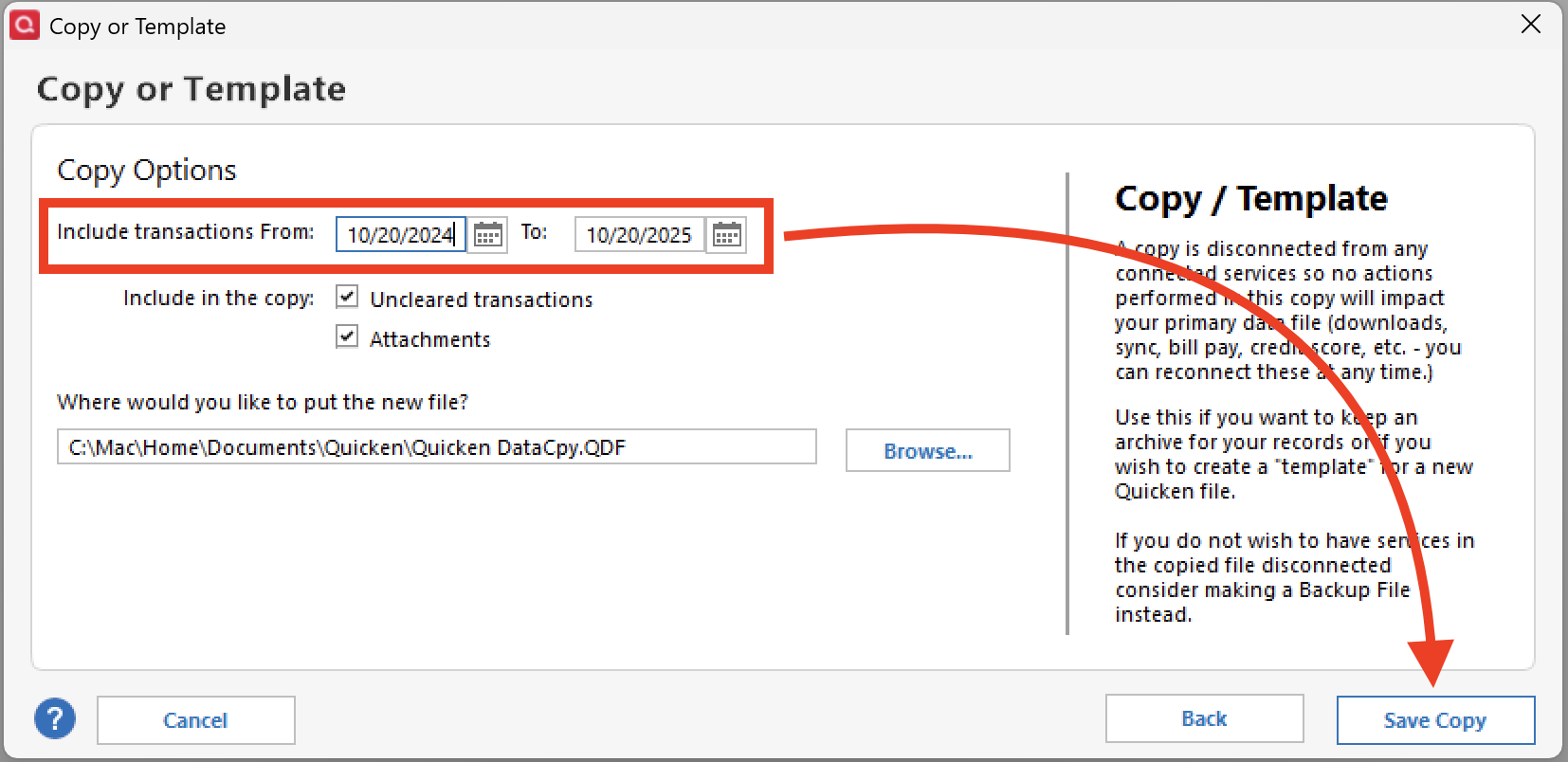
- Edit the date range to reflect one year.
- Click Save Copy.
- Select New copy.
- Click Ok.
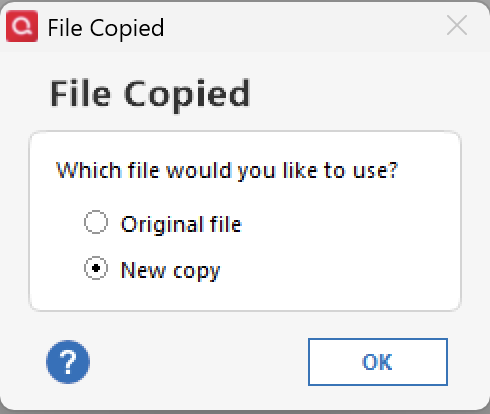
Now Quicken should have opened your copy file. If you had connected accounts, you will need to reestablish those connections. Here are instructions in a Support Article on how to reconnect accounts.
Hope this helps!
Quicken Alyssa
Make sure to sign up for the email digest to see a round up of your top posts.
0 -
Is it this? Unreconciled transactions and investments transactions won't be cleared out. Most of the users here recommend you just hide the accounts. Just make frequent backups.
Will this post help? Year End FAQs
I'm staying on Quicken 2013 Premier for Windows.
0 -
Hi Quicken Alyssa, I did the copy method above, only saving the last 7 years of records but when I look at my quicken register, I still see transactions back to 2006. At this point, my updates are failing because my file is to big. Using the Archive function didn't work for me either. Same results - still seeing transactions back to 2006.
Any suggestions on how to return to a functioning size file with only 2018 to present records visible? I have done a full back up of my data file already.
0 -
Hello @glimmerkz,
Thank you for adding to this discussion.
I would go through the steps again, only this time, select your date range, and then make sure to uncheck Include Unreconciled Transactions.
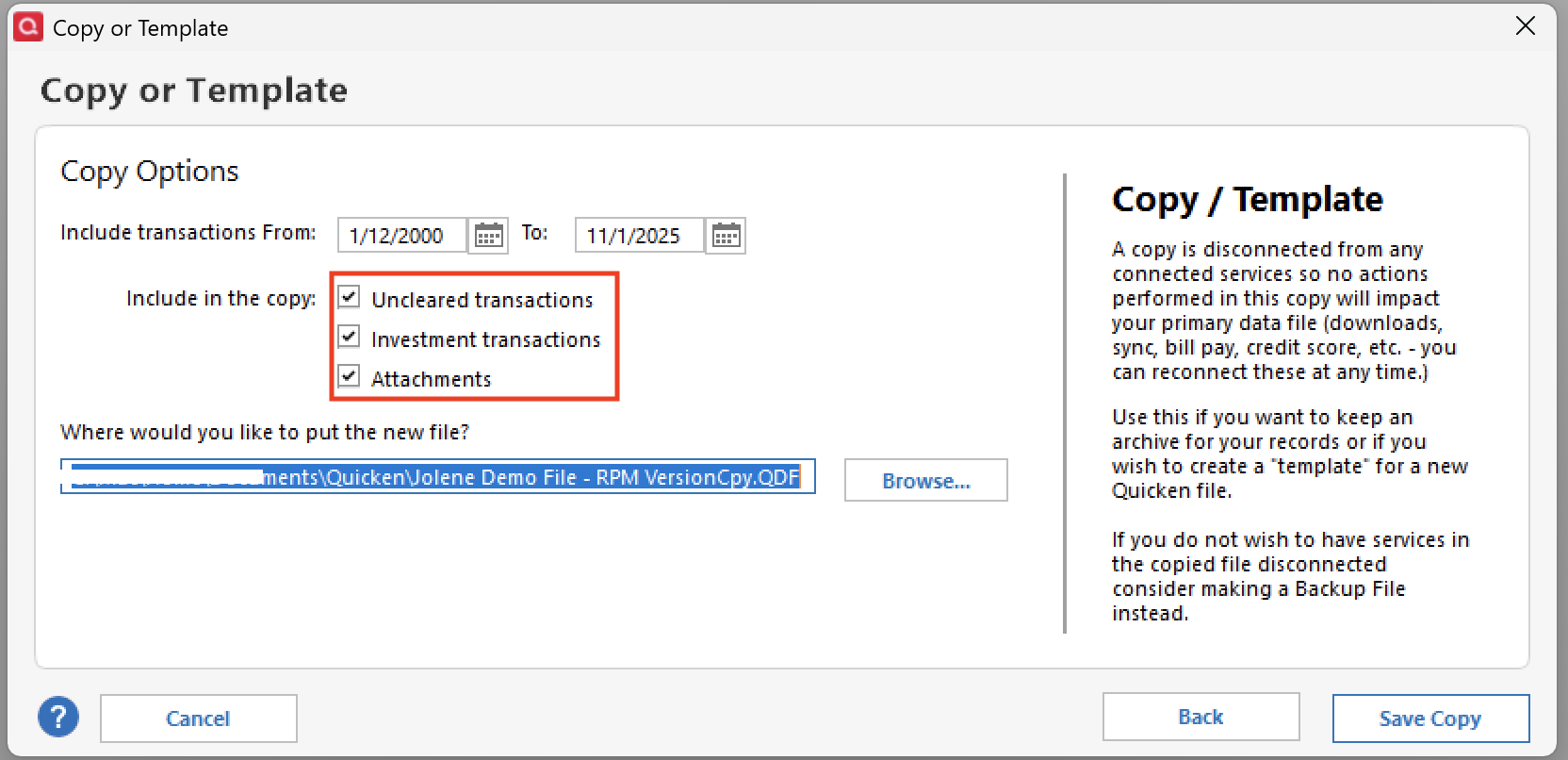
You can uncheck the other options as well. If you use attachments, they can definitely make your file a lot bigger. Not a bad idea to not include those. I would just uncheck all three and see how it goes. If you don't like the result, you can always go back to the original file.
Let me know how it goes!
Quicken Alyssa
Make sure to sign up for the email digest to see a round up of your top posts.
0 -
My detailed transaction file dates back to 2012, with all of the data cleared. If I make a copy of my file from 01/01/2018 to the current date, I understand I will have to reconnect all of the connected services. When I reconnect the services, will the transactions in the new file be cleared (as it is today) or will I have to go through every transaction again?
0 -
Hello @dj_larson,
Thank you for adding to this discussion and posing this question.
Transactions dating back to 2018 should remain cleared, or as they currently are. And the nice part of it all is, if anything goes wrong during the process and you are unhappy with the results, you can easily go back to your original file.
To return to your original file, you would go to File and select the second file listed at the bottom of the menu.
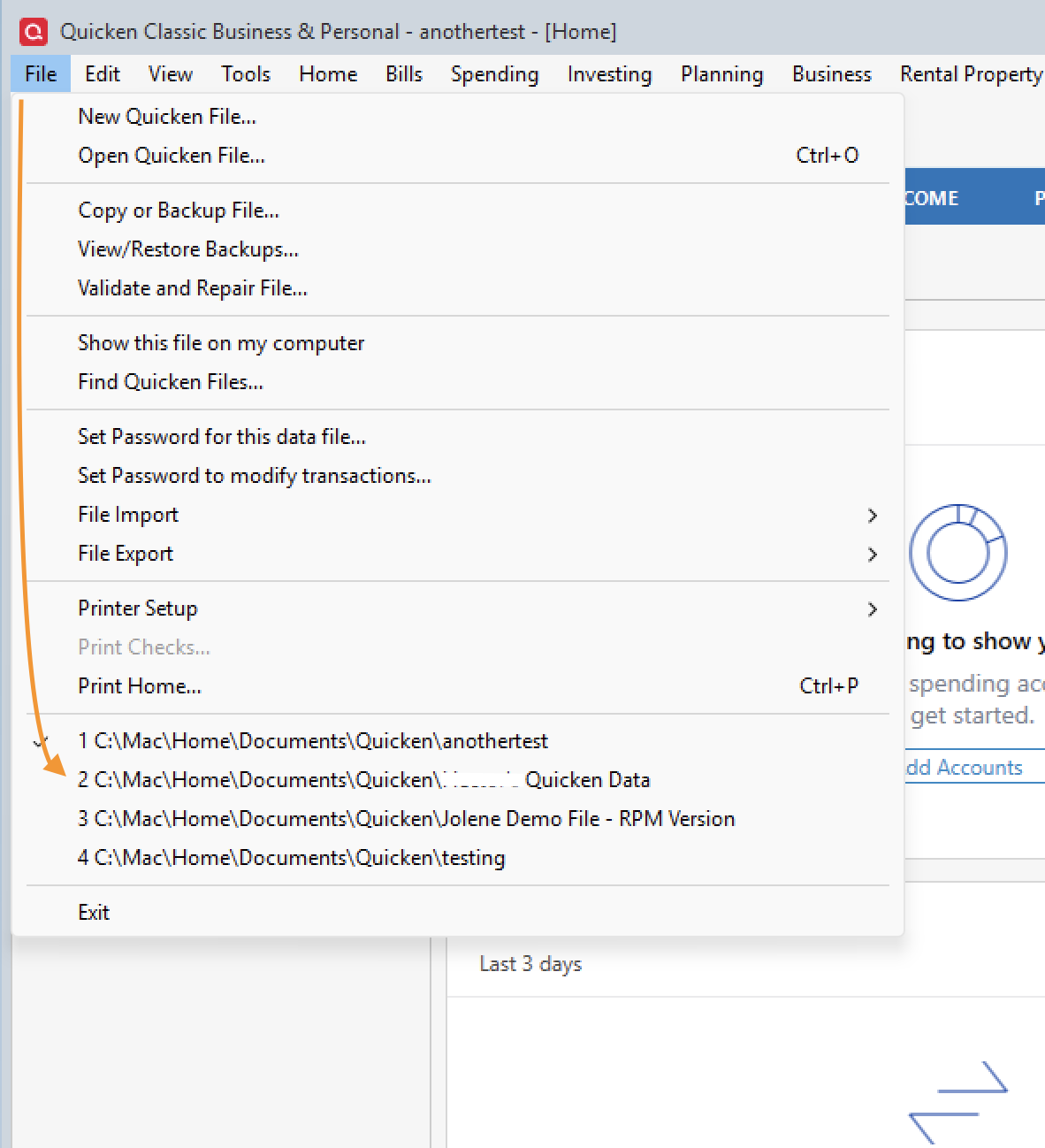
Hope this helps.
Quicken Alyssa
Make sure to sign up for the email digest to see a round up of your top posts.
0


Categories
- All Categories
- 6 Product Ideas
- 34 Announcements
- 249 Alerts, Online Banking & Known Product Issues
- 19 Product Alerts
- 266 Welcome to the Community!
- 301 Before you Buy
- 1.5K Product Ideas
- 55.8K Quicken Classic for Windows
- 16.9K Quicken Classic for Mac
- 1K Quicken Mobile
- 834 Quicken on the Web
- 129 Quicken LifeHub