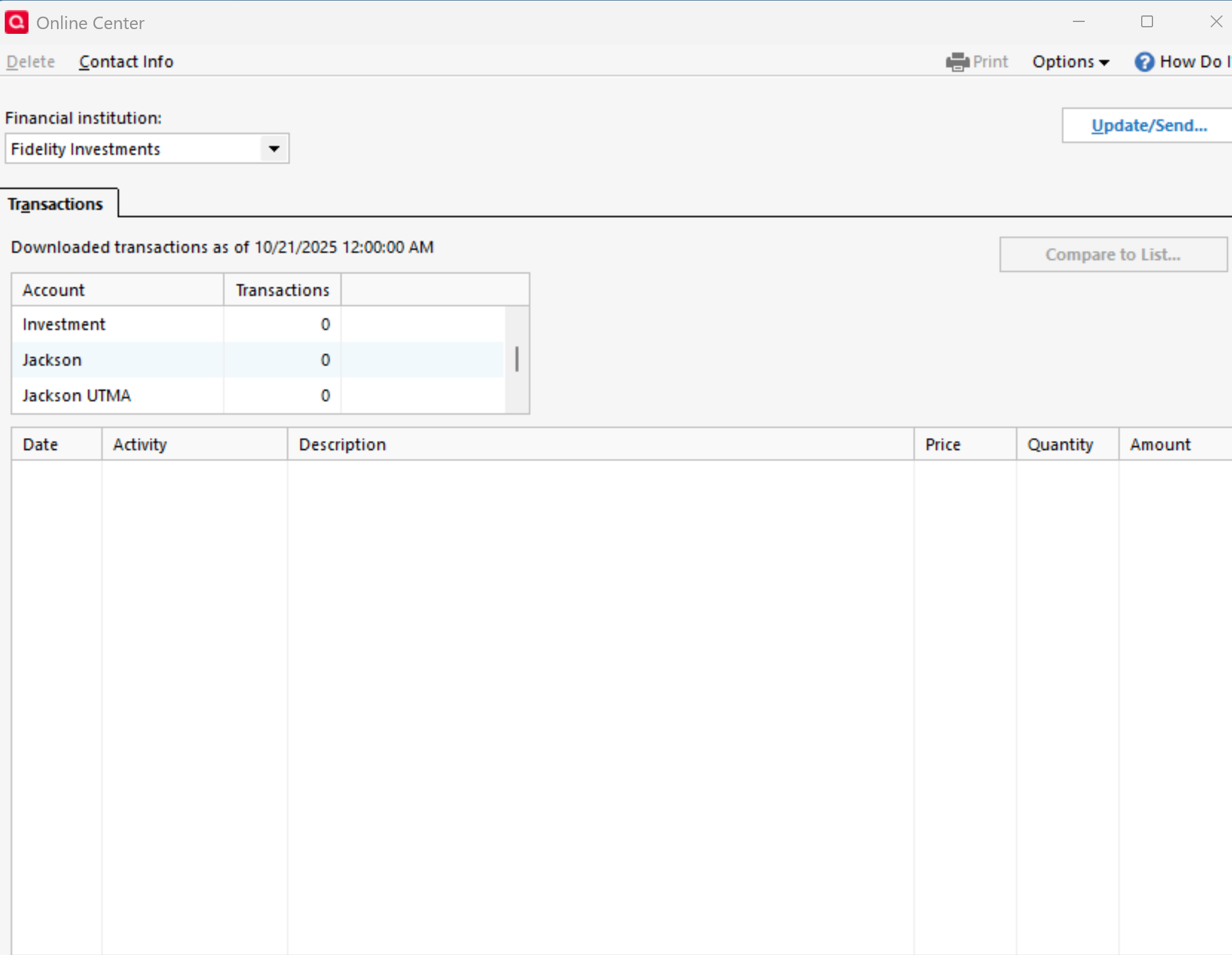
Online Center does not show "Holdings" and other tabs for Fidelity accounts

Online Center does not show "Holdings" and other tabs for Fidelity accounts after recent conversion. Therefore lost ability to compare Quicken vs. Fidelity holdings
Comments
-
I don't know why the Holdings tab for Fidelity in the Online Center would be missing, but have you tried clicking on the gear at the top right of the account and selecting Reconcile Shares? That will compare your holdings in Quicken to what is reported by Fidelity.
If you want to see the current share balances, you can click on the account's Holdings button.
QWin Premier subscription0 -
Shares are reconciled just fine - Holding and Brokerage are in agreement, but Onine Center tabs and columns are missing:
 0
0 -
That is more like what I would expect to see for a banking or credit card account, not an investment account.
If you scroll up in the Account box, what account is selected? If you select an investing account, do you see the tabs?
QWin Premier subscription0 -
No, I do not see tabs for all my Fidelity Investments (Financial Institution) accounts and there few of them.
When selected particular Fidelity Investments account, called "Investment" - only Transaction tab shown despite its Account Type in Quicken is "Brokerage"
0 -
Do you have non-Fidelity investing accounts, and do they look OK in the Online Center?
And for your Fidelity accounts, if you go to Edit account details and click on the Online Services tab, does it indicate that they are set up for transaction downloading?
And you get no errors when you do a One Step Update that includes the Fidelity accounts?
QWin Premier subscription0 -
I do not have non-Fidelity investment accounts.
I have non-Fidelity Checking and Credit accounts - the Online Center for them displays Online Balance column with correct amount.
All Fidelity accounts details show that they are set up for transaction downloading.
I don't get errors while doing One Step Update for Fidelity accounts anymore - used to have those, but followed suggestion to fix them by re-authorizing for conversion.
0

Categories
- All Categories
- 24 Product Ideas
- 34 Announcements
- 248 Alerts, Online Banking & Known Product Issues
- 19 Product Alerts
- 265 Welcome to the Community!
- 301 Before you Buy
- 1.5K Product Ideas
- 55.8K Quicken Classic for Windows
- 16.9K Quicken Classic for Mac
- 1K Quicken Mobile
- 834 Quicken on the Web
- 129 Quicken LifeHub