Cash balance in investment account out of sync - Fidelity

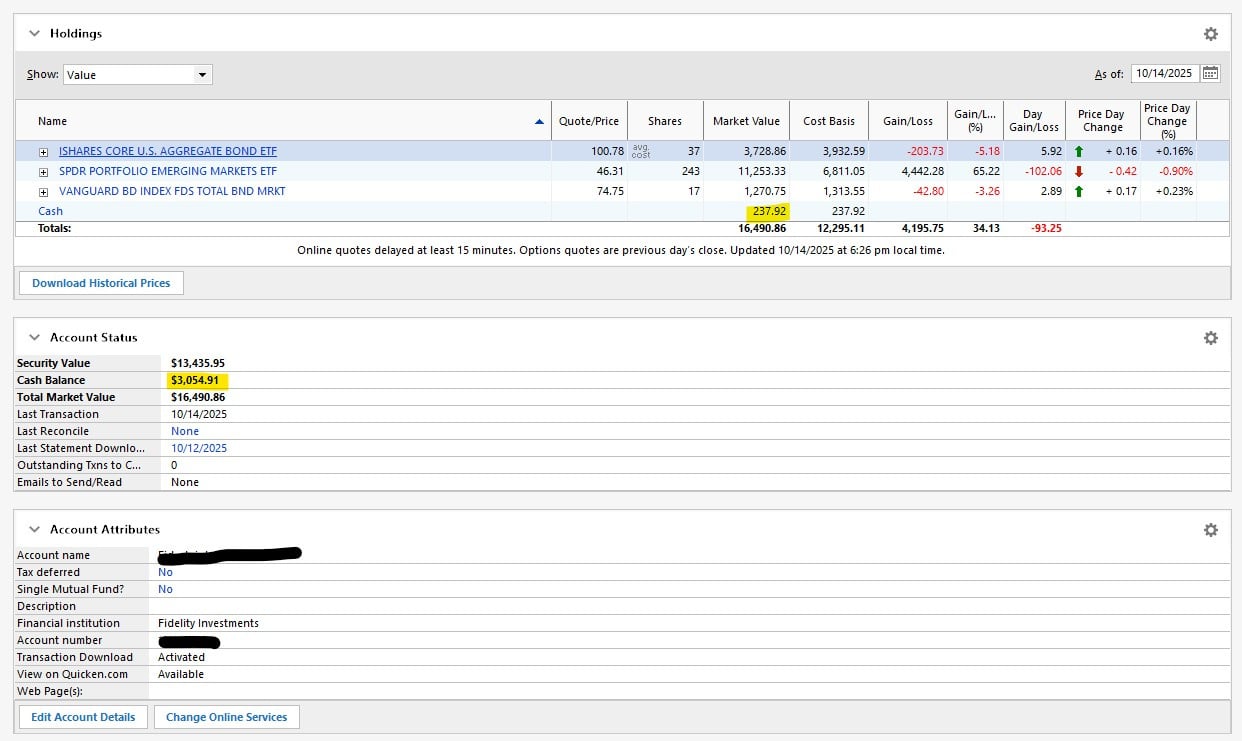
Hi, can anyone tell me why the highlighted cash balances are out of sync? The top portion matches Fidelity, but the Account Status section is wrong. However, the sum of the Security Value and Cash Balance does match the 16,490.86. The register does show a cash balance of $3,054.91, but that obviously is not the correct amount.
Thanks!
Comments
-
Hello @Jeff2056,
Thank you for sharing your experience and providing so many details. Definitely confusing why this cash balance is showing differently in one spot than it is in another.
Some things I would like to start with:
- Did this cash balance suddenly appear, or is it something you just noticed? If it suddenly appeared, you could try restoring a backup from before this happened.
- Where is your data file located?
- Is your file being backed up or synced by any third-party cloud services like Dropbox, OneDrive, or iCloud?
- Have you looked at the transactions for this account to see if there are any clues there?
Looking forward to your response.
Quicken Alyssa
Make sure to sign up for the email digest to see a round up of your top posts.
0 -
Hi sorry for the delay in responding, been out of town. No, I've had a high cash balance in the thousands since back in 2018 when the account was opened so I don't think a restore will help. Data file is stored on local hard drive., and the file is not being backed up by anything other than Quicken. And yes I've looked at transaction and still don't have any clue. It seems like some kind of program glitch. All of my other investment accounts match cash balance between the top section and the Account Status section below it.
Thanks for your time and response. Hopefully you or someone else will have some other ideas.
0 -
Hello again,
Thank you for following up and providing more information.
When I check in my own Quicken, I don't see a discrepancy between the two places where you see one. You mentioned that you also don't see this occurring in any other account; it's only this one.
I think we should try validating your file. To do this:
- Go to File.
- Select Validate and Repair file…

- Check the first box for Validate file.
- Click Ok.
Once that is done, go to File>Exit. Wait about 30 seconds, and reopen Quicken. Then check to see if you still see the discrepancy..
Let me know how it goes!
Quicken Alyssa
Make sure to sign up for the email digest to see a round up of your top posts.
0 -
Sadly, this did not help. Found a couple of minor things that I cleaned up, but no change to this particular problem.
0 -
Hello @Jeff2056,
Thank you for following up.
Please take a look at this Support Article for advanced data file troubleshooting. Follow the steps in the article, and then check to see if this issue is still present in the new copy of the file.
If the issue resolves in the new file, then we know this was file-specific. If it is not resolved, please contact Quicken Support directly, so they can investigate further and process an escalation if needed.
You can get back to your original file by going to File and selecting the second file listed at the bottom of the menu.
Thank you!
Quicken Alyssa
Make sure to sign up for the email digest to see a round up of your top posts.
0
