Auto entered transactions from months ago disappear

Twice in the last several months I have reconciled my checking account but could not make it balance. I discovered that the reason was that a reconciled transaction from 10 months ago had disappeared and another transaction was put it in its place. The new replacement transaction was a duplicate of another transaction already recorded in that month. The transactions were both auto entered monthly health insurance payments. I know where to look for this problem now, but it is very irritating.
I am using the Windows version.
Comments
-
Hello @rickdisney,
Thank you for sharing your experience.
I would start by replacing those scheduled transactions. It is possible they have somehow become damaged. Let's try deleting them and re-adding them, and then seeing if the issue continues.
To do this:
- Go to the Bills & Income tab.
- Look at the Action column.
- Use the drop-down arrow.
- Select Delete this instance and all future instances.
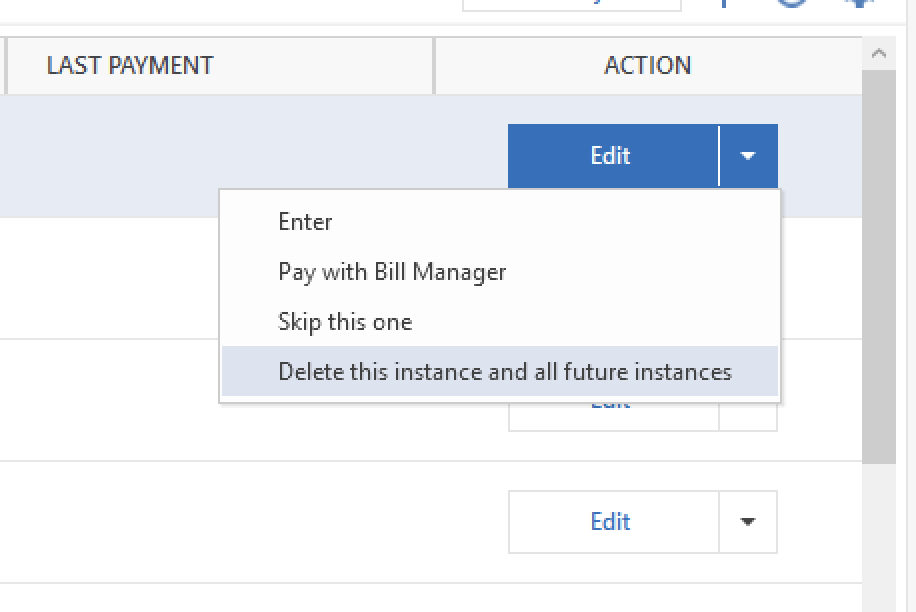
- Click the plus sign +.
- Select Manual Bill.
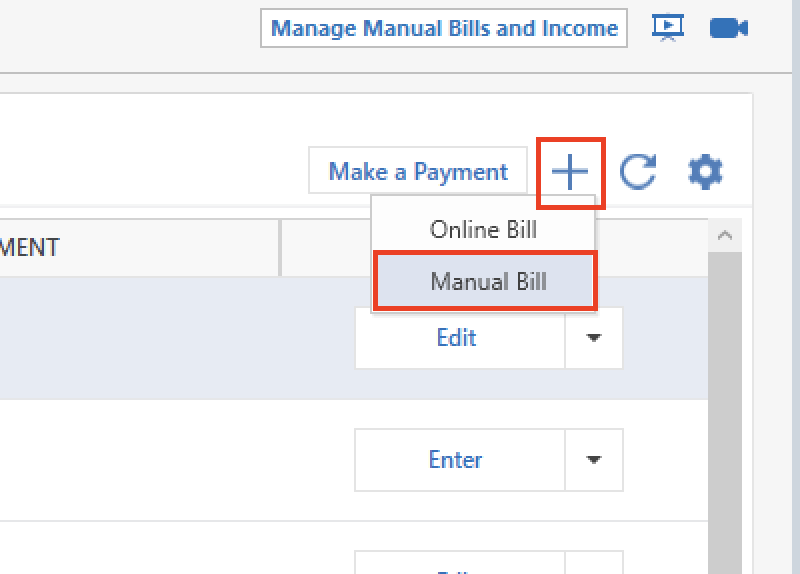
- Follow the prompts and enter the details.
I also have some follow-up questions for you.
- Where is your data file located?
- Is your file being synced/backed up by any third-party services like Carbonite, OneDrive, or Dropbox?
- Are you using Quickens' Mobile & Web apps?
Looking forward to your response.
Quicken Alyssa
Make sure to sign up for the email digest to see a round up of your top posts.
0 -
Thanks I will try that. Seems odd that it would have happened twice, three months apart and change transactions 10 months ago and only change them in a single month.
- My data file is on my laptop hard drive.
- It is backed up to OneDrive.
- I do not use Mobile or Web apps.
Thanks for you help.
0 -
If you have two or more payment transaction reminders using the exact same Payee Name, please try this:
Give each transaction a distinct Payee Name, e.g.
- ABC Insurance {John}
- ABC Insurance {Jane}
This might make it possible to keep the transactions separate.
BTW, do these transactions occur on the same day?
Are both transactions of the exact same amount?Can you change the transactions to occur on different days, perhaps a week apart?
0


Categories
- All Categories
- 6 Product Ideas
- 34 Announcements
- 249 Alerts, Online Banking & Known Product Issues
- 19 Product Alerts
- 266 Welcome to the Community!
- 297 Before you Buy
- 1.5K Product Ideas
- 55.8K Quicken Classic for Windows
- 16.9K Quicken Classic for Mac
- 1K Quicken Mobile
- 834 Quicken on the Web
- 129 Quicken LifeHub