How to Generate a New Security Mismatch Report

Yesterday, my OSU update had 162 transactions on my Fidelity account. Then popped up 15 Security Mismatches. If I work through them, how do I generate a new report to see if I got them all? It does not come up with every new OSU. I think it only happens when there have been some new transactions to process.
Best Answer
-
The text and the Help are wrong about the Placeholders. I think at one time they were created automatically, but now you can simply click on Done on the mismatch page and no Placeholders are created. It is only if you click on Details on the mismatch page and select Create a Placeholder that one is created.
QWin Premier subscription0

Answers
-
In the investment register's gear menu in the upper right, choose "Reconcile Shares…"
Quicken user since version 2 for DOS, as of 2025 using QWin Premier (US) on Win10 Pro & Win11 Pro on 2 PCs.
1 -
I am aware of that for doing the adjustment, but I want to force a new Mismatch Report so I can check I got them all. It does not happen on every OSU.
0 -
If you go to Edit > Preferences > Download transactions, the setting for the account at Compare account portfolio after download enables it to do the comparison when you are done accepting transactions.
It only shows the report if transactions were downloaded and there is a mismatch. If there were no mismatches before the download and there were no new transactions, there normally won't be a mismatch after the download.
As noted above, you can force a comparison by clicking on the account's gear an selecting Reconcile shares.
QWin Premier subscription0 -
That is what I have set.
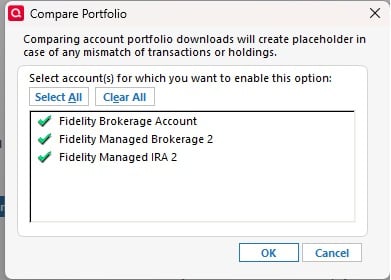
But, according to the definition shown above, and what I read in Quicken Help besides the Mismatch Summary there is an implication that Placeholders would be created in order to keep the account in balance.
"When using Quicken to track your investments, placeholder entries may appear in your account if there are missing transactions for a particular security. Quicken creates these placeholder entries to balance your account so that the total number of shares owned matches the number of shares in your transaction list."
I have never seen a Placeholder created over the years. Am I missing another setting?
0 -
The text and the Help are wrong about the Placeholders. I think at one time they were created automatically, but now you can simply click on Done on the mismatch page and no Placeholders are created. It is only if you click on Details on the mismatch page and select Create a Placeholder that one is created.
QWin Premier subscription0

Categories
- All Categories
- 6 Product Ideas
- 34 Announcements
- 249 Alerts, Online Banking & Known Product Issues
- 19 Product Alerts
- 266 Welcome to the Community!
- 301 Before you Buy
- 1.5K Product Ideas
- 55.8K Quicken Classic for Windows
- 16.9K Quicken Classic for Mac
- 1K Quicken Mobile
- 834 Quicken on the Web
- 129 Quicken LifeHub