How do I get rid of these unnecessary placeholder transactions?

This is in Quicken Classic for Mac version 8.3.2.
I recently connected my Ameriprise accounts that I've been manually entering data for since 2008. I used the Direct Connect connection so that I can use Detailed tracking. The Quicken Connect connection for Ameriprise only offers Simple tracking.
After it connected, it downloaded about the last 90 days of transactions to the accounts. Most of the transactions matched up, but I had some that did not automatically match and instead created new transactions with all the same information as the existing ones that they should have matched. The amounts were the same as the manually entered ones, the ones that were buy or sell trades had the same ticker symbol as the manually entered ones, the quantity of shares was the same. I figured I could manually match them like I normally would, drag and drop the downloaded one onto the manual entry and they'd be fine, but every one that I tried, it told me that they were not allowed to be matched.
I ended up just deleting all the ones that would not match, marked the matched ones as reviewed, and moved on, figuring that it would sort itself out going forward now that I would be downloading the transactions rather than matching to manually entered ones.
But now every time they update, I get a set of placeholder transactions for the funds that would not manually match, which doubles my share balances for these funds. I keep deleting the placeholders, but they keep coming back on the next download.
I wish I'd taken some time to try and better figure out why some of them would not match to the manual entries rather than just deleting them, but now I don't seem to be able to get them back. I've tried disconnecting and reconnecting the account, I've tried telling it to download all available transactions, but it seems to still know about all the ones that it already downloaded and it never shows them to me again.
Is there anything I can do to fix this situation, other than just disconnecting and going back to manual entry? How can I make Quicken understand that there are already shares of these funds in the account?
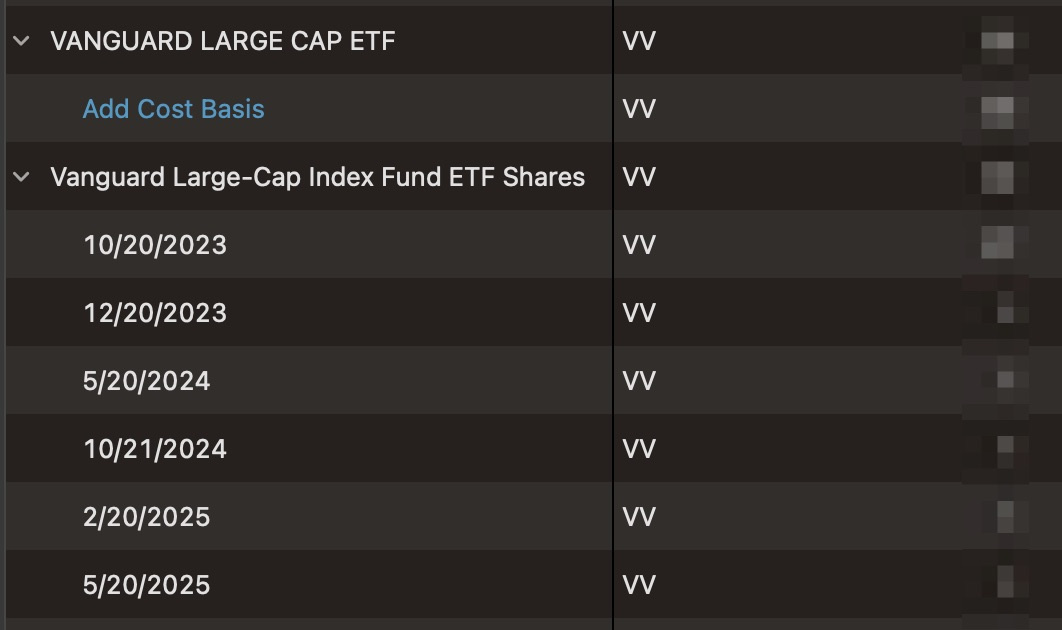
I've attached some screenshots that show the placeholders and an example of what the fund looks like in the portfolio view. The total quantity for each are exactly the same.

Best Answer
-
Howdy, @Miranda
I don't think there are any serious issues here. What I suspect happened is that when you connected to Ameriprise, most of the Securities "matched" correctly, but the ones that keep getting placeholders were just different enough that Quicken is interpreting them as a being a totally different Security. Hence why you couldn't match existing transactions and why you keep getting Placeholders. You just need to merge those Securities so Quicken knows they are the same.
(And Placeholders are nothing more than share balance adjustments which is why your balance keeps doubling: Quicken is counting what is being reported and the amounts from the transx in your register.)
Don't sweat deleting the downloaded transactions if you already have the ones you entered in your file.
After you make a File:Backup of your data file, you will want to go into Window:Securities and locate the two nearly identically securities, and merge them so that Quicken now views them as the same. You select the two I the list, and click on Merge down at the bottom. Click through the merge process which is pretty simple.
Note: I suggest using the name Ameriprise is suggesting as the going forward name. Also, that name must have a Security type associated with it. I don't know what you are using for your ETFs, but make sure the type matches before you attempt the merge. The placeholder for that fund should disappear-and not reappear in subsequent downloads.
Repeat for each Security causing issue.
1

Answers
-
Howdy, @Miranda
I don't think there are any serious issues here. What I suspect happened is that when you connected to Ameriprise, most of the Securities "matched" correctly, but the ones that keep getting placeholders were just different enough that Quicken is interpreting them as a being a totally different Security. Hence why you couldn't match existing transactions and why you keep getting Placeholders. You just need to merge those Securities so Quicken knows they are the same.
(And Placeholders are nothing more than share balance adjustments which is why your balance keeps doubling: Quicken is counting what is being reported and the amounts from the transx in your register.)
Don't sweat deleting the downloaded transactions if you already have the ones you entered in your file.
After you make a File:Backup of your data file, you will want to go into Window:Securities and locate the two nearly identically securities, and merge them so that Quicken now views them as the same. You select the two I the list, and click on Merge down at the bottom. Click through the merge process which is pretty simple.
Note: I suggest using the name Ameriprise is suggesting as the going forward name. Also, that name must have a Security type associated with it. I don't know what you are using for your ETFs, but make sure the type matches before you attempt the merge. The placeholder for that fund should disappear-and not reappear in subsequent downloads.
Repeat for each Security causing issue.
1 -
Thank you, this is exactly what I was looking for! It didn't even occur to me that there was a separate Securities window like Payees, etc. I was looking for the way to merge them from the Portfolio tab itself and only able to edit the individual security details there obviously.
I'm guessing there must be some other behind the scenes unique identifier other than the ticker symbol that it's using, and now that I'm reading up on ticker symbols and CUSIP, I do remember that some of the transactions I deleted had a CUSIP string in the Security/Payee field instead of a fund name.
The funds that didn't match, all the ones that got created from Ameriprise's download were Mutual Fund type, and all the ones that were created from when I manually entered the transactions and let Quicken get the new security from the ticker symbol were Stock type, so once I changed the types to match each other, I was able to merge them and now my share balances are correct again.
0 -
Glad you got it worked out.
And you might have answered why the funds didn't match during setup (regardless of the matching criteria algorithms):If they are of different security type, they won't match.
0