Invisible Renaming rule for securities transaction

I do not have a renaming rule - hidden or not - involving US Treasury securities. Yet, once again today, the downloaded "Payee" for a matured security was renamed magically to "US Treasury". Screenshot attached.
How/why can this happen and how can I stop it from happening?

Quicken user since 1990, MacBook Pro M2 Max on Tahoe 26.2 (and Win 11 under Parallels Desktop)
Comments
-
In Quicken Settings on the Connect Services tab there's a checkbox for "Automatically improve the quality of downloaded payee names and categories". Try unchecking that. Unfortunately that's a global all or nothing setting that will affect all your downloaded transactions, I don't think there's any way to turn it off just for specific payees.
1 -
There actually is a way to prevent renaming for a specific Payee. One of the options in a Renaming Rule is to NOT rename. So in this case:
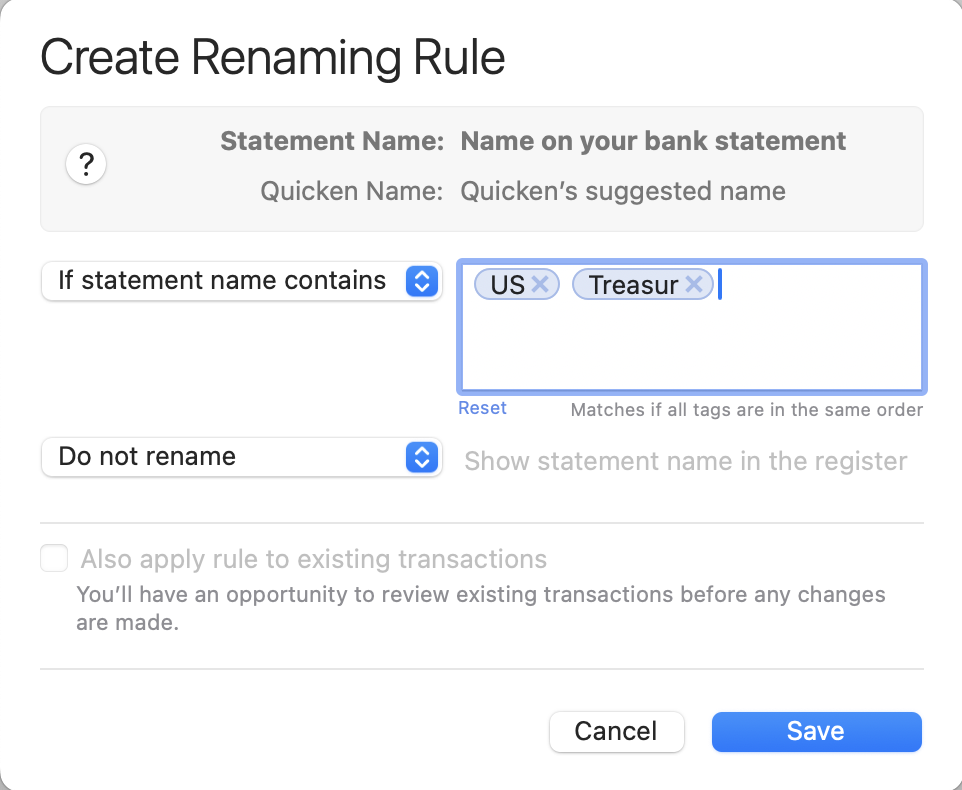
That should prevent the renaming based on the screenshot shown.
Quicken Mac Subscription • Quicken user since 19931 -
@Jon and @jacobs You've both shown me features that I didn't know existed. Thanks! I'll try Jon's suggestion first as I don't like undefined magic happening. If it causes problems, I'll try jacobs' method.
It's too bad that the checkbox Jon mentions is global .. as I've never had issues with bank/credit card account downloads. Would be nice to turn it off for just brokerage accounts for example.Quicken user since 1990, MacBook Pro M2 Max on Tahoe 26.2 (and Win 11 under Parallels Desktop)
0

